


- Home
- Acrobat SDK
- Discussions
- Re: Javascript to populate dropdown field to other...
- Re: Javascript to populate dropdown field to other...

Copy link to clipboard
Copied
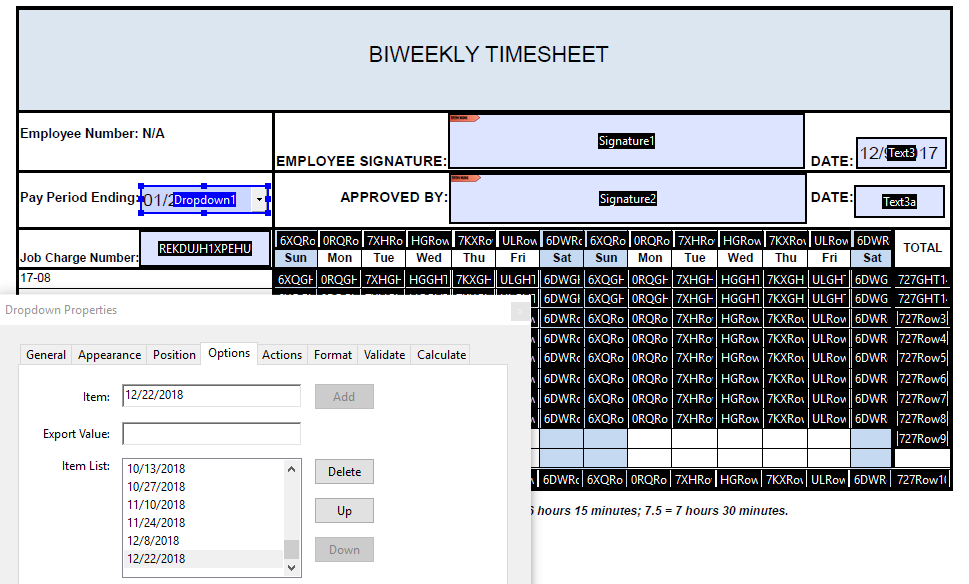
Hi, I am trying to tweak a timesheet that I have added a dropdown box that has dates entered into the <Options>, <Item List> as "1/6/2018" and every 14 days til the end of the year. Where I am stuck is trying to get the javascript that will take the chosen 'Pay Period Ending' date and add to the 14th date field. Then I am trying to get all the other fields to start from this date -1 so that each date of the two-week period is shown. This way, the dropdown date will automatically update the pay period dates. I made some progress following these instructions https://answers.acrobatusers.com/How-autofill-date-field-based-field-selection-q286091.aspx and got the end date to reflect my date but could not get subsequent fields to -1 from the other for the staggered dates I need. The only other issue was date format in that drop downs are MM/DD/YYYY but the 14 date fields for column hours tally are too small and need to be MM/DD. Thank you.


 1 Correct answer


You can use something like this as the custom validation script of your drop-down (I can't make out the field names, so I'm using generic ones):
var d = util.scand("mm/dd/yyyy", event.value);
d.setDate(d.getDate()-1);
this.getField("Date1").value = util.printd("mm/dd", d);
d.setDate(d.getDate()-1);
this.getField("Date2").value = util.printd("mm/dd", d);
d.setDate(d.getDate()-1);
this.getField("Date3").value = util.printd("mm/dd", d);
// etc.

 3
Replies
3
3
Replies
3

Copy link to clipboard
Copied
You can use something like this as the custom validation script of your drop-down (I can't make out the field names, so I'm using generic ones):
var d = util.scand("mm/dd/yyyy", event.value);
d.setDate(d.getDate()-1);
this.getField("Date1").value = util.printd("mm/dd", d);
d.setDate(d.getDate()-1);
this.getField("Date2").value = util.printd("mm/dd", d);
d.setDate(d.getDate()-1);
this.getField("Date3").value = util.printd("mm/dd", d);
// etc.

Copy link to clipboard
Copied
Here's an article on this exact topic:
https://acrobatusers.com/tutorials/date_time_part2
It includes a time-sheet example
Use the Acrobat JavaScript Reference early and often
Copy link to clipboard
Copied
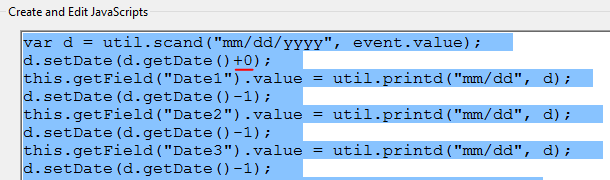
Thanks Try67!! This worked like a champ. I didn't know that a validation field could cause other fields to be populated with specific data so this was enlightening. I entered your script into my dropdown validation script section after renaming my indiscernible field names to your "Date1", "Date2" and so forth. I did have to modify the initial -1 since the "Pay period end" date would be the same date as the chosen drop down date. Once I choose my dropdown option and click anywhere else, all the date range cells automatically update to the desired range. Awesome! Thank you very much.


Get ready! An upgraded Adobe Community experience is coming in January.
Learn more
 AdChoices