BGreggs4
Participant
March 14, 2016
Answered

Time in and time out timesheet question (form attached)

  • March 14, 2016
  • 2 replies
  • 1740 views

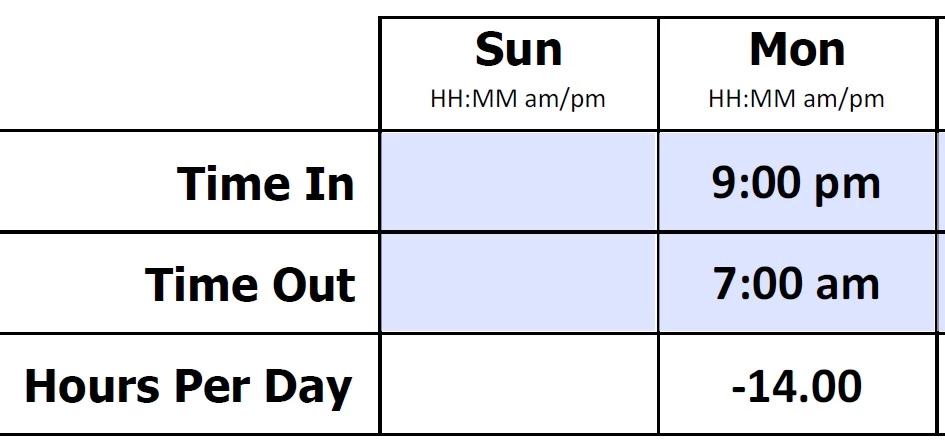
Yes I know this question has been asked many times but I have looked through dozens of examples and a lot of the "Sample" forms in the forums are no longer available since Adobe has changed stuff around. I have attached the form. I need it set up where time is not given in negative numbers for example if a person works from 9:00 pm to 7:00 am. It needs to display 10 hours instead of -14 hours (as it currently gives me). I appreciate the help! There are no "breaks" or "lunches" etc. in this. Just a calculation between the Time In and Time Out.

Thanks!

Dropbox - Staff Assignment Sheet.pdf

This topic has been closed for replies.
Correct answer try67

Thanks I appreciate it!


In TimeDiff, after this line:

var fEnd = Time2Num(sTimeFormat, sEnd);

Add this:

if (fEnd<fStart) fEnd+=86400;

2 replies

BGreggs4
BGreggs4Author
Participant
March 14, 2016

For future purposes for anyone here is the code:

Document Level Javascripts:

function Time2Num(sFormat, sTime) {

if(sTime == '') return ''; // exit

// get date time for Epoch date and sTime

var oTime = util.scand('mm/dd/yyyy ' + sFormat, '01/01/1970 ' + sTime);

// convert UTC Offset to milliseonds for adjustment

var fTZOffset = oTime.getTimezoneOffset() * 1000 * 60

// time since the start of the day in millseconds

var fTime = oTime.valueOf() - fTZOffset;

// convert to seconds and return value

return Math.round(fTime / 1000);

}

function TimeDiff(cStartField, cEndField) {

var sTimeFormat = 'hh:mm';

var fDiff = 0;

// get the start time

var sStart = this.getField(cStartField).value;

// get the end time

var sEnd = this.getField(cEndField).value;

// complete script only if we have data

if(sStart != '' & sEnd != '') {

// convert sStart string to seconds

var fStart = Time2Num(sTimeFormat, sStart);

// convert sEnd string to seconds

var fEnd = Time2Num(sTimeFormat, sEnd);

if (fEnd<fStart) fEnd+=86400;

// compute difference in seconds

fDiff += fEnd - fStart;

}

return fDiff;

}

In the Custom Calculation Script

(this goes in the field that will calculate the difference between Time In field and Time Out field..swap out SundayIn and SundayOut for your field names):

event.value = '';

var fDiff = 0;

// compute the difference for first pair of fields

// get the start time

var sStart = this.getField('SundayIn').value;

// get the end time

var sEnd = this.getField('SundayOut').value;

// complete script only if we have data

if(sStart != '' & sEnd != '') {

// convert sStart string to seconds

var fStart = Time2Num('hh:mm', sStart);

// convert sEnd string to seconds

var fEnd = Time2Num('hh:mm', sEnd);

// compute difference in seconds

fDiff += fEnd - fStart;

}

fDiff = TimeDiff('SundayIn', 'SundayOut');

// convert to rounded minutes if not zero

if (fDiff != 0) {

fDiff = Math.round(fDiff / 60);

// report decimal hours

event.value = fDiff / 60;

}

try67
Community Expert
Community Expert
March 14, 2016

By the way, I would recommend moving the code in the individual fields to a

doc-level script that takes as a parameter the name of the day, as the rest

of the code is exactly the same.

try67
Community Expert
Community Expert
March 14, 2016

If you're interested, I developed a tool that allows you to easily set up such calculations, with or without a break. You can purchase it from here:

Custom-made Adobe Scripts: Acrobat -- Calculate Time Differences in a Worksheet

BGreggs4
BGreggs4Author
Participant
March 14, 2016

Looking for help on what code to help replace for what I currently have.

try67
Community Expert
Community Expert
March 14, 2016

Then start by posting what you currently have...