


- Home
- Acrobat Services API
- Discussions
- Merge PDFs in Logic app returns "The underlying co...
- Merge PDFs in Logic app returns "The underlying co...
Merge PDFs in Logic app returns "The underlying connection was closed: An unexpected error occurred

Copy link to clipboard
Copied
Hi,
I have created a Logic App in Azure that collects PDFs in a array and will use "Merge PDFs"-action:
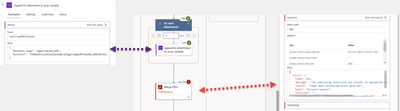
Below is some of the input that is sent to the "Merge PDFs"-action:
"body": {
		"files": [
			{
				"$content": "JVBERi0xLjYNJeLjz9MNCjMxMyAwIG9iag08PC9MaW5lYXJpemVkIDEvTCAxNzQwMzMvTyAzMTUvRSAxNTk1MDMvTiAyL1QgMTczNjY3L0ggWyA1MjMgMjM5XT4+DWVuZG9iag0gICAgICAgICAgICA..",
				"$content-type": "application/pdf"
			},
			{
				"$content-type": "application/pdf",
				"$content": "JVBERi0xLjcNCiW1tbW1DQoxIDAgb2JqDQo8PC9UeXBlL0NhdGFsb2cvUGFnZXMgMiAwIFIvTGFuZyhlbi1VUykgL1N0cnVjdFRyZWVSb290IDIzIDAgUi9NYXJrSW5mbzw8L01hcmtlZCB0cnVlPj4.."
			}
		],
		"outputFileName": "Dummy.pdf"
	}
I have also tried to create another logic app that retrieves PDF-content from to SharePoint-files, append them to an array and then run "Merge PDFs". Same error here:

The "Generate document from Word template" and "Convert Word to PDF" works fine:



 3
Replies
3
3
Replies
3


Copy link to clipboard
Copied
Hi @NOSYS5EAC ,
I was looking into this and I am finding some interesting parts about the difference between Generate document from Word template and the Merge PDF action.
To test, I was using a OneDrive for Business step like this:
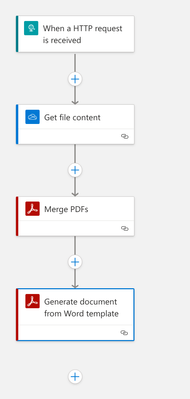
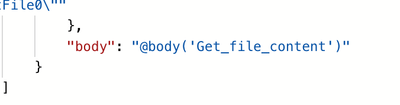
If you look at the Generate document from Word template and you use Dynamic content to insert the file content from OneDrive, it provides this in the code:
However, if you look at the Merge PDF code and you insert the variables, the code looks like this:
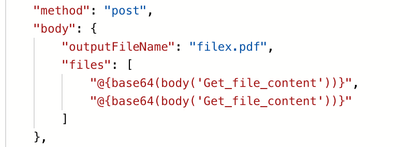
So basically what that tells me is that the Generate Document step accepts the $content and $content-type object, however Merge PDF is looking for a base64 version of the body.

Copy link to clipboard
Copied
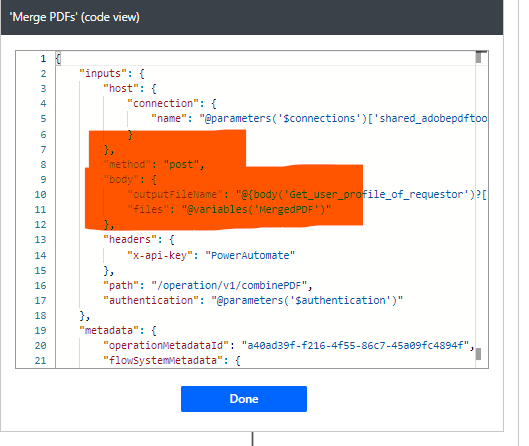
I am getting the same error on MS PowerAutomate
Copy link to clipboard
Copied
I have finally understood what you meant
you have to get the file content, compose it to base64, append to array and then merge the array

Get ready! An upgraded Adobe Community experience is coming in January.
Learn more
 AdChoices