


- Home
- Acrobat
- Discussions
- Acrobat DC crashes on Windows 2012 R2 RDS server
- Acrobat DC crashes on Windows 2012 R2 RDS server

Copy link to clipboard
Copied
Hello,
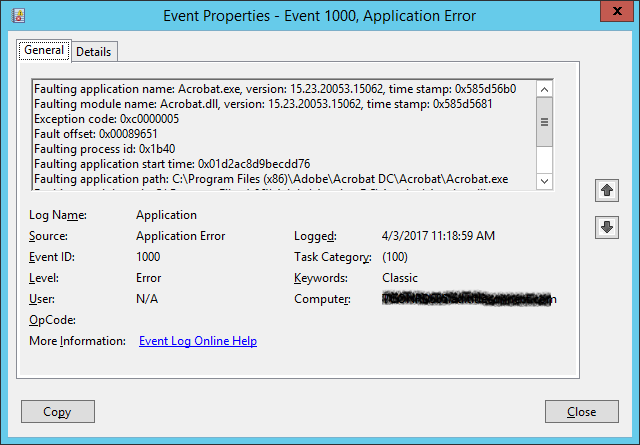
I had installed Acrobat DC on Windows 2012 R2 RDS server successfully and used it in the past, but now when I try to run it, the window opens for a split second and abruptly closes with an error message and I see errors in the Application log about faulting application Acrobat.exe and PDApp.exe (attached). I tried to uninstall and re-install it, but that did not help. Other users are having the same issue on the RDS server.
I read at VIRTUALIZED DEPLOYMENTS — Enterprise Administration Guide that Windows Terminal Server requires a serialized support and named user is not supported. Does this mean that I cannot have Acrobat DC installed on RDS server, so that users who have active subscriptions can sign-in and use Acrobat DC?
Please advise.
Thank you!






Copy link to clipboard
Copied
Sorry, it seems I missed that part while responding on this earlier.
Yes, the environment is not yet supported for named user deployment VIRTUALIZED DEPLOYMENTS — Enterprise Administration Guide . You may check with our enterprise technical support team and they should let you know the possible solution to this issue.
I am sending you an email id to send your query to. The email will only be entertained if you have an ETLA agreement with Adobe.
-Tariq Dar.
 6
Replies
6
6
Replies
6


Copy link to clipboard
Copied
Hi itguyscl,
It seems a licensing issue. Would you launch Acrobat Distiller on one of the machines and leave it idle for a couple of minutes.
Check if it prompts you for licensing.
You may visit this location C:\Users\USER NAME\AppData\Local\Temp and check this file PDApp.log
Also, you may help us with amt3.log file. Upload these file to either Google drive, Adobe Send or DropBox help us with the link via private message. How Do I Send Private Message
Let us know if that above helps you any.
-Tariq Dar
Copy link to clipboard
Copied
Thank you for your response.
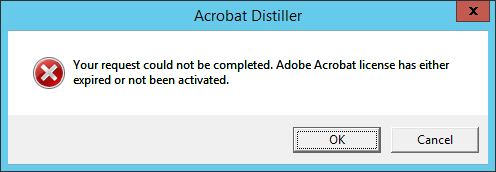
I get the attached when I run the Distiller.
I sent you the requested files via Private Message.
Copy link to clipboard
Copied
Did you have a chance to look into these errors and log files I sent you?
Is there a resolution or workaround?
Thanks!
Copy link to clipboard
Copied
Hi itguyscl,
It seems the application is running in trial mode.
The whole activation process in mentioned here: How to Remove the "Sign In Required" that launches after install? check the prtk step.
For some reason, your application can't find licensing information.
Let us know if that helps.
-Tariq Dar.
Copy link to clipboard
Copied
Thank you for your response.
If you are refering to running Adobe prtk tool with a serial number to "serialize" the installation, then I cannot try that as I do not have a serial number.
I do not have a serial number, I do not have Enterprise subscription, and my question was and still is: how do I install this product on an RDS host (Windows terminal server) in such a way that the product opens and allows each user to use their own Adobe ID to sign in and use the product?
I read at VIRTUALIZED DEPLOYMENTS — Enterprise Administration Guide that Windows Terminal Server requires a serialized support and named user is not supported. Does this mean that I cannot have Acrobat DC installed on RDS server, so that users who have active subscriptions can sign-in and use Acrobat DC?
Copy link to clipboard
Copied
Sorry, it seems I missed that part while responding on this earlier.
Yes, the environment is not yet supported for named user deployment VIRTUALIZED DEPLOYMENTS — Enterprise Administration Guide . You may check with our enterprise technical support team and they should let you know the possible solution to this issue.
I am sending you an email id to send your query to. The email will only be entertained if you have an ETLA agreement with Adobe.
-Tariq Dar.


Get ready! An upgraded Adobe Community experience is coming in January.
Learn more
 AdChoices