Copy link to clipboard
Copied
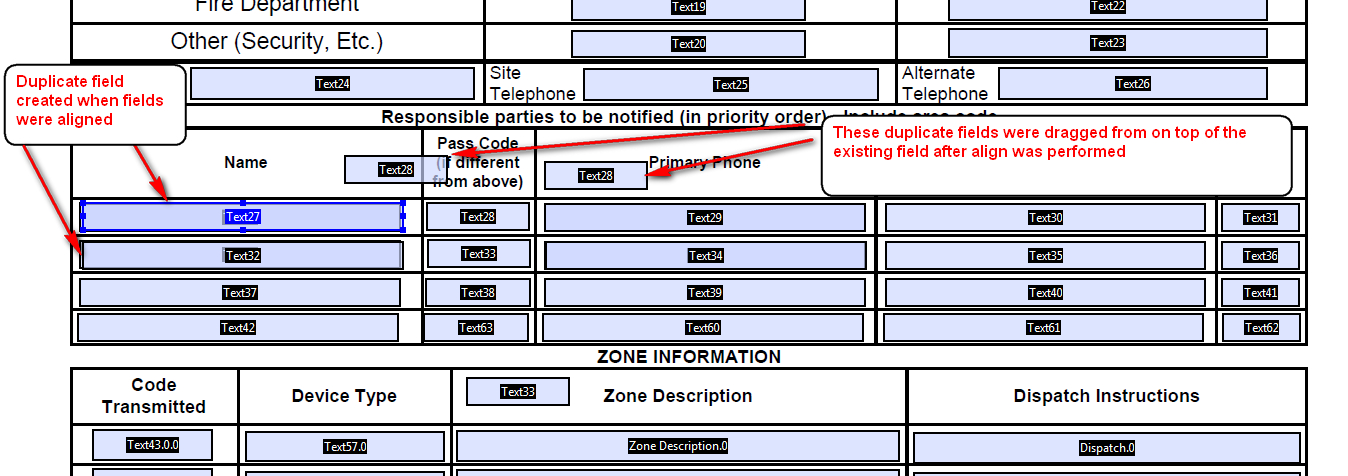
Whenever I select multiple form fields and align, duplicate fields (with the same names) are created on top of the existing fields. This occurred in Acrobat X Standard and now in the newly downloaded Acrobat Pro DC.

Copy link to clipboard
Copied
This also occurs with the "Match Size" command
Copy link to clipboard
Copied
This happens to me sometimes when I accidentally do what's needed to create duplicate fields. In other words, when one or more fields are selected and you hold down the Ctrl key while moving the mouse even a tiny bit. Could this have happened in your case?
Copy link to clipboard
Copied
After a close look, it appears that is what is happening. I tried multiple times and it is almost virtually impossible (for me) to select multiple fields without the mouse moving slightly, thus duplicating fields. Is there any other way to select multiple fields to avoid this?

Copy link to clipboard
Copied
Use the Fields List in Edit Form mode, or use the mouse by clicking and dragging over the area where the fields are located.
Get ready! An upgraded Adobe Community experience is coming in January.
Learn more