Exit
  • Global community
    • Language:
      • Deutsch
      • English
      • Español
      • Français
      • Português
  • 日本語コミュニティ
  • 한국 커뮤니티
0

Batch add link

New Here ,
Oct 04, 2017 Oct 04, 2017

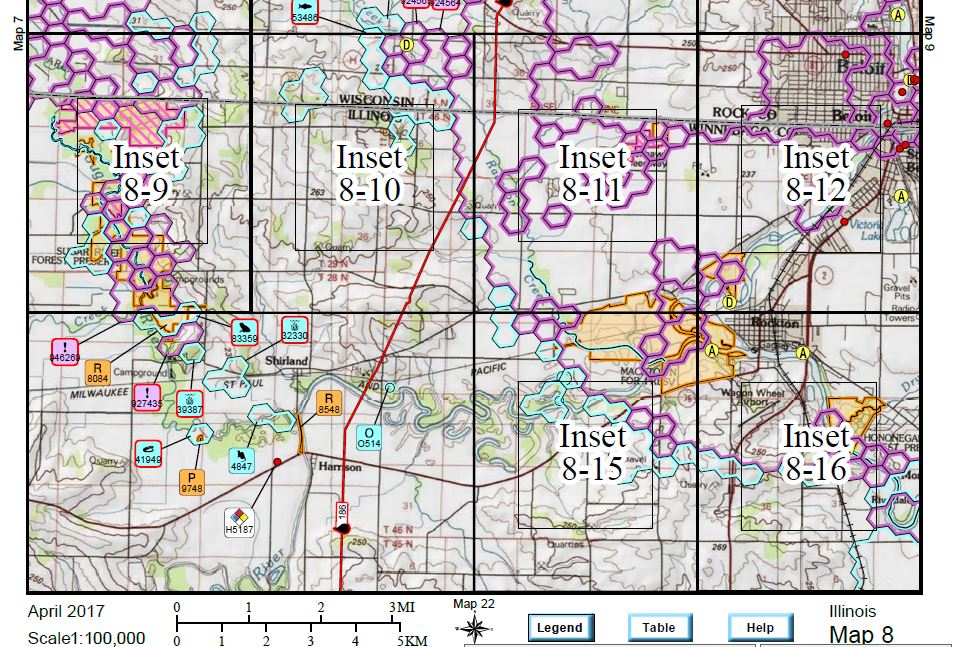
I have many PDF's in a folder, all of them are PDF's of maps that have been exported. Near the bottom of each map there are 3 buttons that I need to create links on to link to other PDFs. The legend button is supposed to open up another PDF in the folder that is the legend for the maps. The help button links to a help document. These 2 links will be the same for all the maps I have in the folder. The other link will be specific for each PDF (the location will be the same but what it links to will be different depending on the map).

I was wondering if it is possible to create the links (at least for the 2 that will remain the same for all PDFs) for all the PDF's at once, and also to have them all created in the correct location?
Capture.JPG

Here is a view of the buttons at the bottom of the map. Basically I have 1000+ maps that all need links added over these buttons and want to add those links in a batch process if possible.

Any help would be greatly appreciated!

TOPICS
Edit and convert PDFs
1.5K
Translate
Report
Community guidelines
Be kind and respectful, give credit to the original source of content, and search for duplicates before posting. Learn more
community guidelines
1 ACCEPTED SOLUTION
Community Expert ,
Oct 04, 2017 Oct 04, 2017
LATEST

Yes, if you have Acrobat Pro it can be done using an Action and a custom-made script.

If you're interested I could write the script for you and explain how to use it (for a small fee). It might even be possible to set up the third button (it's for sure possible to create it), depending on the logic behind it. You can contact me privately at try6767 at gmail.com to discuss it further.

View solution in original post

Translate
Report
Community guidelines
Be kind and respectful, give credit to the original source of content, and search for duplicates before posting. Learn more
community guidelines
Community Expert ,
Oct 04, 2017 Oct 04, 2017
LATEST

Yes, if you have Acrobat Pro it can be done using an Action and a custom-made script.

If you're interested I could write the script for you and explain how to use it (for a small fee). It might even be possible to set up the third button (it's for sure possible to create it), depending on the logic behind it. You can contact me privately at try6767 at gmail.com to discuss it further.

Translate
Report
Community guidelines
Be kind and respectful, give credit to the original source of content, and search for duplicates before posting. Learn more
community guidelines

