Exit
  • Global community
    • Language:
      • Deutsch
      • English
      • Español
      • Français
      • Português
  • 日本語コミュニティ
  • 한국 커뮤니티
0

Convert PDF tables to XML

New Here ,
Apr 10, 2021 Apr 10, 2021

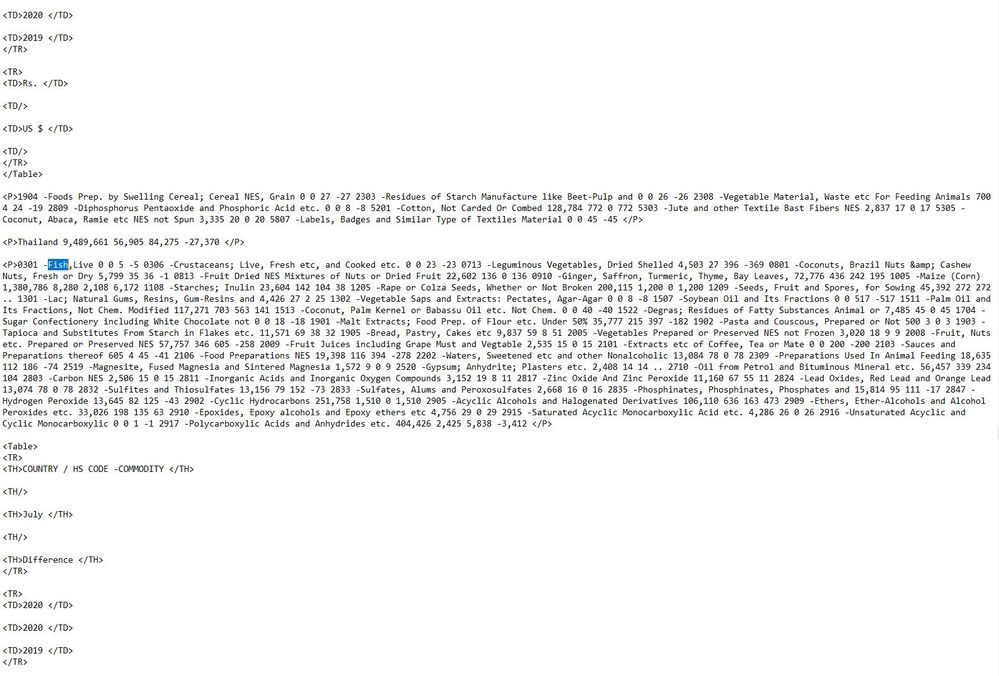
I am using Acrobat XI Pro to convert PDF file to XML which consist many tables but some tables not convert in XML. All the tables showing with TD/TR tags but some tables converted in paragraphs <P> tag. Vertical tables are also disturbed in the XML file Please help me regarding this problem and provide best solution.


TOPICS
Edit and convert PDFs , How to
2.1K
Translate
Report
Community guidelines
Be kind and respectful, give credit to the original source of content, and search for duplicates before posting. Learn more
community guidelines
LEGEND ,
Apr 10, 2021 Apr 10, 2021

Most PDF files don't contain tables. It's all guesswork, sometimes it guesses as you want, sometimes not. 

Translate
Report
Community guidelines
Be kind and respectful, give credit to the original source of content, and search for duplicates before posting. Learn more
community guidelines
New Here ,
Apr 10, 2021 Apr 10, 2021

Thank you for your reply but what is the solution of this problem?

Translate
Report
Community guidelines
Be kind and respectful, give credit to the original source of content, and search for duplicates before posting. Learn more
community guidelines
LEGEND ,
Apr 10, 2021 Apr 10, 2021

Lower expectations.

Translate
Report
Community guidelines
Be kind and respectful, give credit to the original source of content, and search for duplicates before posting. Learn more
community guidelines
Community Expert ,
Apr 10, 2021 Apr 10, 2021

Is this PDF tagged or not?


Acrobate du PDF, InDesigner et Photoshopographe
Translate
Report
Community guidelines
Be kind and respectful, give credit to the original source of content, and search for duplicates before posting. Learn more
community guidelines
New Here ,
Apr 12, 2021 Apr 12, 2021

Yes, the PDF tagged.

Translate
Report
Community guidelines
Be kind and respectful, give credit to the original source of content, and search for duplicates before posting. Learn more
community guidelines
LEGEND ,
Apr 12, 2021 Apr 12, 2021

If it's tagged, Acrobat might manage better. Do the tags define all the table definitions?

Translate
Report
Community guidelines
Be kind and respectful, give credit to the original source of content, and search for duplicates before posting. Learn more
community guidelines
New Here ,
Apr 12, 2021 Apr 12, 2021

Yes.

Translate
Report
Community guidelines
Be kind and respectful, give credit to the original source of content, and search for duplicates before posting. Learn more
community guidelines
LEGEND ,
Apr 12, 2021 Apr 12, 2021

Did you try in up to date Acrobat? 

Please show screen shot of a table in the tags panel and the same date extracted to XML.

(Protect private information).

Translate
Report
Community guidelines
Be kind and respectful, give credit to the original source of content, and search for duplicates before posting. Learn more
community guidelines
New Here ,
Apr 13, 2021 Apr 13, 2021

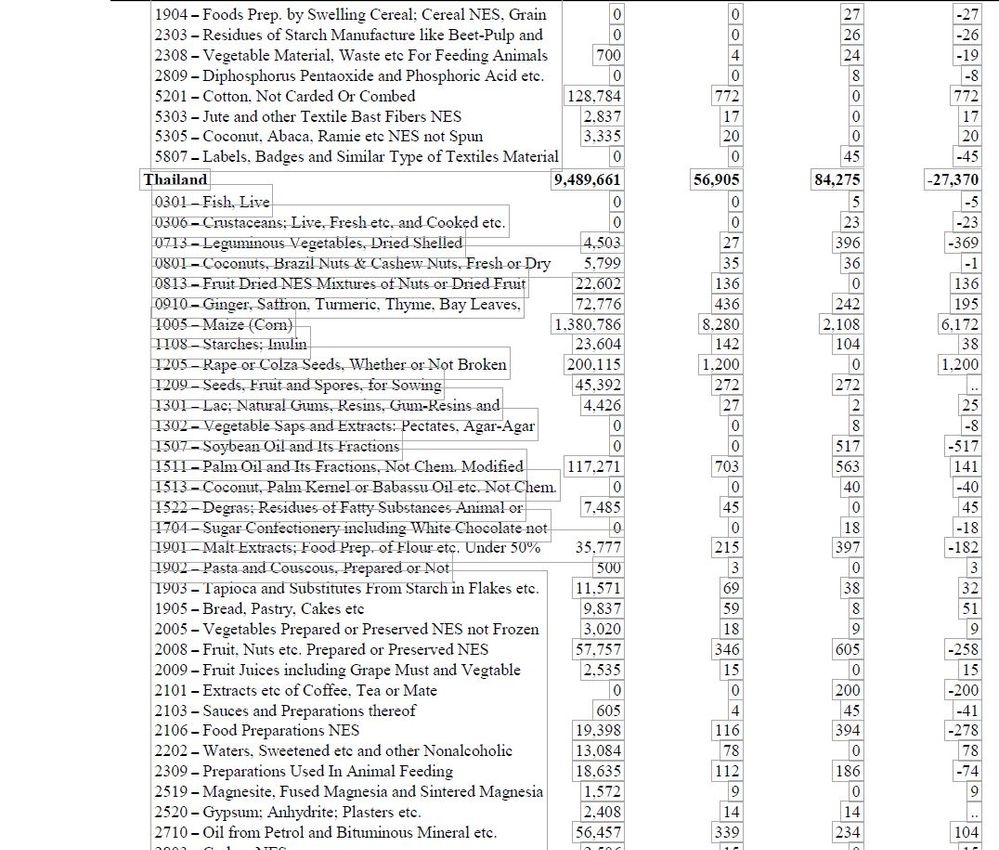
sample data PDF tagged.JPGsample xml data.JPG

Translate
Report
Community guidelines
Be kind and respectful, give credit to the original source of content, and search for duplicates before posting. Learn more
community guidelines
LEGEND ,
Apr 13, 2021 Apr 13, 2021

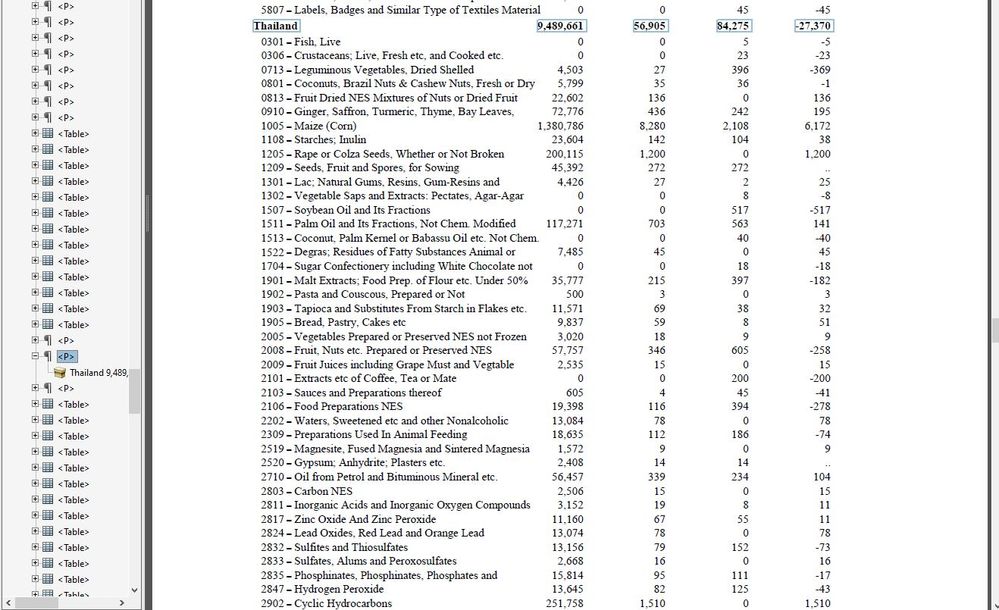
Thank you. Now please show the same information (perhaps starting at Thailand 9,487,661) in the Tags panel, showing that it is tagged as a table.

Translate
Report
Community guidelines
Be kind and respectful, give credit to the original source of content, and search for duplicates before posting. Learn more
community guidelines
New Here ,
Apr 13, 2021 Apr 13, 2021

Thailand Tag.JPG

Translate
Report
Community guidelines
Be kind and respectful, give credit to the original source of content, and search for duplicates before posting. Learn more
community guidelines
LEGEND ,
Apr 13, 2021 Apr 13, 2021
LATEST

Thank you. I am not an expert on tags, but I notice that there are a very large number of table tags, perhaps the file is badly tagged with a series of one line tables. Anyway I defer to Thom Parker who knows a lot more about this than I do.

Translate
Report
Community guidelines
Be kind and respectful, give credit to the original source of content, and search for duplicates before posting. Learn more
community guidelines
Community Expert ,
Apr 12, 2021 Apr 12, 2021

Table recognition and conversion is extremely difficult. There are several applications that attempt this, and one very well used open source tool, https://tabula.technology/.

In general, they all work decently on simple tables and then fall to pieces when things start getting complicated. 


So you are asking a lot of Acrobat. Even if the table tags are really well formed, the Acrobat conversion might fall apart. Consider using another tool for this. Search google for 'PDF Table Extraction'

Thom Parker - Software Developer at PDFScripting
Use the Acrobat JavaScript Reference early and often

Translate
Report
Community guidelines
Be kind and respectful, give credit to the original source of content, and search for duplicates before posting. Learn more
community guidelines