
Exit
  • Global community
    • Language:
      • Deutsch
      • English
      • Español
      • Français
      • Português
  • 日本語コミュニティ
  • 한국 커뮤니티
0

Current Date and Time

New Here ,
Oct 29, 2020 Oct 29, 2020

I have been using 

event.value = util.printd('m/d/yyyy h:MM tt', new Date());

to display the date and time printed on my documents. It used to work displaying the current date and time but now it does not update but prints the date and time created.


TOPICS
PDF forms , Print and prepress
2.4K
Translate
Report
Community guidelines
Be kind and respectful, give credit to the original source of content, and search for duplicates before posting. Learn more
community guidelines
1 ACCEPTED SOLUTION
Community Expert ,
Oct 29, 2020 Oct 29, 2020

Printing the file will not trigger this code. You should move it to the Will Print event of the document, or add a call there to the calculateNow method.

View solution in original post

Translate
Report
Community guidelines
Be kind and respectful, give credit to the original source of content, and search for duplicates before posting. Learn more
community guidelines
Community Expert ,
Oct 29, 2020 Oct 29, 2020

Where does you use the script?

Translate
Report
Community guidelines
Be kind and respectful, give credit to the original source of content, and search for duplicates before posting. Learn more
community guidelines
New Here ,
Oct 29, 2020 Oct 29, 2020

In scanned document  - prepare forms, image field, date and time. Formula added to the calculate field.

Translate
Report
Community guidelines
Be kind and respectful, give credit to the original source of content, and search for duplicates before posting. Learn more
community guidelines
Community Expert ,
Oct 29, 2020 Oct 29, 2020

Printing the file will not trigger this code. You should move it to the Will Print event of the document, or add a call there to the calculateNow method.

Translate
Report
Community guidelines
Be kind and respectful, give credit to the original source of content, and search for duplicates before posting. Learn more
community guidelines
New Here ,
Nov 06, 2020 Nov 06, 2020

I am unable to locate the "Will Print" event of the document. However, using my previous approach I have inconsistent results. It works sometimes but not always.

Translate
Report
Community guidelines
Be kind and respectful, give credit to the original source of content, and search for duplicates before posting. Learn more
community guidelines
Community Expert ,
Nov 06, 2020 Nov 06, 2020

Does you use Acrobat Standard or Pro.

Translate
Report
Community guidelines
Be kind and respectful, give credit to the original source of content, and search for duplicates before posting. Learn more
community guidelines
Community Expert ,
Nov 06, 2020 Nov 06, 2020

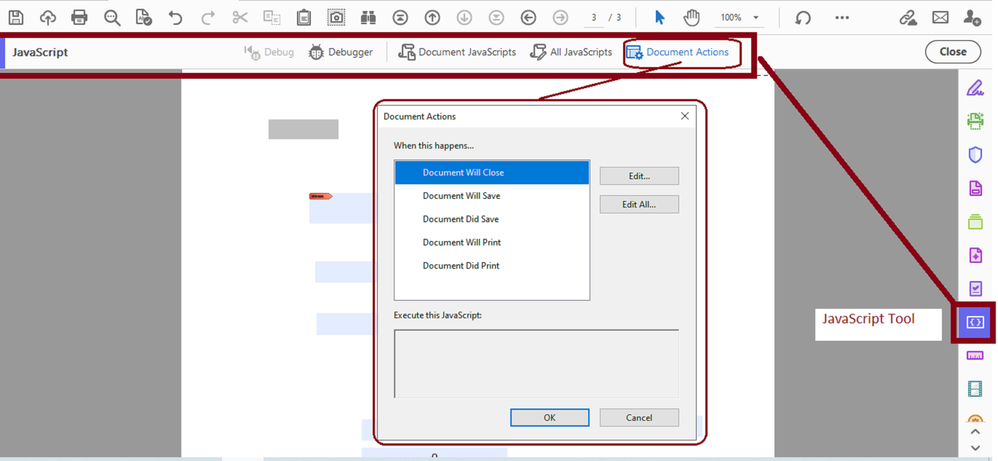
I think Try67 is referring to the document actions .


You need to go to tools and select the "JavaScript" tool to get to the document eventss.
 

willprint.png

Translate
Report
Community guidelines
Be kind and respectful, give credit to the original source of content, and search for duplicates before posting. Learn more
community guidelines
New Here ,
Nov 16, 2020 Nov 16, 2020

I am using Adobe Acrobat Pro DC. What properties of a document would interfere with the formula?

event.value = util.printd('m/d/yyyy h:MM tt', new Date());

It works with some of my scanned documents but not with others.

Translate
Report
Community guidelines
Be kind and respectful, give credit to the original source of content, and search for duplicates before posting. Learn more
community guidelines
Community Expert ,
Nov 16, 2020 Nov 16, 2020

Where did you place the code?

Translate
Report
Community guidelines
Be kind and respectful, give credit to the original source of content, and search for duplicates before posting. Learn more
community guidelines
New Here ,
Nov 16, 2020 Nov 16, 2020

Prepare Form, Date Field, Properties, Calculate, Custom calculate script.

Translate
Report
Community guidelines
Be kind and respectful, give credit to the original source of content, and search for duplicates before posting. Learn more
community guidelines
Community Expert ,
Nov 16, 2020 Nov 16, 2020

Then it should work fine, but it will not update just by opening the file...

Translate
Report
Community guidelines
Be kind and respectful, give credit to the original source of content, and search for duplicates before posting. Learn more
community guidelines
New Here ,
Nov 16, 2020 Nov 16, 2020

In some documents it updates automatically when opened, with others it always print the date and time the script was entered and never updates unless it is re-entered. How can I get it to update automatically?

Translate
Report
Community guidelines
Be kind and respectful, give credit to the original source of content, and search for duplicates before posting. Learn more
community guidelines
Community Expert ,
Nov 16, 2020 Nov 16, 2020

Use the document will print event.

Translate
Report
Community guidelines
Be kind and respectful, give credit to the original source of content, and search for duplicates before posting. Learn more
community guidelines
New Here ,
Nov 16, 2020 Nov 16, 2020
LATEST

Thnak you, I used the document "Will Print" event in JavaScript as shown by Try67 and my issue has been resolved. Thaks all.

Translate
Report
Community guidelines
Be kind and respectful, give credit to the original source of content, and search for duplicates before posting. Learn more
community guidelines
