Exit
  • Global community
    • Language:
      • Deutsch
      • English
      • Español
      • Français
      • Português
  • 日本語コミュニティ
  • 한국 커뮤니티
0

Exporting issue from Salesforce

Community Beginner ,
Oct 15, 2018 Oct 15, 2018

Hi Support,

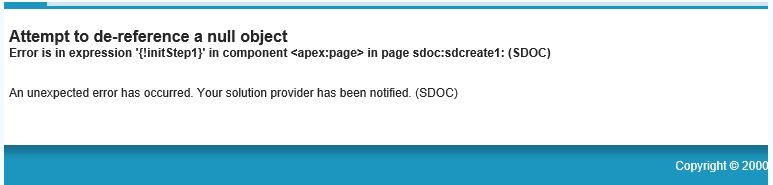
The export to PDF is no longer working in Salesforce and i believe it is something to do with the latest version release from Acrobat Reader.


Thanks
Francis

TOPICS
Edit and convert PDFs
935
Translate
Report
Community guidelines
Be kind and respectful, give credit to the original source of content, and search for duplicates before posting. Learn more
community guidelines
1 ACCEPTED SOLUTION
Community Beginner ,
Oct 16, 2018 Oct 16, 2018
LATEST

We have reproduce the issue and it is due to browser-related and not a problem with the PDF.

It is working on Microsoft Edge and Google Chrome but not IE 11.

View solution in original post

Translate
Report
Community guidelines
Be kind and respectful, give credit to the original source of content, and search for duplicates before posting. Learn more
community guidelines
Community Beginner ,
Oct 15, 2018 Oct 15, 2018

Capture.JPG

Translate
Report
Community guidelines
Be kind and respectful, give credit to the original source of content, and search for duplicates before posting. Learn more
community guidelines
Community Expert ,
Oct 15, 2018 Oct 15, 2018

Reader has nothing to do with the export process since it can't create PDF

files, only display existing ones.

Translate
Report
Community guidelines
Be kind and respectful, give credit to the original source of content, and search for duplicates before posting. Learn more
community guidelines
Community Beginner ,
Oct 16, 2018 Oct 16, 2018

Thanks for your quick answer.

However, if we remove the Acrobat Reader and install another open-source document viewer such as Sumatra PDF then it will works as fine.

Translate
Report
Community guidelines
Be kind and respectful, give credit to the original source of content, and search for duplicates before posting. Learn more
community guidelines
Community Expert ,
Oct 16, 2018 Oct 16, 2018

There's probably something wrong with the output generated by the

application. If you could share a sample file we might be able to help

further.

Translate
Report
Community guidelines
Be kind and respectful, give credit to the original source of content, and search for duplicates before posting. Learn more
community guidelines
Community Beginner ,
Oct 16, 2018 Oct 16, 2018
LATEST

We have reproduce the issue and it is due to browser-related and not a problem with the PDF.

It is working on Microsoft Edge and Google Chrome but not IE 11.

Translate
Report
Community guidelines
Be kind and respectful, give credit to the original source of content, and search for duplicates before posting. Learn more
community guidelines