


Copy link to clipboard
Copied
I am creating a pdf from multiple files. I would like the file names to appear with the thumbnail view instead of the usual 1, 2, 3, etc numbering. I don't mind doing it by "hand" (one at a time). Is there a way to do this?





Copy link to clipboard
Copied
You can do it manually using the Page Labels command. Enter the original file-name as the prefix and apply it to the range of pages that came from it. It should also be possible to do automatically, if the files are merged using a script.
 7
Replies
7
7
Replies
7


Copy link to clipboard
Copied
This is not a feature of Adobe Acrobat.
Copy link to clipboard
Copied
You can do it manually using the Page Labels command. Enter the original file-name as the prefix and apply it to the range of pages that came from it. It should also be possible to do automatically, if the files are merged using a script.
Copy link to clipboard
Copied
That sounds very promising, thanks! I can't find the "Page Labels" command at this time. Where should it be?
I'm on a Mac using version 10.0.0.
Thanks!

Copy link to clipboard
Copied
Hi Chris:
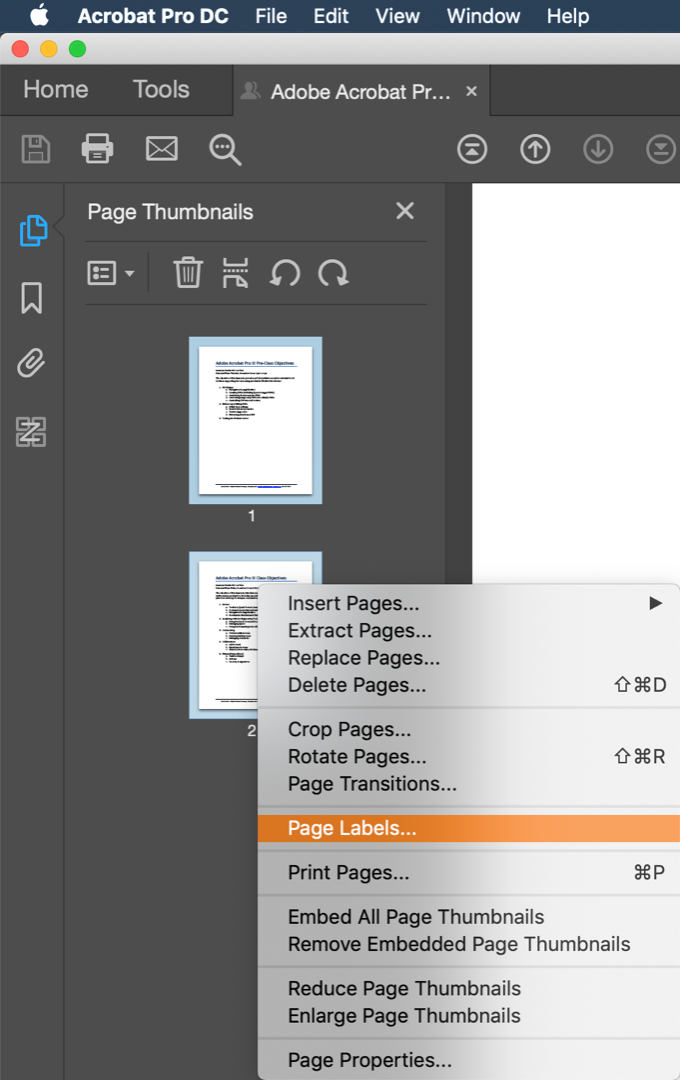
Open the Page Thumbnails navigation pane, select the pages you want to modify and then right+click.
~Barb
Copy link to clipboard
Copied
thanks! I must be using an old version (10.0.0) so I had to go to "number pages" instead, but still works.
Copy link to clipboard
Copied
Ok great. Glad you got it figured out, Chris.
~Barb
Copy link to clipboard
Copied
Oh, wait, I figured it out! Have to go to thumbnails, press ctrl, and then select "number pages" where you can create prefixes and numbers for any range. Thank you so much!


Get ready! An upgraded Adobe Community experience is coming in January.
Learn more
 AdChoices