

Exit
  • Global community
    • Language:
      • Deutsch
      • English
      • Español
      • Français
      • Português
  • 日本語コミュニティ
  • 한국 커뮤니티
0

Formatting not showing up in Forms

New Here ,
Aug 13, 2021 Aug 13, 2021

I'm trying to use Forms formatting but the only tabs available to me in Properties are General / Appearance / Postion / Options... what happened?

TOPICS
PDF forms
1.9K
Translate
Report
Community guidelines
Be kind and respectful, give credit to the original source of content, and search for duplicates before posting. Learn more
community guidelines
2 ACCEPTED SOLUTIONS
Community Expert ,
Aug 13, 2021 Aug 13, 2021

Select 'Prepare form' tool, click on 'More' then on 'Convert to acrobat form'.

View solution in original post

Translate
Report
Community guidelines
Be kind and respectful, give credit to the original source of content, and search for duplicates before posting. Learn more
community guidelines
Adobe Employee ,
Aug 13, 2021 Aug 13, 2021

Hi there


Hope you are doing well and sorry for the trouble. As you are unable to get the 'Format' option in the PDF forms properties:


Please try the steps below:

  • Open the PDF form
  • Go to Tools > Prepare Form
  • Click on 'More' in the right hand panel and select 'Rever to Acrobat form' as shown in the screenshot below:


Untitled.png


Regards

Amal

View solution in original post

Translate
Report
Community guidelines
Be kind and respectful, give credit to the original source of content, and search for duplicates before posting. Learn more
community guidelines
Community Expert ,
Aug 13, 2021 Aug 13, 2021

Select 'Prepare form' tool, click on 'More' then on 'Convert to acrobat form'.

Translate
Report
Community guidelines
Be kind and respectful, give credit to the original source of content, and search for duplicates before posting. Learn more
community guidelines
New Here ,
Aug 13, 2021 Aug 13, 2021

Ohmigoodness! I guess I don't understand the difference between what I was doing and why it wasn't a "form"?? But thank you!

Translate
Report
Community guidelines
Be kind and respectful, give credit to the original source of content, and search for duplicates before posting. Learn more
community guidelines
Community Expert ,
Aug 13, 2021 Aug 13, 2021

There are no more tabs available in a Adobe Sign form.

Translate
Report
Community guidelines
Be kind and respectful, give credit to the original source of content, and search for duplicates before posting. Learn more
community guidelines
Adobe Employee ,
Aug 13, 2021 Aug 13, 2021

Hi there


Hope you are doing well and sorry for the trouble. As you are unable to get the 'Format' option in the PDF forms properties:


Please try the steps below:

  • Open the PDF form
  • Go to Tools > Prepare Form
  • Click on 'More' in the right hand panel and select 'Rever to Acrobat form' as shown in the screenshot below:
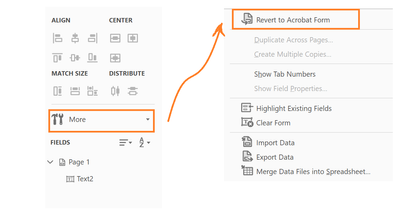
 

Untitled.png


Regards

Amal

Translate
Report
Community guidelines
Be kind and respectful, give credit to the original source of content, and search for duplicates before posting. Learn more
community guidelines
New Here ,
Aug 13, 2021 Aug 13, 2021

Thank you! What's the difference between the Form I was creating and editing and Convert to Form?

Translate
Report
Community guidelines
Be kind and respectful, give credit to the original source of content, and search for duplicates before posting. Learn more
community guidelines
Community Expert ,
Aug 13, 2021 Aug 13, 2021

By ticking the "This form requires signatures" box when you created the form you converted it (unknowingly) to an Adobe Sign form, which has much more limited functionalities compared to a "normal" Acrobat form.

If you revert the form back you'll have these functionalities again. You can still have the form signed, by adding a Digital Signature field to it. Adobe Sign is an online service that stores the file and distributes it to the recipients so multiple people can sign the same copy of it.

Translate
Report
Community guidelines
Be kind and respectful, give credit to the original source of content, and search for duplicates before posting. Learn more
community guidelines
New Here ,
Aug 13, 2021 Aug 13, 2021

Thank you so much for explaining (so I don't inadvertently do it again!).

Translate
Report
Community guidelines
Be kind and respectful, give credit to the original source of content, and search for duplicates before posting. Learn more
community guidelines
New Here ,
Aug 19, 2024 Aug 19, 2024
LATEST

Recently had this problem and the below solution did not work due to there being no 'More' option.


I had to go to 'File' and in the drop down select 'Disable new Adobe' after which the below solution from Nesa Nurani worked.

Translate
Report
Community guidelines
Be kind and respectful, give credit to the original source of content, and search for duplicates before posting. Learn more
community guidelines
