/t5/acrobat-discussions/how-can-i-print-highlighted-text/td-p/7172373May 14, 2015
May 14, 2015
Copy link to clipboard
Copied
I have highlighted text on a document and have selected color printing and have enabled the printing of comments and it still won't print the highlight as yellow. Help!
/t5/acrobat-discussions/how-can-i-print-highlighted-text/m-p/7172374#M21547May 15, 2015
May 15, 2015
Copy link to clipboard
Copied
Hi Rebecka,
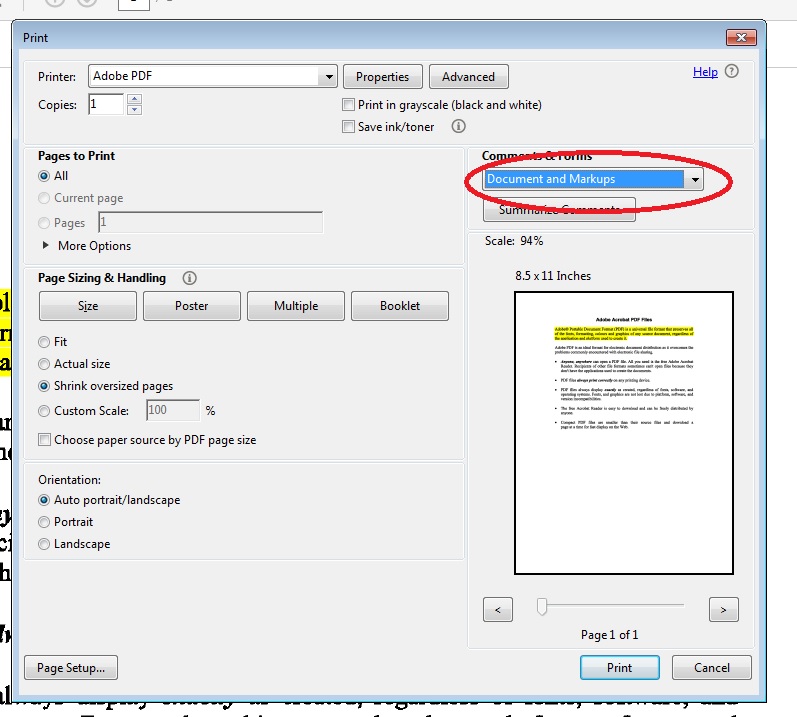
I replicated the issue at my end & was able to successfully print the highlighted text. Please choose the " Document & Markups " option in the print dialog box.
/t5/acrobat-discussions/how-can-i-print-highlighted-text/m-p/7172374#M21547May 15, 2015
May 15, 2015
Copy link to clipboard
Copied
Hi Rebecka,
I replicated the issue at my end & was able to successfully print the highlighted text. Please choose the " Document & Markups " option in the print dialog box.






 3
Replies
3
Replies





 AdChoices