


- Home
- Acrobat
- Discussions
- Re: How send filled form via email in PDF format n...
- Re: How send filled form via email in PDF format n...
How send filled form via email in PDF format not XML when button clicked

Copy link to clipboard
Copied


 40
Replies
40
40
Replies
40


Copy link to clipboard
Copied

Copy link to clipboard
Copied
My bank in another state has emailed me a form to fill out. I have completed filling it out and because my printer is currently down, I need to send the form back to the bank which I have an email address for. However, I haven't yet been successful in getting it sent back to them. I normally use Gmail as my email client. The form which the bank sent me (via email) is an Adobe document. I'm puzzled about how I can get the completed form back to them via email. Can anyone help?
Copy link to clipboard
Copied
This is from Gary Stutsman again. I'm sorry, but I didn't intend for my previous entry to be a response to Patrick Leahy. Apologies!

Copy link to clipboard
Copied
Have you since found a solution to this? I am experiencing the same issue and the Adobe support has yet to get back to me.

Copy link to clipboard
Copied
A number of issues have been discussed here. Can you provide more details about your problem?
Copy link to clipboard
Copied
I apologize for not being more specific - I assumed by hitting reply to a specific post that it would be called out.
I was referring to Post #31.
My company creates order forms and distributes them to our customers.
Typically my designers create the order forms, and they are sent directly back to them once filled out by the customer for order fulfillment.
Now we are dealing with a larger customer that requires purchasing as well as sales to be copied on the submission for confirmation.
The issue is that we cannot change the E-Mail address that the 'Submit Form' button in LiveCycle is directed to.
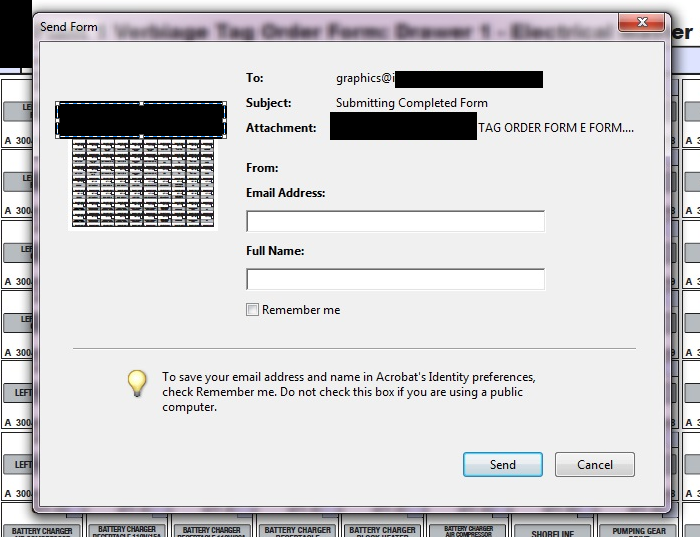
In waiting over 3 days for Adobe tech support to get back to me on a time sensitive matter, I have spent quite a bit of time trying to find alternative solutions on my own.
1.) I have tried setting up the 'Button' from scratch, and submitting the pdf via HTML by typing mailto:desiredemailaddress.com
This worked on computers we tested that had older versions of Adobe, but the new versions still reverted back to the initial single email.
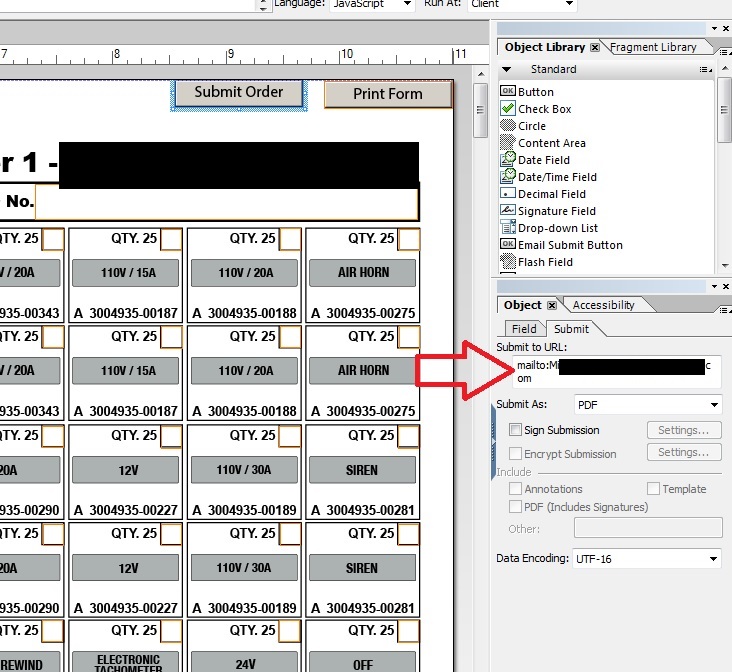
2.) I have tried purchasing Live Cycle on a different users computer and creating the button from there.
I have recently read that by changing the identity of the Adobe Acrobat user and redistributing the form, it could partially solve the issue - however, it still will not allow us to include multiple emails in the submission, including addresses that are not within our organization.
Copy link to clipboard
Copied
OK. You said you're using the Distribute Form feature of Acrobat. If you don't do this you will have more flexibility (including specifying multiple recipients), but then you won't be able to use the Tracker feature either. So my first question would be are you relying on Tracker to collect the responses?
Copy link to clipboard
Copied
First – Thank you so much for your help.
The Tracker feature is not necessary. I do not believe we have ever used it. The flexibility to use multiple recipients is more important to us.
How would we ‘distribute’ the form without using the Distribute feature?
Copy link to clipboard
Copied
When you use the Distibute Form feature in Acrobat, it adds some JavaScript for submitting the form, some things that make it work with Tracker, and finally Reader-enables the form. You can do the first and last steps yourself.
Here's a good tutorial that should help with setting up the submit form by email: https://acrobatusers.com/tutorials/dynamically-setting-submit-e-mail-address
This includes instructions for both Acroforms and XFA forms.
To Reader-enable the document, which is only necessary if the form will be used with Reader 10 or older on Windows/Mac, then select (in Acrobat 11/DC):
File > Save as Other > Reader Extended PDF > Enable More Tools

Copy link to clipboard
Copied
I have the same question as above. I´m designin in LiveCycle Designer and yes, I intend for people with only free Adobe Reader to be filling out this form.
Thank you!!!
Copy link to clipboard
Copied
You will need an Adobe LiveCycle Reader Extensions Server to make this possible for users who only have Reader and not full Acrobat. It requires a copy of the filled-out PDF to be saved in order to send it, and Reader doesn't have the ability to save a file without the extended rights from a Reader Extensions Server.

Copy link to clipboard
Copied
Thank you Patrick.
Here is someone who doesn't add wasted words and says exactly what needs to be done... Well done. Unique for a reply.

Copy link to clipboard
Copied
I'm new to Acrobat, in fact only designed first interactive form today :)
I like the idea posted above about emailing as a PDF for those users that only have Reader.
I unaware of what PDL means by "You will need an Adobe LiveCycle Reader Extensions Server to make this possible for users who only have Reader" and "Reader doesn't have the ability to save a file without the extended rights from a Reader Extensions Server."
I'm designing in Acrobat Professional 8, is it possible to achieve this and can you point me in the right direction?
Copy link to clipboard
Copied

Copy link to clipboard
Copied
Can anyone teach me how to send the filled out form in pdf to send as a PDF, because currently i created pdf using the Acrobat Professional 8 and Adobe LifeCycle Designer, went the person receive the email it shows special character in the body of the email, i want it to be send the filled out form as an attachement so that the user will just download the filled out pdf.. Please help me regarding my problem.. I need this to be fix asap. And i need this badly..
Thanks and God Bless

Copy link to clipboard
Copied
for many, many reasons. For HTML forms, an experienced web programmer
needs to write the server back end (ASP, CGI, PHP...) . PDF forms are
no simpler.
Aandi Inston
Copy link to clipboard
Copied
Will your end users (the people filling out the form) all have a fully licensed version of Acrobat or will they only have Reader? That will significantly change how you need to approach this issue.

Copy link to clipboard
Copied
Copy link to clipboard
Copied
Please note: Unless you enable the form through an Adobe LiveCycle Reader Extensions Server, people who only have Reader WILL NOT be able to submit the form if it is set to submit in PDF format, since that operation requires save rights.

Copy link to clipboard
Copied
I use a regular button with the the Control Type:Submit and the Submit Format: PDF and then to Submit to URL: mailto: email@adress.com
I receive a Notice that says: This operation is not permitted.
What am I doing wrong?
Copy link to clipboard
Copied
There should be no space between 'mailto:' and the address.
Copy link to clipboard
Copied
I am using Adobe LifeCycle Designer 7.1 and Adobe Acrobat 7.0.
I'm getting the error message: "This operation is not permitted."
Any help would be appreciated!

Copy link to clipboard
Copied
In the previous answer to the question regarding the form receiver only having Adobe Reader and not being able to open the XML form:
"
Please note: Unless you enable the form through an Adobe LiveCycle Reader Extensions Server, people who only have Reader WILL NOT be able to submit the form if it is set to submit in PDF format, since that operation requires save rights. "
Can I accomplish this(enabling A LC Reader Extensions Server) on my (the form designer's) end? How?

Copy link to clipboard
Copied
Years late, I know. But I'll post this for others
like me who founds this thread while googling for an anwser.
What I finaly did:
Found the line:
<submit format="xml" textEncoding="UTF-8" target="mailto:"/>
changed it to:
<submit format="pdf" textEncoding="UTF-8" target="mailto:"/>
resaved document, and it worked.

-
- 1
- 2

Get ready! An upgraded Adobe Community experience is coming in January.
Learn more
 AdChoices