


- Home
- Acrobat
- Discussions
- How to add acrobat to windows 7 home pro default ...
- How to add acrobat to windows 7 home pro default ...
How to add acrobat to windows 7 home pro default programs list

Copy link to clipboard
Copied
I have lost the ability to set Acrobat as the default program for opening pdf files. I can do it with manual "open with", however I cannot set it as the default to do it automatically through any of the windows options. I found that Acrobat is not listed as one of the windows default rpgrams and would like to be able to add to that list. Does anyone know how to do that? I assume it requires a registry change but I don't know where.
Thanks for your help
Jerry


 25
Replies
25
25
Replies
25


Copy link to clipboard
Copied
Have you tried "Browse", select Acrobat in C\Program Files etc and then click "Always use the selected etc ..."?
Copy link to clipboard
Copied
Unfortunately, that is not an available option on the drop down list
when I right or left click on the file (acroRd32) or if I select Acrobat
9 pro
Thanks
Jerry

Copy link to clipboard
Copied
Why not try a repair of Acrobat? Your problem is that you apparently have reader also installed (AcroRd32) and it has probably stolen the link.
Typically you would select open with and then select the browse and go from there. The other way is to open Explorer (Opps, doesn't work in Win 7, forgot). In Win7 they moved everything and you go to the Control Panel>Default Programs>Set Associations. Select the ".pdf" files and select change program. You should see Acrobat listed and select it (do not select Reader if that is not what you want). If Acrobat is not listed, then select browse and go to the Acrobat folder and select the Acrobat.exe. That should do it. You should be able to do the same selection from the Open With menu, but you say you can not and so i have given this alternative. The repair may do the job for you and you then would not have to do this process. Apparently you selected something that overwrote the association for PDF files.
Copy link to clipboard
Copied
I can do an open with through the drop down list for an individual file but can't set it for a default.
when I try using the win 7 facility it will show both acrobat and reader as options but the default button is not activated so I can't make it a default.
Acrobat does not show in the basic win default program list.
I've also done a full reinstall of reader hoping it would give me the option to make it the default, it didn't.
Currently all pdf files show an outlook icon and open with an outlook mail window
Still hoping to find a fix
Thanks
Jerry
Connected by DROID on Verizon Wireless
Copy link to clipboard
Copied
I am not an Outlook user, but some programs such as Outlook provide an Application list that associates a file extension with a program. I think that Outlook uses the windows default and so it is still an issue of your Windows default. If you are still having problem, you might want to capture some of the screens that you are trying to use for setting things and post those. We can only try to guess by experience of what you are looking at.


Copy link to clipboard
Copied
Unfortunately, that is not an available option on the drop down list when I right or left click on the file (acroRd32) or if I select Acrobat
9 pro
You must select a pdf file.

Copy link to clipboard
Copied
The default is set on the General Tab under Preferences.
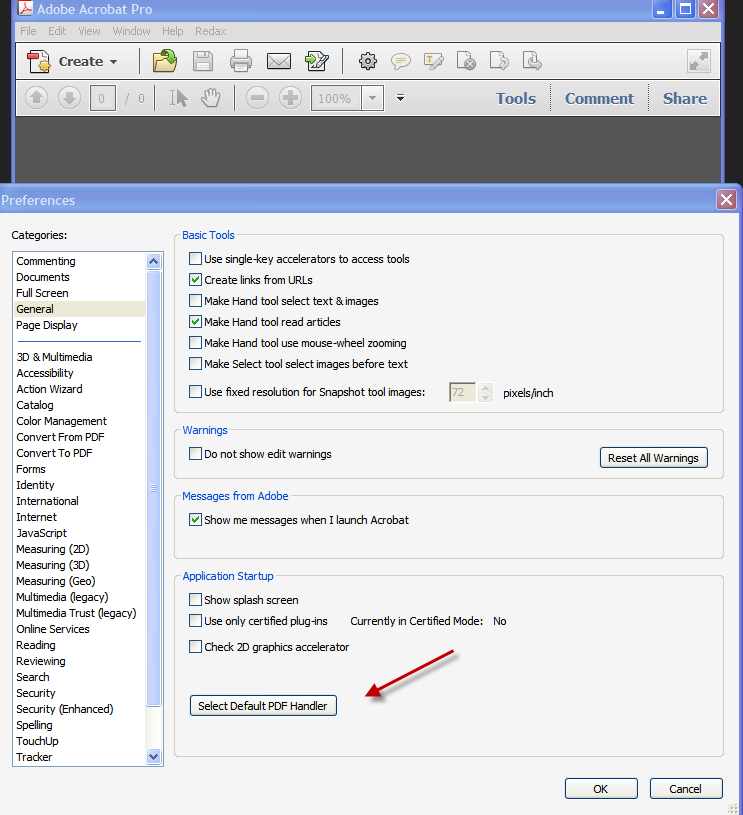
Copy link to clipboard
Copied
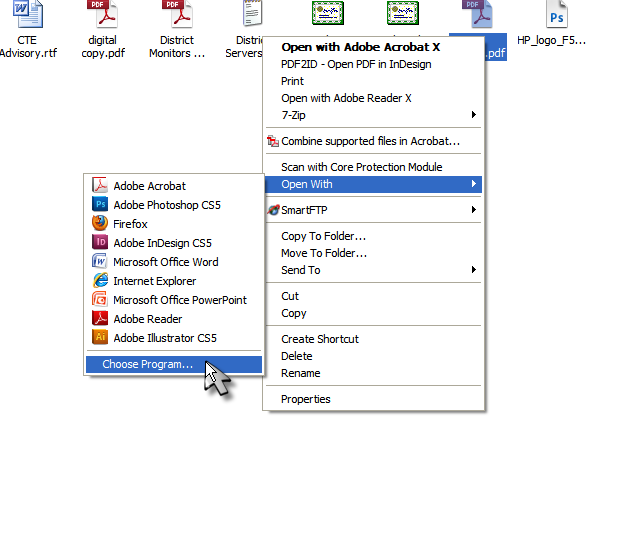
Unfortunately I don't have that option, see attached snips from windows
default open with and Acrobat's open with
Copy link to clipboard
Copied
If you are using an older version of Acrobat, try this:
Depending on what OS you're using this may change slightly;
Right click any PDF document > select 'Open with' and click 'Choose Program'
Select Acrobat from the resulting list and tick the 'Always use this program to open this file'
Click OK!
You may also want to review this post:
Copy link to clipboard
Copied
Rufus, whether I try with the Open With on an individual file or use the
OS generic default option in neither case does it allow me to set a
default. As you can see in the two snips I sent earlier, either the
option does not appear or, in the case of individual file openings, it
is grayed out and is inactive.
I really don't care whether I have reader or acrobat open a pdf file but
right now neither will open it by default and all the the file icons on
my system changed from a pdf icons to Outlook icons when this happened.
I was working on an outlook issue trying to save mail files as pdf's
when this occurred.
I do not think it is an issue with having both programs on my system at
the same time as I have had that configuration for many years with
either one or the other, Acrobat or reader, set as the default.
Thanks very much for your help.
jerry
Copy link to clipboard
Copied
I am unsure of this reference "As you can see in the two snips I sent earlier". Nothing was attached.
Unless your WIndow 7 profile is not set-up as Administrator, you should have access to this as a part of the OS.
Copy link to clipboard
Copied
Rufus, I have attached a print screen image, in the word doc, that shows
the Open With options when I right click on a pdf file. It shows three
programs, Acrobat, readerand pdf converter. If I select acrobat or the
reader the file will open in the appropriate program without a problem.
However, I can not find a way to associate pdf files with either acrobat
or reader as he default.
I have attached the word file and also two snips (PNG files) I took of
the areas in the Win 7 OS where you normally can select default options
for opening files. Neither of those locations gives me the option, as
the selection is missing in one and grayed out in the other.
That is my problem. I am running as administrator.
Copy link to clipboard
Copied
I can not see any of your screen images.
Copy link to clipboard
Copied
Hopefully this will be better
I tried creating a word file and then converting it to a pdf but got an
error that PDFMaker files were missing. It suggested running repair,
which I did but when I tried again I got the same error message. I
don't know if it has anything to do with my Open With problem, but don't
think so.
Thanks for your help.
Copy link to clipboard
Copied
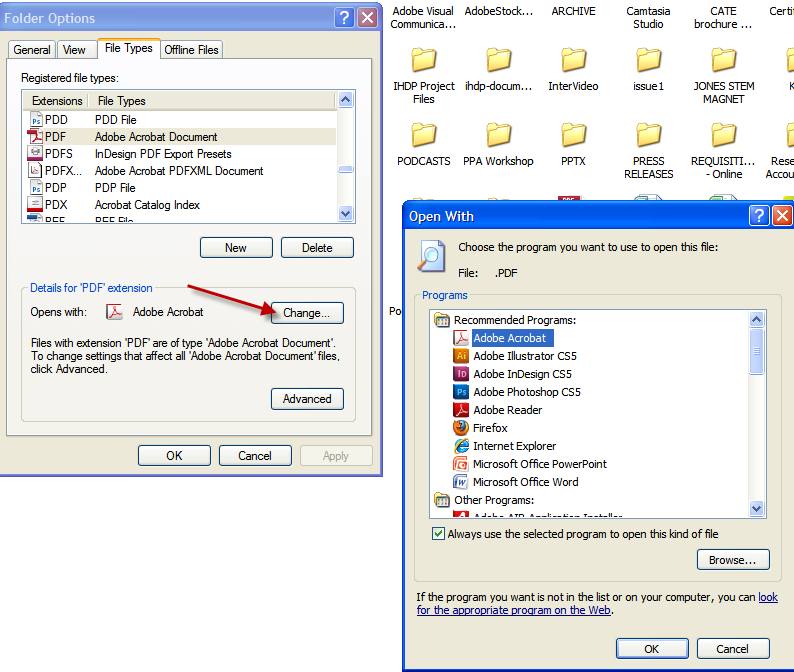
Not sure how you are attempting to attach files, but nothing is coming through. Another option that you may us is select "Folder Options", then select the "File Types" tab.
Select "PDF" from the extension list
then select "Change"
Copy link to clipboard
Copied
The last item about PDF Maker files missing is another matter altogether. You really need to indicate what version of OFFICE you are using (usually where PDF Maker is used). With AA9, you can only use PDF Maker with OFFICE 2007 or earlier. AA9 is not compatible with OFFICE 2010. So adequate information is needed to give an answer. I suspect that you may have OFFICE 2010 or are using a 64-bit version of OFFICE that is also a compatibility issue for PDF Maker unless you upgrade to AA X.
The last screen Rufus shows is not available in Win7. They moved that functionality to the Control Panel as I indicated in an earlier post. But you would in a similar manner go to the set Associations and see a long list of file types. You would select the PDF type and then edit the association. You would select Acrobat.exe and not AcroRd32.exe as your default association for PDF files. Reinstalling Reader just messes things up and should generally not even be installed when you have AA9. AA X is the first version that really has allowed both Acrobat and Reader due to some compatibility issues. Usually it is best to just stay with Acrobat and not have Reader on your system. If you do uninstall Reader, you will likely have to do a Repair to Acrobat.
Copy link to clipboard
Copied
OK, tomorrow I will uninstall reader and repair Acrobat and see what
happens. I am running Office 2007, window 7 home premium, Acrobat 9 and
currently reader 10. Everything was running fine until I believe I made
a change in outlook to save emails as a pdf file. That changed all the
icons to outlook and then I found I no longer had any options to reset
acrobat or reader to the default for PDF's
I have a meeting I need to go to tonight so I will have to pick this up
tomorrow.
Thanks very much for your and Rufus's help.
BTW, I use Thunderbird and just attach the files through their file
attach process.

Copy link to clipboard
Copied
This forum does not allow file attachments. There is an icon to insert an image into the post.

Copy link to clipboard
Copied
Thanks Daniel, I have been responding via email not at the forum, I
will use the forum directly
Copy link to clipboard
Copied
OK, I uninstalled reader 10, repaired Acrobat 9 then tried to set the defaults through an individual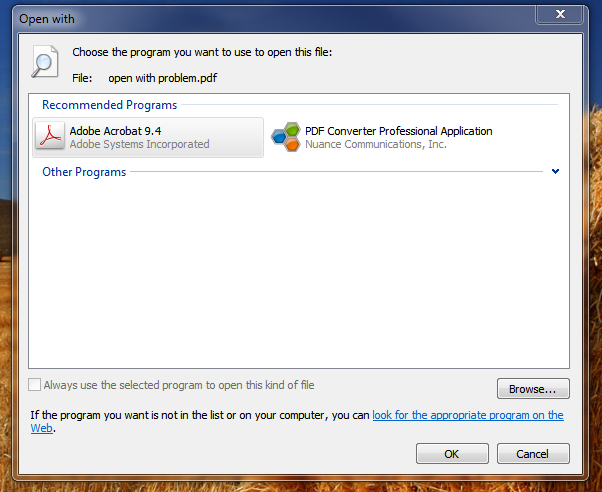
 file and using the contol panel defaults. Neither worked. I took snapshots of both screens, hope you can see them now. In both cases the option to make a program the default is grayed out and not functional.
Thanks
jerry
Copy link to clipboard
Copied
Looks like you installed another program that is taking over. I don't necessarily see it grayed out. It appears to me that Adobe Acrobat 9.4 is selected. However you also need to check to always use the program to open the PDF file or it will only do it for this round. It seems strange that Outlook is the default for the file. My screen shows the following:
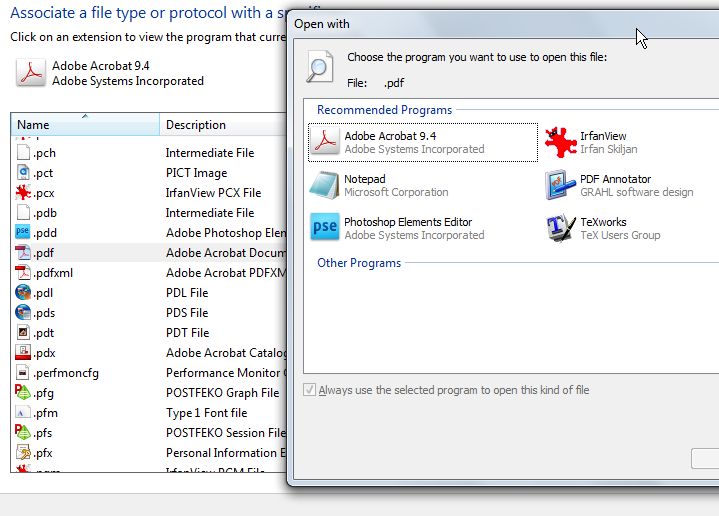
I have AA9 set by default. So have you tried to select AA9 and check the box at the bottom?
Copy link to clipboard
Copied
I think that Office 2010 come with a PDFdistiller in addition to XPS, perhaps it has been set as the default.
Copy link to clipboard
Copied
Rufus, I am running Office 2007, not 2010. The program that has grabbed the association and won't let it be changed appears to be Outlook.
Copy link to clipboard
Copied
I just took a look at Outlook again and I realized that I have PDFMaker linked into and on the Outlook toolbar could that be part of my problem?

-
- 1
- 2

Get ready! An upgraded Adobe Community experience is coming in January.
Learn more
 AdChoices