If you've used the Weblink plug-in that is found in the "Edit PDF" tool it won't work.
It seems like (just saying, it seems like ) this is a bug. When you used this weblink tool it generates simple URLs out of the text string that you input but it fails to treat this field as an annotation. That is why you can't work around it.
If it was treated as an annotation you would be able to manually edit its tag propperties and even its container attributes.
To work around this, don't use the weblink plug-in to generate URI actions. Instead, follow the recommendations I posted for another user here:
- Links work perfectly fine if you decide to use a javascript action to createlinks or to open URLS
- Links also work perfectly if you just go to EDIT -->>> PREFERENCES---->>> GENERAL --->>> check the tickbox "Create Links from URLs" and then just right-click on the document and select from the context menu "Edit Text & Images" (OR , opening the "Edit PDF Tool") ---> select "Add Text" and type in the desired URL with its opening parameters in just plain text.
- NOTE 1 : You can also use copy and paste the URL text string from a file text editor such as Notepad and paste it in the text box. (DO NOT copy from MS Word or Wordpad , they both will convert the text string to a hyperlink automatically; this is what we're trying to avoid). This method won't work when you copy a hyperlinks that are already encoded as Text/HTML and paste it in the text box in Acrobat; it will create the same issue because it trigger to use the problematic weblink creation tool in Acrobat.
- NOTE 2: When you're done adding your URLs to your document, SAVE and close it . Reopening your document in Acrobat will apply the conversion to hyperlinks automatically and most importantly, if your URI action includes a speacial character that is used as a PDF opening parameter it will open successfully in your web browser without the incorrect %23 encoding (or similar).
- NOTE 3: Using an mouse up javacsript action in a button or through the Action Wizard also works. Below is the script that will (and I quote) "Scans the specified pages looking for instances of text with an http: scheme and
converts them into links with URL actions." from page 141 of the Acrobat JavaScript Scripting Reference - Doc Methods, addWeblinks
var numWeblinks = this.addWeblinks();
console.println("There were " + numWeblinks +
" instances of text that looked like a web address,"
+" and converted as such.");
Using the method that I described in the bullets and notes above work.
You will be able to see those hyperlinks treated as annotations in Acrobat too.
NOTE: My post in the link above have many typos and errors, but you will get the point. The real issue is very technical to explain in simple words, though.

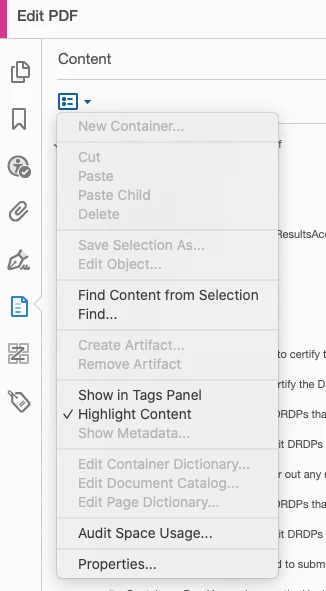
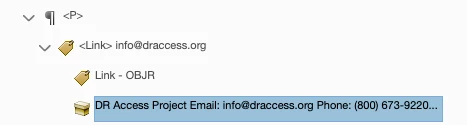
 I see the option in the Content panel menu (see attached), but it's greyed out. I've gotten a <link> tag followed by the Link - OBJR tag, but the text didn't follow inside that. So either I create a new container tag with the content, or I need to edit the Link tag to make it work correctly.
 AdChoices