Exit
  • Global community
    • Language:
      • Deutsch
      • English
      • Español
      • Français
      • Português
  • 日本語コミュニティ
  • 한국 커뮤니티
0

Incorrect Name Shown in Windows Taskbar After Save As

New Here ,
Jun 19, 2018 Jun 19, 2018

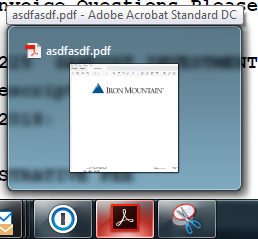
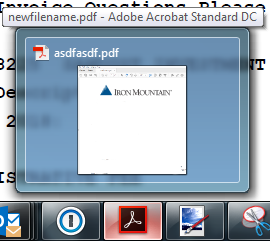
I'm using Adobe Acrobat Standard DC on Windows 7 and I'm seeing what I believe to be a bug.  If I open a .pdf and do a Save As to change the name, the name shown in the Windows taskbar when I hover over the window is not updated to the new name.  Can anyone else reproduce this behavior?  It happens whether I have .pdf documents open as tabs in the same window or as new windows.

TOPICS
General troubleshooting
1.5K
Translate
Report
Community guidelines
Be kind and respectful, give credit to the original source of content, and search for duplicates before posting. Learn more
community guidelines
Community Expert ,
Jun 20, 2018 Jun 20, 2018

Did you change also the title of the document?

Translate
Report
Community guidelines
Be kind and respectful, give credit to the original source of content, and search for duplicates before posting. Learn more
community guidelines
New Here ,
Jun 20, 2018 Jun 20, 2018

I did not change the title of the document.  All I did was a Save As.  If I then close the document and re-open it, the window name is correct in the Windows taskbar, but it shouldn't be necessary to do that.

Translate
Report
Community guidelines
Be kind and respectful, give credit to the original source of content, and search for duplicates before posting. Learn more
community guidelines
New Here ,
Jun 20, 2018 Jun 20, 2018

I've verified that it is not file or machine specific.  Different machines, different files, different windowing preferences (tabbed vs. windowed) all exhibit the same symptom.

Version: Adobe Acrobat DC (18.011.20040)

There are no updates available.

After initial open, before Save As

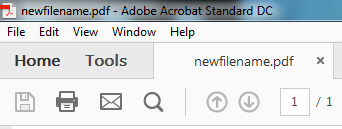
After Save As with new file name
Translate
Report
Community guidelines
Be kind and respectful, give credit to the original source of content, and search for duplicates before posting. Learn more
community guidelines
Adobe Employee ,
Dec 17, 2018 Dec 17, 2018
LATEST

With the latest release of Acrobat on 11th Dec,2018 this issue has been addressed.

If your product is not already updated, you can manually do so from within the product.  Click on the menu Help-> Check for updates.

Translate
Report
Community guidelines
Be kind and respectful, give credit to the original source of content, and search for duplicates before posting. Learn more
community guidelines
Adobe Employee ,
Jul 19, 2018 Jul 19, 2018

Hi Sawdusti,

We tried replicating the issue at our end and the issue was reproducible. We have logged the bug for the same.

Appreciate your patience while the team is working on the fix.

Thanks,

Shivam

Translate
Report
Community guidelines
Be kind and respectful, give credit to the original source of content, and search for duplicates before posting. Learn more
community guidelines