


- Home
- Acrobat
- Discussions
- Need 2 mutually exclusive checkboxes that host res...
- Need 2 mutually exclusive checkboxes that host res...
Need 2 mutually exclusive checkboxes that host respective JavaScripts

Copy link to clipboard
Copied
To begin, I'd like to make two different checkboxes mutually exclusive.
Where when Checkbox1 is selected, it shows a check in its box and only showcases Fields 1-3...when Checkbox2 is selected, it shows a check in its box and only showcases Fields 4-6 - ultimately forcing Checkbox1 and Fields 1-3 to then disappear.
Here's where I am now with the script - can anyone help me adjust the script so that it accomplishes the above.
JavaScript for Checkbox1:
var fieldHide = event.target.isBoxChecked(0)?display.visible:display.hidden;
this.getField("Field 1").display = fieldHide;
this.getField("Field 2").display = fieldHide;
this.getField("Field 3").display = fieldHide;
JavaScript for Checkbox2:
var fieldHide = event.target.isBoxChecked(0)?display.visible:display.hidden;
this.getField("Field 4").display = fieldHide;
this.getField("Field 5").display = fieldHide;
this.getField("Field 6").display = fieldHide;
Currently this script requires me to manually select and deselect Checkbox1 to showcase or remove Fields 1-3... and select and deselect Checkbox2 to showcase or remove Fields 4-6. Can any one assist in updating the script or providing set up instructions to achieve what I'd like to achieve from above?
Thanks,
Eric


 8
Replies
8
8
Replies
8




Copy link to clipboard
Copied
You want a radio checkbox  You'll find the solution here:Checkboxes and Radio Buttons
However the solution is trivial, just give both checkboxes the same name, but different export values.
But you also need to add code to each checkbox to qualify the MouseUp event so the code is only run when the button is turned on.
Like this:
if(event.target.value == "Off")
{ // hide fields for this button
}
else
{// Show fields for the button and Hide fields for the other button
}
You need to put the code for both showing and hiding in both because the user is hitting only one button. But since checkboxes can be turned off, you need to include the case where the checkbox is turned off.
Another solution is to create a document level function that sets the field visibility based on values from both checkboxes, The this function is called from the MouseUp of each button.
Use the Acrobat JavaScript Reference early and often
Copy link to clipboard
Copied
Hi Thom,
Thanks for the quick reply! I'm new to this function of Acrobat to I apologize for my elementary coding questions. Based on your code above, to achieve my goal, can you confirm if the code should look like this?
if(event.target.value == "On")
{ // Show fields for this button
this.getField("field1").display = display.visible;
this.getField("field2").display = display.visible;
this.getField("field3").display = display.visible;
}
else
{// Show fields for the button and Hide fields for the other
this.getField("field4").display = display.hidden;
this.getField("field5").display = display.hidden;
this.getField("field6").display = display.hidden;
}

Copy link to clipboard
Copied
Depends. Where did you place it? If it's a check-box field, did you change it's export value to "On"? By default it's "Yes"...
Copy link to clipboard
Copied
Yes, I've updated the export value for box 1 to be On and the export value for box 2 to be off.
Copy link to clipboard
Copied
I would use something else, as the default "off" value of a check-box is "Off", which can be confusing. Maybe call them "Yes" and "No", or "1" and "0", or something. Anyway, your code should work...
Copy link to clipboard
Copied
Eric,
You need to move the Hidden code for fields 4-6 into the first code block. Turning the check box on means not only showing the fields 1-3, but also hiding the fields 4-6. Then put code for hiding 1-3 in the "else" block, so when the check is turned off
Neither check box can have a value of "Off". Off is the default value of all checkboxes and radio buttons. It's clearly stated in the article I posted above. Each needs to have a different export value that is not "Off".
It's best to write the code using the default "Off" value because this value never changes, meaning you can make the export whatever you want and the code will always work.
Use the Acrobat JavaScript Reference early and often

Copy link to clipboard
Copied
If you want mutually exclusive checkboxes is it not radio buttons you really want?
For radio buttons I have used:
var Q = this.getField("Q"); -- (the name of radio button group)
var A = this.getField("Annan"); -- (the name of field ro be required if more fields are needed add variables B;C;D etc…)
if (Q.value === "Y") {
A.required = false;
}
if (Q.value === "N") {
A.required = false;
}
if (Q.value === "O") {
A.required = true;
}
Value is set in the radio button preferences "Radio Button Choice"
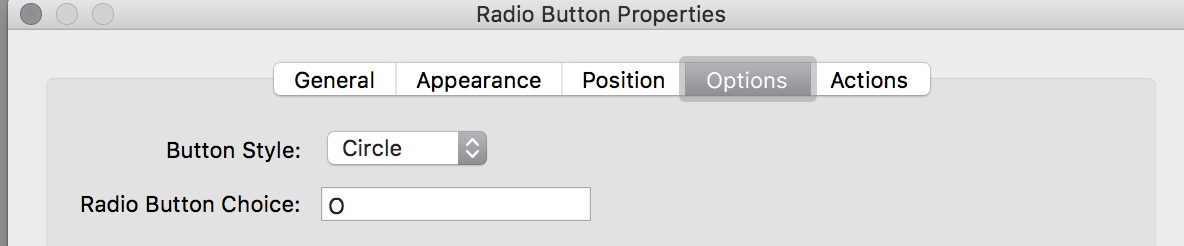
If one choice should make more required more lines can be added in each if statement.
I am sure it is possible to do this in a similar manner but with hidden instead of required.
Copy link to clipboard
Copied
Lucas, Radio button and checkboxes about almost the same thing. Read this article:Checkboxes and Radio Buttons
Use the Acrobat JavaScript Reference early and often


Get ready! An upgraded Adobe Community experience is coming in January.
Learn more
 AdChoices