Exit
  • Global community
    • Language:
      • Deutsch
      • English
      • Español
      • Français
      • Português
  • 日本語コミュニティ
  • 한국 커뮤니티
0

Radio buttons question

Community Beginner ,
Sep 22, 2017 Sep 22, 2017

Hello everyone,

I need a bit of help on this one.  I have two radio buttons that I have inserted into my form - one is print the form and the other is Submit the form.  Both have javascript and they work - BUT i want the name of the buttons to show up all the time not just when you hover over them.  Does anyone know how i can accomplish this?

Thanks so much!!!!

TOPICS
PDF forms
2.2K
Translate
Report
Community guidelines
Be kind and respectful, give credit to the original source of content, and search for duplicates before posting. Learn more
community guidelines
1 ACCEPTED SOLUTION
Community Expert ,
Sep 22, 2017 Sep 22, 2017
LATEST

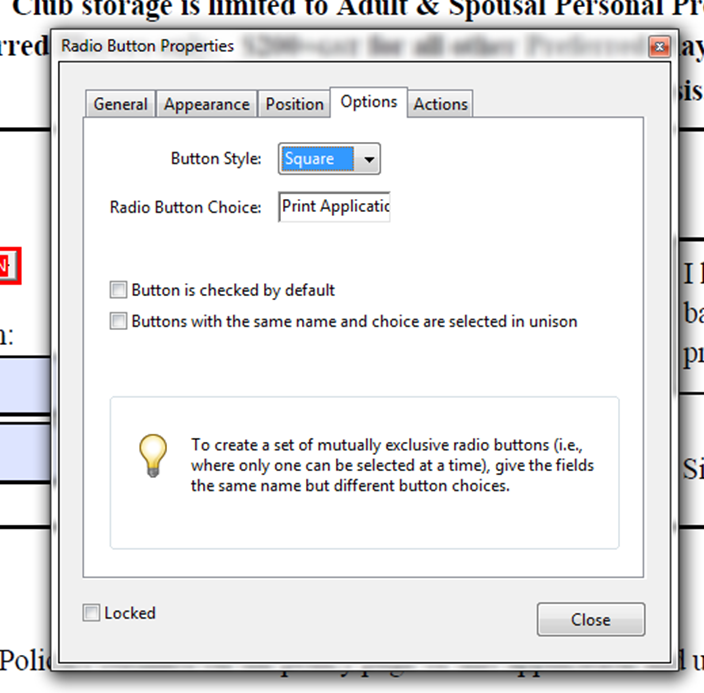
That's because it's not a button, it a radio-button, and radio-buttons don't have a visible text component (a "label"). You'll need to add one separately next to it.

View solution in original post

Translate
Report
Community guidelines
Be kind and respectful, give credit to the original source of content, and search for duplicates before posting. Learn more
community guidelines
Community Expert ,
Sep 22, 2017 Sep 22, 2017

You need to set the Label property, under the buttons' Properties, Options tab.

PS. What you're seeing when you hover over the field is not the field's name, but its tooltip value. That can be set under Properties - General.

Translate
Report
Community guidelines
Be kind and respectful, give credit to the original source of content, and search for duplicates before posting. Learn more
community guidelines
Community Beginner ,
Sep 22, 2017 Sep 22, 2017

I don't have that option:

Translate
Report
Community guidelines
Be kind and respectful, give credit to the original source of content, and search for duplicates before posting. Learn more
community guidelines
Community Expert ,
Sep 22, 2017 Sep 22, 2017
LATEST

That's because it's not a button, it a radio-button, and radio-buttons don't have a visible text component (a "label"). You'll need to add one separately next to it.

Translate
Report
Community guidelines
Be kind and respectful, give credit to the original source of content, and search for duplicates before posting. Learn more
community guidelines