Exit
  • Global community
    • Language:
      • Deutsch
      • English
      • Español
      • Français
      • Português
  • 日本語コミュニティ
  • 한국 커뮤니티
0

Remove pdf file which already encrypted

New Here ,
Apr 02, 2018 Apr 02, 2018

Hi all,

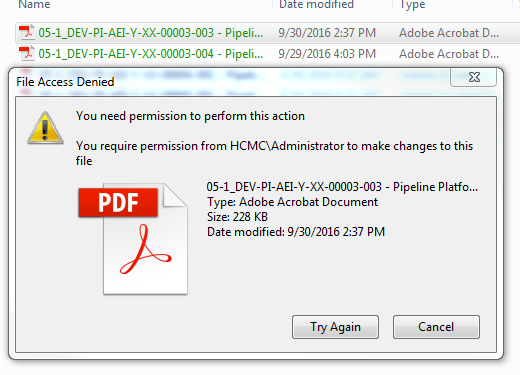
I have some pdf files have been encrypted by certificate, it show on the window explorer as green colour. But it make my backup job failure cause backup progress can not backup these encrypted files, now I want to delete/remove these file to complete my backup job. but I can not, it prompt out I need permission to delete, copy event open. some one have this issue ? and could you please show me how to do ? thank you so much .

pdf 2.PNG

TOPICS
General troubleshooting
1.2K
Translate
Report
Community guidelines
Be kind and respectful, give credit to the original source of content, and search for duplicates before posting. Learn more
community guidelines
1 ACCEPTED SOLUTION
Adobe Employee ,
Apr 03, 2018 Apr 03, 2018

Hello Mrm,

As per the description above, you are not able to delete/remove the PDF files which are encrypted with certificates, Is that correct?

If you are the owner of the PDF file and have the certificate key, you can open it and can remove the security from Help>Properties after you open the PDF, and click the Security tab in the Properties dialog box to change the security settings.

Unfortunately, if you don't have the certificate keys, you won't be able to make any changes in the PDF document, or cannot delete them.

For more detailed information, you may refer to Securing PDFs with certificates, Adobe Acrobat

Feel free to update this discussion for any further assistance.

Regards,

Anand Sri.

View solution in original post

Translate
Report
Community guidelines
Be kind and respectful, give credit to the original source of content, and search for duplicates before posting. Learn more
community guidelines
Adobe Employee ,
Apr 03, 2018 Apr 03, 2018

Hello Mrm,

As per the description above, you are not able to delete/remove the PDF files which are encrypted with certificates, Is that correct?

If you are the owner of the PDF file and have the certificate key, you can open it and can remove the security from Help>Properties after you open the PDF, and click the Security tab in the Properties dialog box to change the security settings.

Unfortunately, if you don't have the certificate keys, you won't be able to make any changes in the PDF document, or cannot delete them.

For more detailed information, you may refer to Securing PDFs with certificates, Adobe Acrobat

Feel free to update this discussion for any further assistance.

Regards,

Anand Sri.

Translate
Report
Community guidelines
Be kind and respectful, give credit to the original source of content, and search for duplicates before posting. Learn more
community guidelines
New Here ,
Apr 04, 2018 Apr 04, 2018
LATEST

hello Anand Sri.

thank you . I got it.

Regards,

Tien Dat

Translate
Report
Community guidelines
Be kind and respectful, give credit to the original source of content, and search for duplicates before posting. Learn more
community guidelines