


- Home
- Acrobat SDK
- Discussions
- show and hide fields based on a date range
- show and hide fields based on a date range

Copy link to clipboard
Copied
Hello, I have been struggling with this for a while and can't find my exact situation out there.
How can I hide 2 text fields and 2 checkbox fields based on a particular date range?
I have a form that includes a date field, after a certain date I don't want the fields to be available so I would like to hide those fields.
I tried the following, but I don't think I have the date syntax right. What am I doing wrong?
if(this.getField("Date").value >= "9/21/17"){
this.getField("Text3").display = display.hidden;
}
else{
this.getField("Text3").display = display.visible;
}
Thank you so much in advance!


 1 Correct answer
Ok, so I replaced the field name with a number value in the script and it all works great. THANK YOU!!!
Now the last part needed for this form is to incorporate 2 late fees on the last section - if after 9/21/2017 the late fee is 25% and if after 10/21/2017 the late fee is 50%. I am not sure how to add the second late fee to the script you gave me.
This is my attempt, it's working but not calculating the 1.5 correctly, it's multiplying 1.5 by the result of the first late fee (125) resulting in a t
...
 27
Replies
27
27
Replies
27



Copy link to clipboard
Copied
Working with Date objects in Acrobat is a bit tricky... Here are some good tutorials about it:
https://acrobatusers.com/tutorials/working-with-date-and-time-in-acrobat-javascript
https://acrobatusers.com/tutorials/working-with-date-and-time-in-acrobat-javascript-part-2
https://acrobatusers.com/tutorials/working-with-date-and-time-in-acrobat-javascript-part-3
As for your request, try this code (make sure you fill in the blank value on line #2, depending on what you want to happen when the date field is empty):
var s = event.value;
if (s=="") this.getField("Text3").display = display.???; // what should happen if the field is empty?
else {
var d = util.scand("mm/dd/yy", s); // I'm assuming this is the date format of your field... If not, adjust this line
var cutOffDate = util.scand("mm/dd/yyyy", "9/21/2017"); // It's never a good idea to use only two digits for the year...
if (d.getTime()>=cutOffDate.getTime()){
this.getField("Text3").display = display.hidden;
} else {
this.getField("Text3").display = display.visible;
}
}
Place this code as the custom Validation script of the Date field, by the way.
Copy link to clipboard
Copied
Thank you so much, that worked perfectly!! I have been struggling with this for a while, and I appreciate the tutorials as well.
I figured out how to add the additional fields, however 2 of the fields are checkboxes and I get an error on those fields. Do I need to do something different than I have below?
var s = event.value;
if (s=="") {
this.getField("Text3").display = display.visible; // what should happen if the field is empty?
this.getField("Text6").display = display.visible;
this.getField("chkBx1").display = display.visible;
this.getField("chkBx2").display = display.visible;
}
else {
var d = util.scand("mm/dd/yyyy", s); // I'm assuming this is the date format of your field... If not, adjust this line
var cutOffDate = util.scand("mm/dd/yyyy", "9/21/2017"); // It's never a good idea to use only two digits for the year...
if (d.getTime()>=cutOffDate.getTime()){
this.getField("Text3").display = display.hidden;
this.getField("Text6").display = display.hidden;
this.getField("chkBx1").display = display.hidden;
this.getField("chkBx2").display = display.hidden;
} else {
this.getField("Text3").display = display.visible;
this.getField("Text6").display = display.visible;
this.getField("chkBx1").display = display.visible;
this.getField("chkBx2").display = display.visible;
}
}
Thank you again! Have a great evening!!
Copy link to clipboard
Copied
Should work just fine with any kind of field... What error message are you getting, exactly?
Copy link to clipboard
Copied
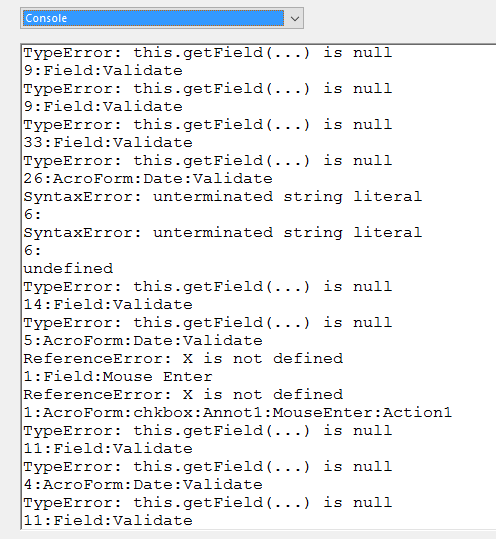
This is the error I get in the Javascript console and it isn't hiding the checkbox fields.
Copy link to clipboard
Copied
All of the "this.getField(...) is null" errors mean that you used an incorrect field name.
Go back to your code and double-check that you typed the right names, including spaces and upper/lower-case letters.
Copy link to clipboard
Copied
The field names are correct... are checkboxes treated any differently?
Another question...
How can I use the same date parameters in the above to calculate a late fee if past the specified date? I have been trying to use what you gave me above, but I can't figure it out.
I have a Subtotal field that is currently set to calculate Field1 * Field2 using the simple calculations field.
Now I need Subtotal to add 25% to the subtotal if past a certain date like above.
This is what I tried...
var sub = ("Subtotal").value;
var s = event.value;
if (s=="") {
this.getField("Subtotal").value;
}
else {
var d = util.scand("mm/dd/yyyy", s); // I'm assuming this is the date format of your field... If not, adjust this line
var cutOffDate = util.scand("mm/dd/yyyy", "9/21/2017"); // It's never a good idea to use only two digits for the year...
if (d.getTime()>=cutOffDate.getTime()){
this.getField("Subtotal" * .25);
} else {
this.getField("Subtotal").value;
}
}
Copy link to clipboard
Copied
Let's focus on the first issue: Can you share the file (via Dropbox, Google Drive, Adobe Cloud, etc.)?
Copy link to clipboard
Copied
I can share the document via Dropbox, Dropbox - 2017AFM_Internet_Form_Test_Hidden_Fields.pdf
The strange thing is when I was testing the original code you gave me I was using a dummy document with only a few fields on it and it worked. But when I tried doing the same thing to my actual working document the fields are no longer hiding. I don't receive any error messages, but it's not working like it did in my test document.
The link above is my actual working document that I need to hide the "LAN Connection" section at the top and also incorporate the late fee script on each of the other total fields. I understand that I would need to convert the flat text to locked text fields, but I thought I would wait until it was working to do that.
Thank you again for all your help, I truly appreciate it!!!
Copy link to clipboard
Copied
When I change the value in any field I get multiple error messages in the JS Console, all saying:
TypeError: f is null
This means you still have references to non-existing field names. It's most likely not in a custom code, but in the more simple ways of setting up a calculation (the first two options in the Calculate tab). Unfortunately, those errors are quite difficult to track down.
You need to think whether you changed the name of a field that's involved in a calculation at some point, or removed it, and then locate the field that might be referencing it and fix the problem there.
Copy link to clipboard
Copied
Okay, the only error I noticed was the date format in the field settings was set to mm/dd/yy instead of mm/dd/yyyy, so once I fixed that everything works perfectly, thank you so much!!!
Now if we can address my second issue with trying to add the late fee function I will be eternally grateful lol?
Copy link to clipboard
Copied
It's actually better to do that from the calculation script of the SubTotal field itself. Use something like this:
var sub = Number(this.getField("Field1").value) * Number(this.getField("Field2").value); // Replace with actual field names
var s = this.getField("Date").valueAsString; // Replace with actual field name
if (s!="") {
var d = util.scand("mm/dd/yyyy", s);
var cutOffDate = util.scand("mm/dd/yyyy", "9/21/2017");
if (d.getTime()>=cutOffDate.getTime()){
sub *= 1.25;
}
}
event.value = sub;
Copy link to clipboard
Copied
I'm not getting any errors, but it's not calculating the LAN7 * Quantity7 fields, the subtotal field remains empty.
Copy link to clipboard
Copied
Can you share the file?
Copy link to clipboard
Copied
It's the same document as before, but this one includes the hidden fields script in the Date field and my attempt to add the new script you provided for the late fee calculation in the Subtotal field.
Dropbox - 2017AFM_Internet_Form_Test_Hidden_Fields_and_Late_Fee.pdf
Thank you so much for your help!
Copy link to clipboard
Copied
There are still errors in your code. Change the value of any field and then check the JS-Console.
I recommend you enable the option to show the console on warnings and errors, under Edit - Preferences - JavaScript.
Copy link to clipboard
Copied
Forgive my inexperience, but I don't understand what the errors in the console mean or how to fix them. Can you give me a little more info to get me started?
Copy link to clipboard
Copied
The error I'm seeing is:
TypeError: this.getField("Date") is null
2:Field:Calculate
This means you're referring to a field name that doesn't exist. There's no
field in your file called "Date".
On Fri, Aug 18, 2017 at 11:29 PM, Darlhouse11 <forums_noreply@adobe.com>
Copy link to clipboard
Copied
I thought I figured it out...
When I added the Date field I used the built in Date field from the toolbar and it gave it a name of Date_af_date. I changed the name in the General tab of the field's properties, but it wasn't changing the name of the field in the sidebar area where it lists all of the form fields used in your document. I didn't realize those can be modified independently from the properties tab so once I changed it on the sidebar to match my properties general tab it seems to be working.
Now I get this error when I clear my form...

I gave the Subtotal field the Number format, is that not correct?
Copy link to clipboard
Copied
When LAN7 is not ticked its value is "Off", which is not a number. So you need to add an if-condition that checks if that's the case, and if so does not continue with the calculation.
Copy link to clipboard
Copied
I gave LAN7 a default value of 760 to perform the calculation of LAN7 * Quantity7 = Subtotal field. Doesn't that give it a numerical value? Should I replace LAN7 with the actual number 760? Would that help and still keep the script accurate?
Also, When I change the format of Subtotal field to None, I receive NaN in the field before entering any values, but once i enter something it disappears.
Copy link to clipboard
Copied
That's the value when it's ticked. When it's not ticked the value is Off, resulting in NaN (Not a Number).
The solution is either to use some other kind of field, or to adjust the code, as I've described above.
Copy link to clipboard
Copied
Ok, so I replaced the field name with a number value in the script and it all works great. THANK YOU!!!
Now the last part needed for this form is to incorporate 2 late fees on the last section - if after 9/21/2017 the late fee is 25% and if after 10/21/2017 the late fee is 50%. I am not sure how to add the second late fee to the script you gave me.
This is my attempt, it's working but not calculating the 1.5 correctly, it's multiplying 1.5 by the result of the first late fee (125) resulting in a total of 187.50 and it should be 150...how can I fix this?
var sub = 100 * Number(this.getField("numEthernet").value); // Replace with actual field names
var s = this.getField("Date").valueAsString; // Replace with actual field name
var t = this.getField("Date").valueAsString;
if (s!="") {
var d = util.scand("mm/dd/yyyy", s);
var cutOffDate = util.scand("mm/dd/yyyy", "9/21/2017");
if (d.getTime()>=cutOffDate.getTime())
sub *= 1.25;
}
if (t!="") {
var d = util.scand("mm/dd/yyyy", t);
var cutOffDate1 = util.scand("mm/dd/yyyy", "10/21/2017");
if (d.getTime()>=cutOffDate1.getTime()){
sub *= 1.5;
}
}
event.value = sub;
I tried again and figured it out, this is what I used and it works great!
var sub = 100 * Number(this.getField("numEthernet").value); // Replace with actual field names
var sub1 = 100 * Number(this.getField("numEthernet").value);
var s = this.getField("Date").valueAsString; // Replace with actual field name
var t = this.getField("Date").valueAsString;
if (s!="") {
var d = util.scand("mm/dd/yyyy", s);
var cutOffDate = util.scand("mm/dd/yyyy", "9/21/2017");
if (d.getTime()>=cutOffDate.getTime())
sub *= 1.25;
}
if (t!="") {
var d = util.scand("mm/dd/yyyy", t);
var cutOffDate1 = util.scand("mm/dd/yyyy", "10/21/2017");
if (d.getTime()>=cutOffDate1.getTime()){
sub1 *= 1.5;
}
}
event.value = sub1;
THANK YOU SO MUCH FOR ALL YOUR HELP AND QUICK REPLIES!!!!!
Copy link to clipboard
Copied
There's no need to declare two variables... Just use the same one, twice:
var sub = 100 * Number(this.getField("numEthernet").value); // Replace with actual field names
var s = this.getField("Date").valueAsString; // Replace with actual field name
if (s!="") {
var d = util.scand("mm/dd/yyyy", s);
var cutOffDate = util.scand("mm/dd/yyyy", "9/21/2017");
var cutOffDate1 = util.scand("mm/dd/yyyy", "10/21/2017");
if (d.getTime()>=cutOffDate1.getTime()) {
sub *= 1.5;
} else if (d.getTime()>=cutOffDate.getTime()) {
sub *= 1.25;
}
}
event.value = sub;
Copy link to clipboard
Copied
Ahh I see, I was trying it with the same one and I could't get it to work, but I think it's because I wasn't writing the "else if" I was using another "if else".
Could you please explain the (s!="") reference? I understand everything else in the script now, but I don't understand what the "" represents.

-
- 1
- 2
Get ready! An upgraded Adobe Community experience is coming in January.
Learn more
 AdChoices