Copy link to clipboard
Copied
Hi Team,
We are adding sticky notes in the PDF with formatting (italic and bold) using the MAC OS. After saving the PDF, when we open the same file in windows PC, the formatting are lost. But this file formatting are fine with MAC OS.
Note: We are using the "Adobe Acrobat Reader DC 2018.011.20035" in PC and MAC.
Is there any compatibility issue between MAC and PC version?
Please advice, how to avoid this error.
Thanks,
Thenmozhiarasan
Copy link to clipboard
Copied
Hello ThenmozhiarasanKiruba,
As per the description above, the formatting in sticky notes are lost when you open the PDF file in Windows, Is that correct?
There is no such compatibility issue between Mac and Windows version, as I tested on both the platforms Windows 10 and Mac OS and formatting remains same in Sticky notes on both the platforms.
Please check for any pending updates on Windows machine from help>check for updates, reboot the machine after the installation of updates.
Try resetting the Acrobat preferences once, to reset preference, refer to How to reset Acrobat Preference settings to default.
Have you checked with any other PDF file? Is this issue specific to one PDF?
Let us know how it goes and share your findings.
Regards,
Anand Sri.

Copy link to clipboard
Copied
Hi Anand,
Thanks for your quick response.
We came to know there is no problem between MAC and PC compatibility.
While inserting the text from word with thinspace, the formatting are getting lost. The problem is in PC version only.
For your better understanding below is a step by step screen shot.
Step1:
The text in word document with thinspace.

Step 2:
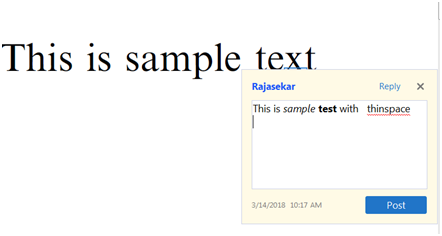
I copied the text from word and paste into the sticky notes in Adobe DC.

Step3:
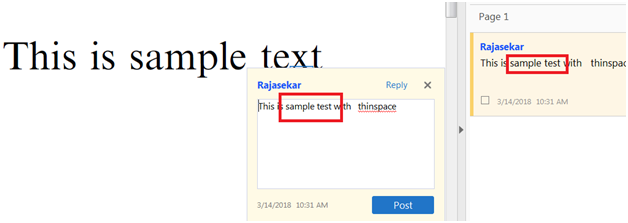
After posting the text in sticky notes, the italic and bold (formatting) are lost (see below).

Please advice, how to avoid this?
Thanks,
Thenmozhiarasan
Copy link to clipboard
Copied
Hello Thenmozhiarasan,
Sorry for the delayed response and inconvenience caused. Is it specific to one PDF file or with all the PDF files? Is it possible to share a sample PDF file with us so that we can try it at our end?
I tried reproducing the issue at my end, but this issue is not reproducible.
To share the file, please use Adobe Send feature, upload the file, share the link to files via private message only, How Do I Send Private Message
Please share the following details as well:
Install the latest update of Acrobat from DC Release Notes — Release Notes for Acrobat DC Products
and see if this brings any difference.
Let us know how it goes.
Regards,
Anand Sri.
Get ready! An upgraded Adobe Community experience is coming in January.
Learn more