


Adobe Send FAQ


Copy link to clipboard
Copied
If your question isn't listed here, please post your question in the Adobe Send forum and we'll answer it as soon as we can.
What kind of files can I send?
What sources can I send files from? Do they have to be stored on my desktop?
Can I send files from my mobile device?
Do I have to share with someone specific, or can I share with many people at once?
Can I use my own logo/branding with Adobe Send?
How can people access the files I send them?
Where do I see all the files I've sent?
What kinds of information does Adobe Send track?
Can I check on who's viewed the file?
Does Adobe Send work with Microsoft Outlook?
What's Adobe Send?
Adobe Send is a new service that makes it easy to send and track large files online as part of an improved, integrated set of Adobe document services. You can send files you have stored on Acrobat.com or upload files from your desktop. Sending a file is just like sending an email (read: no training necessary!), and you’re notified as soon as someone views or downloads the file you sent. To subscribe to the service, click here.
How do I access Adobe Send?
You can sign into Adobe Send with your favorite web browser at https://cloud.acrobat.com/send, where you’ll also find a few other services to help you with your document-related work tasks. Since Adobe Send is an online service, there is no software to download or install. If you have the latest version of Adobe Reader installed, you can also send documents directly from there by opening your Tools pane and expanding "Send Files". Just make sure you're signed in to Adobe Reader with the Adobe ID you used to subscribe to Adobe Send.
What kind of files can I send?
Many kinds of files! You can send people big PDF files, PowerPoint files, Word documents or Excel spreadsheets. You can share files you created with your Creative Cloud applications and ZIP files. You can even share audio and video files. There are a few kinds of files that we do not allow to be shared with Adobe Send. These excluded filetypes include:
- Font formats (such as TTF, DFONT, OTF)
- Archive formats (TGZ, RAR 7Z, SIT, JAR, WAR, CAB)
- System files and executable formats (EXE, DLL, JS, VB, BAT, CMD, COM, CPL, SH, CSH, TCSH, KSH, BASH, ZSH, INF, HTA, HLP, INS, ISP, VB, JSE, LNK, MS, PIF, SCR, SHS, WS)
- Web files (CHM, CRT)
- Database files (MDB)
- Raster image files (PCD, SCT)
What sources can I send files from? Do they have to be stored on my desktop?
Adobe Send lets you send files that you’ve got stored on your computer or files that you’ve already uploaded to your Acrobat.com cloud storage. That gives you the flexibility of always having access to your important documents, whether you want to share them or simply access them from wherever you are. For more information about storing documents with Acrobat.com, click here.
Can I send files from my mobile device?
Why, yes you can! Adobe Send works within the Acrobat.com world of services, so whenever you sign into your account from a mobile browser, you’ll see Send as one of your options. (Please note: The mobile experience is optimized for tablets, so if you’re sending from your phone, please be aware that the whole page may not fit on your screen.)
Do I have to share with someone specific, or can I share with many people at once?
You have two options when it comes to sharing files:
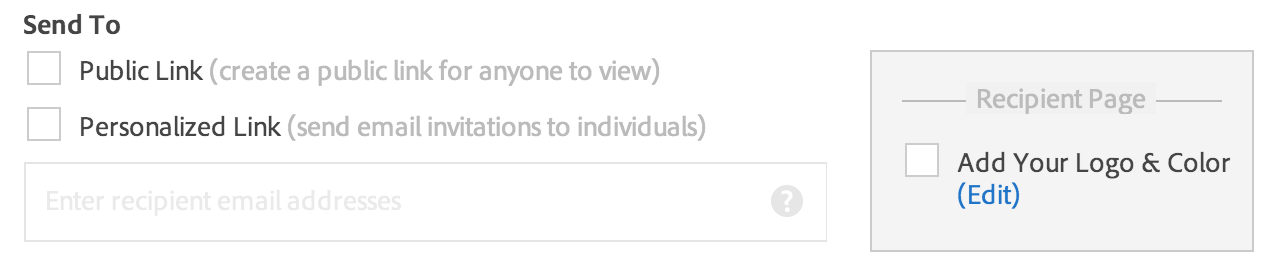
- You can send an email to a specific person or several people, which will give them access to that file.
- You can share a “Public Link” which you can publish at will (you can also just email that public link to a few people, if that’s what you prefer). Please note that a public link will not provide personalized tracking or viewing information.
Can I use my own logo/branding with Adobe Send?
We're glad you asked: Yes, you can. When you're signed into Adobe Send from a browser, you can upload a logo and choose a custom color for all outgoing communications from your Adobe Send account. Just check the box marked "Add Your Logo & Color".
How can people access the files I send them?
When you send someone a file, they’ll receive an email notification that the file is available for them. When they click the link in the email, they’ll be taken to a page where they can preview that file (in most cases*) and download it. They should be able to go through this process from a computer, a tablet, or a smartphone.
* Previewing works for certain file types, like PDF, graphics, and Microsoft Office files, but not others, like video files or ZIP files.
Where do I see all the files I've sent?
When you’re logged into your account, you have two ways to find the files you’ve sent.
- In the Send tab, click the link that says “View all sent files”.
- In the Files tab, find the shortcut in the left-hand pane that says “Sent Files”.
You can then click on a transaction for more information and all that file’s tracking data.
What kinds of information does Adobe Send track?
Adobe Send will show you a few different kinds of information about a sent file:
- When the file was sent
- Whom it was sent to (or if you shared a public link instead of sending to individuals)
- How frequently a file sent via a personalized link has been previewed by each recipient
- When it was previewed by each recipient
Can I check on who's viewed the file?
When you send a personalized link to specific individuals, Adobe Send will track when those individuals preview or download the file. If you share a public link, however, Adobe Send will not keep track of who previews or downloads the file.
Does Adobe Send work with Microsoft Outlook?
Yes! You can download an Outlook plugin to easily send large files through your email client (without actually emailing an attachment, of course). If you've been using the SendNow plugin for Outlook, you can expect similar functionality and behavior. The Adobe Send plugin works with Office 2010 and 2013, and is available as either 32-bit or 64-bit. Learn more and download the plugin here.


 8
Replies
8
8
Replies
8


Copy link to clipboard
Copied
Too many negatives with the new system:
1. Way too many restrictions on the type of files to be sent. Why? No one else does that. There were no such restrictions with SendNow.
2. It doesn't say anywhere what the biggest file size is. Why is that a secret?
3. Seems to be much slower than SendNow. I haven't done any scientific measurements, just a gut feel of watching the file upload, and upload, and upload
4. No way to insert my logo, like I was able to do with SendNow
5. How long are the downlink valid for? There doesn't seem to be a way to control that like there was with SendNow.
Update: Just tried to upload a 750MB file. After about 1/2 hour of uploading progress, a window popped up that said: "Error sending message, please try again"
Not a good change Adobe. I'm very disappointed with the new service, and will be looking again for alternatives. Perhaps Google Drive? Drop Box? Yousendit? There are alternatives!
Thanks
Pierre Chiha

Copy link to clipboard
Copied
I totally agree with all that pchiha2 commented on above.
Please advise when will the features we subscribed to with SendNow will be on Send - seems like the features that made us choose SendNow is no longer with Send. Bring them back.
I too get the "Error sending message, please try again." What is the size limit of Adobe Send - SendNow is 2 GB. I cannot find anything on this site to state what the limit is.

Copy link to clipboard
Copied
I tend to love most Adobe products and I actively get others to use Adobe products. However, this product is not worth the headache—do you want us to use it or not? There are no legitimate reasons for Adobe to have so many restrictions on this type of product, especially when none of your competitors has them. The logo feature was the main reason I chose Adobe SendNow over the others. Although I was never happy with not being able to send files larger than 2 GB when competitors allow up to 20 GB. Because of all of this, I’m forced to pay and use another service to get my work done today.
I don’t understand the logic in NOT observing what your competitors are providing and noticing which features the end-users like the most. After evaluating that information, create a service that incorporates and improves on all of those features while including new original Adobe features. By now, Adobe should have a service that can easily be a product leader in this category. It seem whomever is in charge of this product/service is putting no sincere effort into creating a product leader. This product has gone from being an average product with a couple of “cool” features, to the worst product in its category.
I really hope someone at Adobe pays attention to these comments and upgrade Adobe Send to a real product leader.
Thanks
Cedric Beasley

Copy link to clipboard
Copied
Cedric Beasley: I'm a student using Adobe Creative Cloud and needed to get a project to an instructor that was a mere 1.5 gb video file (.mov format). The "Cloud" in cc does not accept over 1gb...I had been counting on Adobe's cloud and was surprised when I learned it was not possible there. I ended up mailing him a flashdrive after trying Dropbox (same outcome), and some others. I was surprised to see you sending files up to 2 GB!! And are seeking to send larger files! Can you tell me please, am I understanding this correctly. Was "SendNow" (which I just found...but also can't find allowable file sizes listed anywhere) the program you were using for 2 GB files? And if you don't mind my asking, who are you using (paid or not) for files up to 20GB?
I just can't seem to find a program that allows me to send video files over about 350 MB. Not near to 1GB and certainly not over.
Thanks!
Copy link to clipboard
Copied
Hi, I am using Google Drive now, if you have a Gmail address, you will get Google Drive for free and it allows sending up to 10 GB at a time. Depending on your internet connections speeds, it could take awhile to upload files of that size, however, it's easy for the receiver to download them. Just go to Google Drive and setup an account if you don't already have one. If you already have Gmail, just compose a new email and attach a file larger then 20 Mb and it will automatically send you to Google Drive.
SendNow has so many restrictions at this point that it's not worth dealing with anymore. ...and I used to love it.
Thanks
Copy link to clipboard
Copied
Thanks Cedric! I forgot about Google Drive! I'm trying it now. Wish me luck.
Yes, I fully understand why Adobe's Send/SendNow is frustrating. As is their "Cloud" in Creative Cloud
Again, thanks for the tip.
Athena

Copy link to clipboard
Copied
With the paid service - How does this compare to Hightail or WeTransfer or even Google Drive? How many people can you send to at one time? Do we set the expiration time or does the software? How long can something stay on your servers (if I have a file I continually want people to be able to download)? And what's up with next to no documentation saying what will actually be available in the new Send service?

Copy link to clipboard
Copied
I am only trying to send a book to myself shouldn't be this hard even for someone with limited knowledge of the computer! thanks


Get ready! An upgraded Adobe Community experience is coming in January.
Learn more
 AdChoices