
Participant
October 18, 2017
Answered

Send multiple documents in library template, but keep docs seperate

  • October 18, 2017
  • 1 reply
  • 1499 views

Hello. I want to send multiple documents using a library template at one time to a signer, but I want these documents to stay separate and not get merged together once signed. The reason being is once these documents are signed I need to send them to different people. Can this be done?
This topic has been closed for replies.
Correct answer ScottCarter

Greetings!

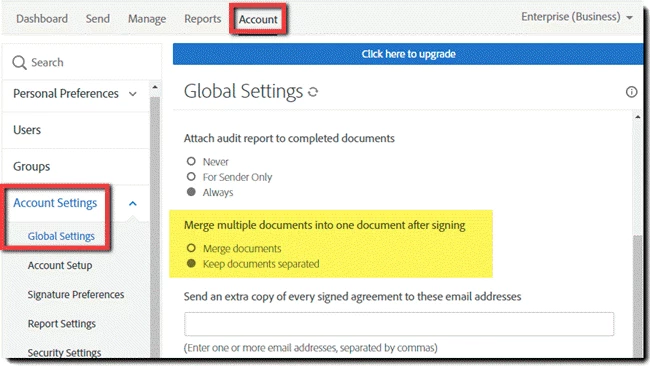
For Business and Enterprise levels of service, there is an option that the account admin can configure to separate the documents on the Signed and Filed email.

The transaction in Adobe Sign will always be one contiguous document, as the audit trail refers to the whole transaction, and that must be all pages of the document in one object.

However, for the purpose of distributing copies to your internal departments, separating the discrete files on the Signed and Filed email should do the trick.

1 reply

ScottCarterCommunity ManagerCorrect answer
Community Manager
October 23, 2017

Greetings!

For Business and Enterprise levels of service, there is an option that the account admin can configure to separate the documents on the Signed and Filed email.

The transaction in Adobe Sign will always be one contiguous document, as the audit trail refers to the whole transaction, and that must be all pages of the document in one object.

However, for the purpose of distributing copies to your internal departments, separating the discrete files on the Signed and Filed email should do the trick.

Participant
January 14, 2021

Hi. I did this in my account (my company is on Enterprise) and tested it out. The documents did not remain sperated after singing. They came back as one document. Any advise? 

Participating Frequently
June 6, 2023

Same problem here.