
Participant
January 8, 2024
Answered

File Version history Adobe Express

  • January 8, 2024
  • 3 replies
  • 6170 views

I deleted several clips out a video project to download one segment of it with the intent to CMD+Z back to the original state after the download was complete. Then the browser crashed, and now Adobe Express only has the one clip in my project – I can't undo back to the full video.


Does Adobe Express have version history saved anywhere, or is the work lost thanks to my quick and lazy workflow?


Thanks!
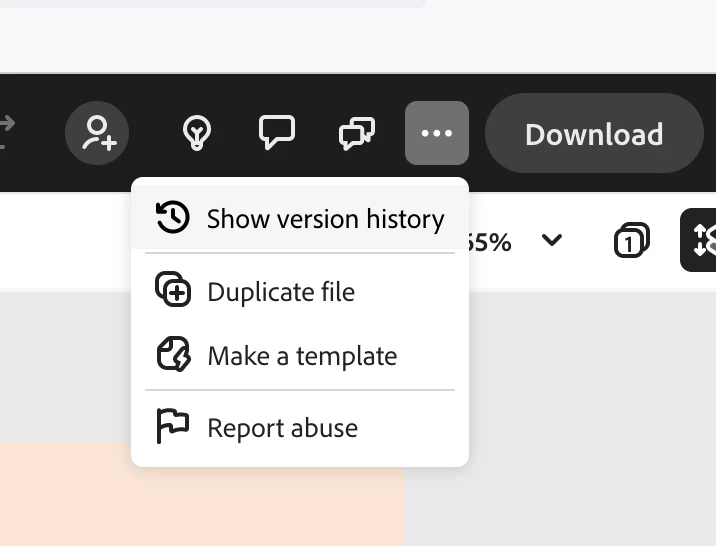
Correct answer Abhi.G @ ADBE

Yep, it does (... menu in the header bar to the left of Download)


3 replies

Participant
August 22, 2024

So theres no way of actually reverting the current file back to a previous version? Creating a duplicate doesn't copy over all the comments. So you now have a new file with the version you actually want, but no comments. 

Known Participant
September 24, 2024

is there anyway of reverting to a previous version of a webpage in Express? @Abhi.G @ ADBE 

it relates to this bug: https://community.adobe.com/t5/adobe-express-bugs/overwrite-webpage-with-different-webpage/idi-p/14877467


Abhi.G @ ADBECorrect answer
Adobe Employee
January 8, 2024

Yep, it does (... menu in the header bar to the left of Download)


Participant
September 13, 2024

these dots are nonexistent

Participant
September 20, 2024

@Joe26605525d73u Version history has moved under the File menu now


I can see that version history has moved under the file menu, but when i try to create a copy of the older version of file, it keeps giving me the below message. Do we know if the version history function is working?


Participant
January 8, 2024

Found the version history and restored the project. If anyone else needs to know:


In the black bar across the top: click the elipses (...) and then select Version Histoy. Select the Version to restore, then Adobe Express will make a copy of it for you.

Participant
February 2, 2024

Can you tell me where this is? "Across the top" of what? I desperately need this fix and I can't find anything anywhere that has what I'm seeing in your screen shot.