Participant
August 27, 2017
Question

Motion Tile not working

  • August 27, 2017
  • 3 replies
  • 7863 views

Hi,

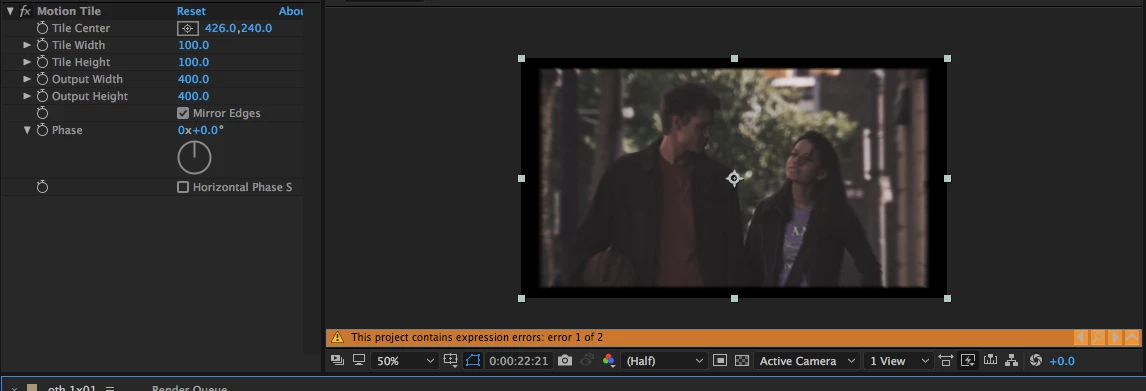
So on my video I have applied motion tile but it's not working. I don't understand why because on everything else it's working.

This topic has been closed for replies.

3 replies

Kevin-Monahan
Community Manager
Community Manager
September 12, 2017

Hi elisabonsignour,

Sorry for this issue. Did you ever find a solution? Please let us know if you have or if you still need help.

Thanks,

Kevin

Kevin Monahan - Sr. Community and Engagement Strategist – Adobe Pro Video and Audio
angie_taylor
Legend
August 27, 2017

From your screenshot it looks like you have two expression errors. Perhaps these are contributing to your issues? To find out where your errors are, select the layers in your comp and hit the E key twice in quick succession. This will expose the expressions. Send us  a screenshot of these so we can see what those errors are.

Thanks,

Angie Taylor

Community Expert
August 27, 2017

Without seeing the modified properties of the layers that are giving you problems and the composition settings it's hard to know what is going on. Select the Composition in the Project Panel so we can see the project settings in the displayed info or if you have questions about the footage select the footage in the Project panel so we can see the properties. Then select the layers you are having problems with in the timeline and press the U key twice to reveal all modified properties, make sure that the switches and modes columns are visible in the timeline (middle icon at the bottom right of the timeline), then PrintScreen and paste or Shift+Ctrl/Cmnd +3 on a Mac and drag from the desktop to the forum.

Motion tile works on layer size. If the layer is a text layer or a shape layer you have to pre-compose before you apply motion tile. If the layer has opacity around the edges then motion tile will respect the alpha channel and leave holes. Motion tile will not work on an adjustment layer. For example:

Shows you everything required to figure out why the gradient applied to the solid does not tile and explains the spaces between the tiles.

Simply changing the rendering order of the effects solves the production problem.

Mylenium
Legend
August 27, 2017

We can't realyl know. Sorry, but you've made even your screenshot useless by cropping it and on top of it have not provided any otehr useful info like version of AE, system info and so on. And not to put too fine a point to it - this expression error mus come from somewhere, too. You simply have to be much more specific and provide better info.

Mylenium

Participant
August 28, 2017

Ok here is the image