Exit
  • Global community
    • Language:
      • Deutsch
      • English
      • Español
      • Français
      • Português
  • 日本語コミュニティ
  • 한국 커뮤니티
0

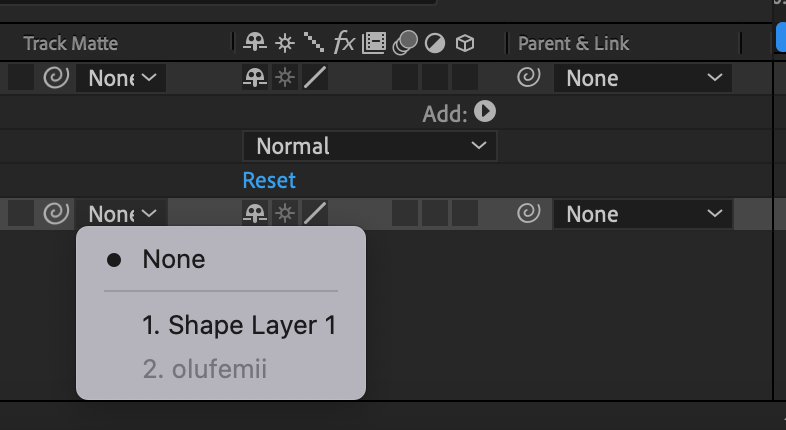
Track Matte options unavailable

Community Beginner ,
Nov 02, 2022 Nov 02, 2022

Hello! I'm trying to learn After Effects and I need to select the "Alpha Matte" option that SHOULD be under "Track Matte." It is not. Does anyone know what's going on or how to fix it? All I see when I open the drop down under Track Matte are the layers I have within the composition. Please help!

Screen Shot 2022-11-02 at 6.26.49 PM.png

TOPICS
How to
242
Translate
Report
Community guidelines
Be kind and respectful, give credit to the original source of content, and search for duplicates before posting. Learn more
community guidelines
Community Expert ,
Nov 02, 2022 Nov 02, 2022
LATEST

The Track Matte feature has been greatly improved in the latest release. The layer can be anywhere in the timeline and can be used as the matte for multiple layers. Make sure you have both the Modes and Switches columns visible by selecting the first two icons in the bottom left corner of the Timeline panel, then experiment with the new UI. To learn more about the changes type Track Matte in the Search Help field in the top right corner of After Effects. 


There are also several threads on this forum on the subject.

Translate
Report
Community guidelines
Be kind and respectful, give credit to the original source of content, and search for duplicates before posting. Learn more
community guidelines