
Participant
March 6, 2018
Answered

Track Matte Transition with colored text

  • March 6, 2018
  • 2 replies
  • 916 views

Hey Everyone-

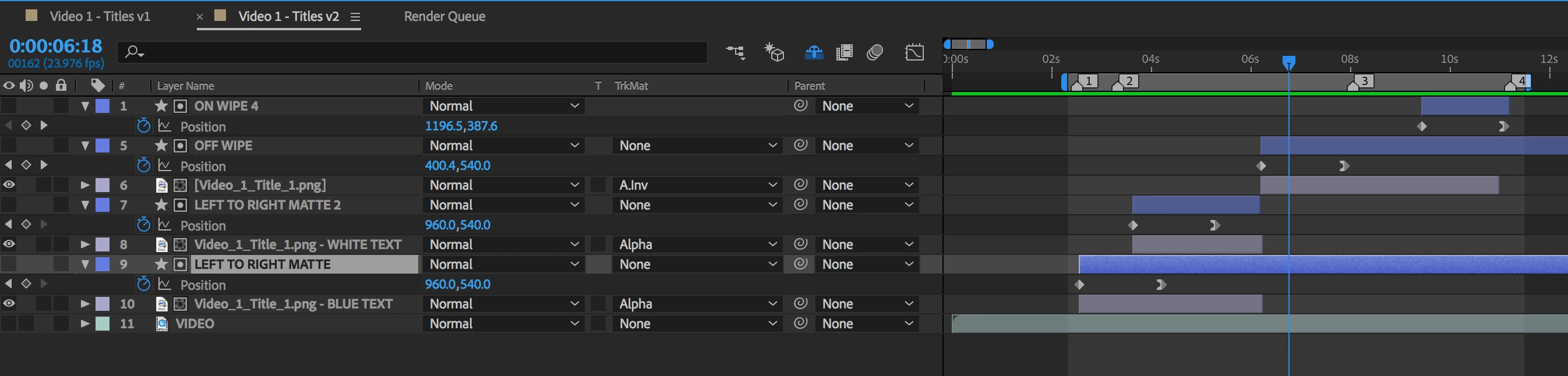
I am doing a text animation that I believe needs track mattes to work properly but I'm not getting the desired effect. Here's what the animation is supposed to do:

1. Fade on left to right in blue with a diagonal feathered edge

2. As the Fade on is 60% complete, the transition should repeat changing the text to white. So it should sweep white through it, which resolves in the text being onscreen in white. The text is supposed to have a 90% opacity.

3. Then to Fade off, the the text should disappear from left to right with a diagonal feathered edge

The issue I'm having is that I can see a bit of the blue layer underneath with the way I've done it. The white also changes opacity at a point when I have the first white layer off to have the transition to remove the text come in. I've also tried CC Light Sweep and that makes the text too bold. Attached are screenshots. Can anyone let me know a better workflow? Thanks so much!
This topic has been closed for replies.
Correct answer Dave_LaRonde

Cool I updated that. It doesn't solve the transparency issue. Should I have the track matte fade out on the blue layer as it's sweeping across so when the white layer resolves, the blue is completely gone?


If the problem is the 90% opacity, eliminate it!  Get it working the way you want at 100% opacity, then precompose & reduce the precomp's opacity to 90%.  Now, THAT will work!

2 replies

Rameez_Khan
Legend
May 11, 2018

Hi dang34488211,

Did you try what Dave suggested in the last post?

Let us know.

Rameez

Dave_LaRonde
Inspiring
March 6, 2018

Reduce the amount of feathering on the track matte(s) a bit -- probably won't need much.

Participant
March 6, 2018

I'm actually not using feathering, I have a gaussian blur on the matte. I think the problem has to do with the opacity of the white text layer showing the blue layer below. I could prep the files differently in photoshop if that would help?

Dave_LaRonde
Dave_LaRondeCorrect answer
Inspiring
March 6, 2018

Cool I updated that. It doesn't solve the transparency issue. Should I have the track matte fade out on the blue layer as it's sweeping across so when the white layer resolves, the blue is completely gone?


If the problem is the 90% opacity, eliminate it!  Get it working the way you want at 100% opacity, then precompose & reduce the precomp's opacity to 90%.  Now, THAT will work!