


Exit
  • Global community
    • Language:
      • Deutsch
      • English
      • Español
      • Français
      • Português
  • 日本語コミュニティ
  • 한국 커뮤니티
2

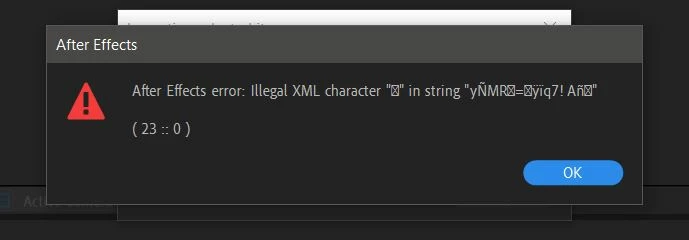
Illegal XML character error ( 23 :: 0 )

Community Beginner ,
Mar 01, 2019 Mar 01, 2019

Im getting error when import another AE project, Im currently using wondows 10 with AE version 16.0.1 (Build 48)

Anyone having same problem and found a solution?

Thanks.

Here is the screenshoot.
Capture.JPG

Im using joystick n slider 1.7.1, Move anchor point 3.1 and Animation composer plugin.

11.5K
Translate
Report
Community guidelines
Be kind and respectful, give credit to the original source of content, and search for duplicates before posting. Learn more
community guidelines

correct answers 1 Correct answer

Participant , Apr 04, 2019 Apr 04, 2019

hi,

Not sure if you figured this out but I found a work around as I was getting the same issue when trying to import a vector based animation using AE 15.1.2 on Windows 7. 

In my case I'd kept pressing "okay" on the warning until the project I was importing appeared in my AE project.  Everything appeared to be there but just not visible so I dropped a 'fill' onto one object and everything else suddenly appeared.

It wasn't the most over complicated scene so maybe you might be sitting there for hou

...
Translate
Community Expert ,
Mar 01, 2019 Mar 01, 2019

Are you able to open that project on its own?
Have you tried importing it into a new/blank project?

Translate
Report
Community guidelines
Be kind and respectful, give credit to the original source of content, and search for duplicates before posting. Learn more
community guidelines
Community Beginner ,
Mar 01, 2019 Mar 01, 2019

Yes im able to open the project, but i cant import it into new project.

I have tried to convert them and import to previous AE (version 14 and 15) but still get the error.

I think joystick n slider might be the cause. When i open the converted project in older AE, composition with joystick not showing in preview.

Right now im waiting for a reply from aescripts, hopefully they have a solution.

Translate
Report
Community guidelines
Be kind and respectful, give credit to the original source of content, and search for duplicates before posting. Learn more
community guidelines
Mar 08, 2019 Mar 08, 2019

Hi mochr,

Keep us posted about your progress.

Thanks,

Rameez

Translate
Report
Community guidelines
Be kind and respectful, give credit to the original source of content, and search for duplicates before posting. Learn more
community guidelines
Participant ,
Apr 04, 2019 Apr 04, 2019

hi,

Not sure if you figured this out but I found a work around as I was getting the same issue when trying to import a vector based animation using AE 15.1.2 on Windows 7. 

In my case I'd kept pressing "okay" on the warning until the project I was importing appeared in my AE project.  Everything appeared to be there but just not visible so I dropped a 'fill' onto one object and everything else suddenly appeared.

It wasn't the most over complicated scene so maybe you might be sitting there for hours clicking okay but figured I'd let you know.

Translate
Report
Community guidelines
Be kind and respectful, give credit to the original source of content, and search for duplicates before posting. Learn more
community guidelines
Community Beginner ,
May 09, 2019 May 09, 2019

YES!! It work! Thanks alot darkcurv​ you save my day.

I hit enter repeatedly until the warning is closed . evreything is fine just some script error from animation composser, but it can be fix easly..

Translate
Report
Community guidelines
Be kind and respectful, give credit to the original source of content, and search for duplicates before posting. Learn more
community guidelines
New Here ,
Mar 25, 2020 Mar 25, 2020

Worked for me too! Big thanks!

Translate
Report
Community guidelines
Be kind and respectful, give credit to the original source of content, and search for duplicates before posting. Learn more
community guidelines
New Here ,
Jul 09, 2020 Jul 09, 2020

The only way is - hit ENTER continuously until it gets merged. 

I had a 1 MB file, so I had to hit ENTER about 20 times.

Translate
Report
Community guidelines
Be kind and respectful, give credit to the original source of content, and search for duplicates before posting. Learn more
community guidelines
New Here ,
Sep 01, 2020 Sep 01, 2020

keep ok ok . after many ok it will open surely . it happens to me many times .

Translate
Report
Community guidelines
Be kind and respectful, give credit to the original source of content, and search for duplicates before posting. Learn more
community guidelines
New Here ,
Jan 28, 2021 Jan 28, 2021

For me this is aways the solution 😄
I had project where I had to spam enter for more than 30 sec constantly and in the end the projects get merged!

Translate
Report
Community guidelines
Be kind and respectful, give credit to the original source of content, and search for duplicates before posting. Learn more
community guidelines
Participant ,
Dec 16, 2020 Dec 16, 2020

I tried to import an layers AI into AE and having this problem. After this I tried to export the file into Jpeg, still having same problem. I just found out this problem is causing by the FILE NAME.
Just change your file name into an short and simple name will solve the problem.

So weird....

Translate
Report
Community guidelines
Be kind and respectful, give credit to the original source of content, and search for duplicates before posting. Learn more
community guidelines
New Here ,
Apr 01, 2021 Apr 01, 2021
LATEST

I have this same issue. It's definitely something to do with Animation Composer. I was hoping that when they moved to their new update it would sove the issue, but it doesn't.  I spent 2 hours importing a project yesterday and when it does import (after getting through the delayed "OKs") I get the blank/black screen. The fill effect tip did not work. It took saving, then quiting then reopening and going through it again to finally start to work after a few minutes.

This is very frustrating and I've had to start moving away from using any animation composer stuff simply because trying to reuse any project files in a new project is a time sink I can't afford. 

Translate
Report
Community guidelines
Be kind and respectful, give credit to the original source of content, and search for duplicates before posting. Learn more
community guidelines