


- Home
- Animate
- Discussions
- Re: Need help on a (simple) sound/video problem (A...
- Re: Need help on a (simple) sound/video problem (A...
Need help on a (simple) sound/video problem (As3)

Copy link to clipboard
Copied
Hi People, after being away from Flash for 10yr. i tried making a simple music thingie but ran into a problem:
so i basically structured it brutally old school with time/frame animation and embedded media.
so: i have 3 frames (with buttons jumping to the sprcific frames)
each frame has embedded Video or Audio (playting on "event x1"
so what i thought i could do was having the button go to frame 17 and play sound
then add a "SoundMixer.stopAll();" at frame 32 to stop the "old" sound from playing
when the next button is called to go to frame 33 and play a new sound.
stupid simple and seemed as the "easiest" (for a newbee) way to do it without
getting into too much actualy code.
Problem remaining: after the SoundMixer.stopAll();
nothing will play (no sound)
so i need to find a way to allow sound to play again, like:
SoundMixer.ok to play whatever sound again(); 
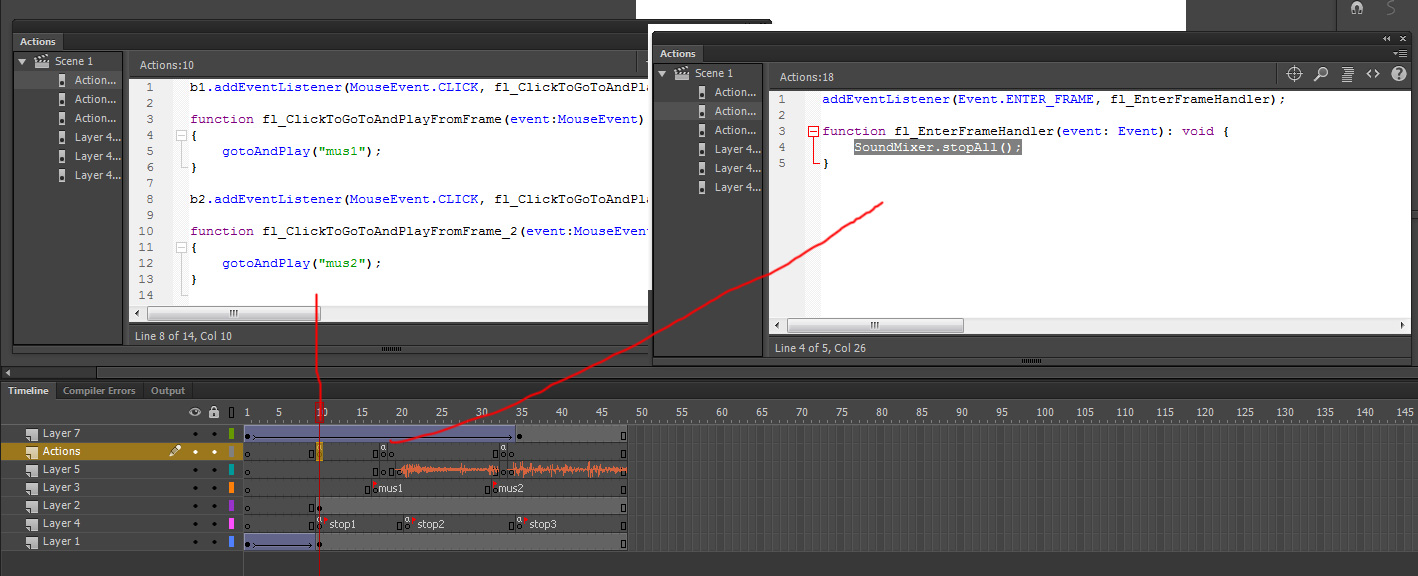
and yes i know this is a stupid as it gets, no clever and there are 1000 better wats to do it
but i am afraid it is over my head 
Ideas?


 8
Replies
8
8
Replies
8


Copy link to clipboard
Copied
can i do something like:
SoundMixer.stop("sound1.mp3")
SoundMixer.stop("sound2.mp3")
SoundMixer.stop("sound2.mp3")
instead of the: SoundMixer.stopAll();
?
or something like: (frameaction)
remove.("sound1.mp3")
...this is driving me crazy, everything in this move works fine except for this last sound thing 


Copy link to clipboard
Copied
no.
SoundMixer.stopAll()
should stop all currently playing sounds but stops no sound subsequently started.
Copy link to clipboard
Copied
Holy mother of funk!
i removed the eventlistener and 3 lines of code (see the image) that should enable the frame action, and ONLY put the:
SoundMixer.stopAll(); as a frame action before every new sound/video, and it works, for the video too...
a w e s o m e and thanks for leading me on to a simple solution that works... 🙂
Copy link to clipboard
Copied
you're welcome.

Copy link to clipboard
Copied
could you paste here a print of the action script with SoundMixer.stopAll() ?
paste with the timeline frames too..
i need this a lot
regards
Copy link to clipboard
Copied
copy and paste it.
Copy link to clipboard
Copied
paste where ?
give me an example please
Copy link to clipboard
Copied
paste on frame 5 of main timeline if that's where/when you want your sound to stop


Find more inspiration, events, and resources on the new Adobe Community
Explore Now
 AdChoices