


- Home
- Audition
- Discussions
- Re: Spectral View 'circle' cursor - why won't it s...
- Re: Spectral View 'circle' cursor - why won't it s...
Spectral View 'circle' cursor - why won't it show?

Copy link to clipboard
Copied
I have been using the spectral view to great advantage lately....erasing out clicks in the middle of words, etc. Usually, when you move your cursor to the spectral view area, it turns into the circle that is your 'eraser'. Suddenly, this afternoon - it no longer appears when my cursor is in that area.... Anyone have an ideas of what changed or how I can get it back?
Much appreciated!!


 2
Replies
2
2
Replies
2


Copy link to clipboard
Copied
It's in the toolbar at the top of the screen:
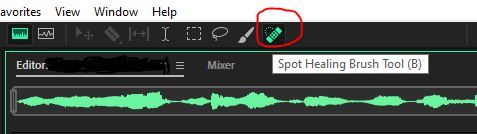
If you change tools for any reason (even if you didn't intend to), you'll have to reselect it.
Copy link to clipboard
Copied
Thank you, Thank you!! I KNEW it had to be Easy! ; ))))
SO Appreciate your feedback!

Find more inspiration, events, and resources on the new Adobe Community
Explore Now
 AdChoices