Exit
  • Global community
    • Language:
      • Deutsch
      • English
      • Español
      • Français
      • Português
  • 日本語コミュニティ
  • 한국 커뮤니티
1

An error has occurred during the delete operation Adobe Bridge macOS Catalina V 10.15.2

Community Beginner ,
Dec 12, 2019 Dec 12, 2019

When I try to delete photos, I get this window.   They do disappear out of Adobe Bridge but show as 0 bytes in the trash can.  I didn't see this happening until the latest Photoshop update.
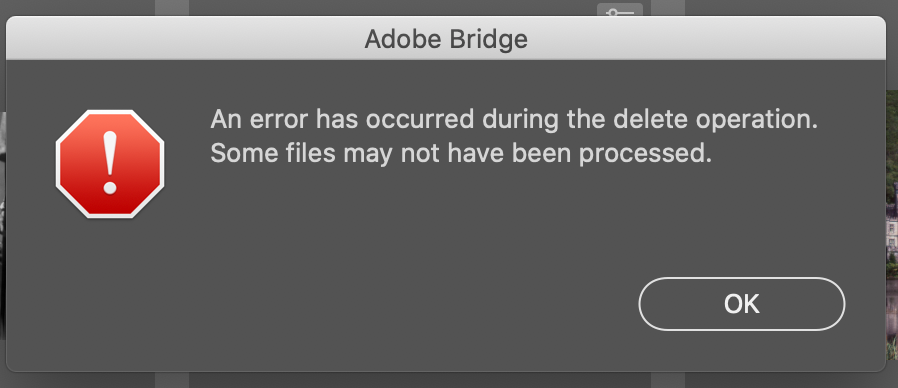
 

Screen Shot 2019-12-12 at 2.56.51 PM.png


{Thread renamed by moderator}

TOPICS
Performance , Problem or error
2.5K
Translate
Report
Community guidelines
Be kind and respectful, give credit to the original source of content, and search for duplicates before posting. Learn more
community guidelines
Adobe Employee ,
Dec 12, 2019 Dec 12, 2019

Hi there,


That does not sound good, have you updated Bridge to version 10.0.1 via the Creative Cloud Desktop app and see if it helps?

MacOS Catalina has introuced a lot of permissions and it is likely that the cause of this error is incorrect permissions.


Regards,
Sahil

Translate
Report
Community guidelines
Be kind and respectful, give credit to the original source of content, and search for duplicates before posting. Learn more
community guidelines
Community Beginner ,
Dec 12, 2019 Dec 12, 2019

Thanks for the reply.  I have always had the latest revisions of all Adobe software and imacOS on my system did before I noticed this annoying issue.  It's either Catalina or Adobe.  Only Adobe knows and so far, they aren't talking.


Translate
Report
Community guidelines
Be kind and respectful, give credit to the original source of content, and search for duplicates before posting. Learn more
community guidelines
New Here ,
Dec 12, 2019 Dec 12, 2019

Exactly the same issue here, and all Adobe software is up to date.

Deleting prefs doesn't fix the issue - and so a finder delete inside the folder is the only work around.


Regards

Mark

Translate
Report
Community guidelines
Be kind and respectful, give credit to the original source of content, and search for duplicates before posting. Learn more
community guidelines
Community Expert ,
Dec 13, 2019 Dec 13, 2019

Its a bug.

and don't install the 10.0.1 update if you are using Catalina

It crashes every 2 minutes.

 

Translate
Report
Community guidelines
Be kind and respectful, give credit to the original source of content, and search for duplicates before posting. Learn more
community guidelines
New Here ,
Dec 31, 2019 Dec 31, 2019

FIX - System Preferences > Security & Privacy > Full Disk Access > Unlock > Add Adobe Bride > Boom

Translate
Report
Community guidelines
Be kind and respectful, give credit to the original source of content, and search for duplicates before posting. Learn more
community guidelines
New Here ,
Jan 17, 2020 Jan 17, 2020

That worked! Thank you.

Translate
Report
Community guidelines
Be kind and respectful, give credit to the original source of content, and search for duplicates before posting. Learn more
community guidelines
LEGEND ,
Jan 17, 2020 Jan 17, 2020

This is a fix but a dangerous one- if there were any security problems with Adobe products, you've given them a lot more access than needed.

Translate
Report
Community guidelines
Be kind and respectful, give credit to the original source of content, and search for duplicates before posting. Learn more
community guidelines
Explorer ,
Jan 30, 2020 Jan 30, 2020

Bridge 10.0.2.131 Catalina 10.15.1

I tried the solution above, but it didn't work. When I try to remove a photo, I get this message and the photo disappears from Bridge, but is still in the finder. Shows as 0 bytes in the trash can.

Along with frequent crashes, this is just one of many problems I'm experiencing in Bridge 10.0.2.131.

Very frustrating as I use Bridge a great deal in my photograph image organization.

Translate
Report
Community guidelines
Be kind and respectful, give credit to the original source of content, and search for duplicates before posting. Learn more
community guidelines
LEGEND ,
Jan 30, 2020 Jan 30, 2020

Bridge is broken on Catalina. Best bet is stay on Mojave.

Translate
Report
Community guidelines
Be kind and respectful, give credit to the original source of content, and search for duplicates before posting. Learn more
community guidelines
Community Beginner ,
Feb 25, 2020 Feb 25, 2020

Great!!! It worked!!

Translate
Report
Community guidelines
Be kind and respectful, give credit to the original source of content, and search for duplicates before posting. Learn more
community guidelines
New Here ,
Apr 20, 2020 Apr 20, 2020
LATEST

Excellent - worked - thank you!


Translate
Report
Community guidelines
Be kind and respectful, give credit to the original source of content, and search for duplicates before posting. Learn more
community guidelines
Adobe Employee ,
Jan 30, 2020 Jan 30, 2020

Hi all,


Yesterday, Apple released Catalina 10.15.3 which should help with resolving this behavior in Bridge. 

Let us know if the 10.15.3 update works for you!


Regards,

Pete

Translate
Report
Community guidelines
Be kind and respectful, give credit to the original source of content, and search for duplicates before posting. Learn more
community guidelines
New Here ,
Feb 10, 2020 Feb 10, 2020

Hi Pete, I'm on 10.15.3 and still get the error message


Mike

Translate
Report
Community guidelines
Be kind and respectful, give credit to the original source of content, and search for duplicates before posting. Learn more
community guidelines
Community Beginner ,
Feb 12, 2020 Feb 12, 2020

Hi Pete, also here no change after Catalina 10.15.3 update and Bridge 10.0.3.138 update. Getting same error.

Translate
Report
Community guidelines
Be kind and respectful, give credit to the original source of content, and search for duplicates before posting. Learn more
community guidelines
Community Beginner ,
Mar 09, 2020 Mar 09, 2020

Just started recieving this error after updating to Catalina 10.15.3. I'm also on the 10.15.3 Bridge update.


So frustrating trying to organize files!

Translate
Report
Community guidelines
Be kind and respectful, give credit to the original source of content, and search for duplicates before posting. Learn more
community guidelines