Exit
  • Global community
    • Language:
      • Deutsch
      • English
      • Español
      • Français
      • Português
  • 日本語コミュニティ
  • 한국 커뮤니티
0

[Font Panel] Why are fonts on top of each other?

New Here ,
Dec 17, 2018 Dec 17, 2018

After installing Bridge 2019, the fonts in the font panel are displayed on top of each other.

I had hoped that with the first round of updates, it would have been discovered and patched.

However, after the recent update the problem still persists. I can no longer read which fonts are in a document because it is now unreadable.
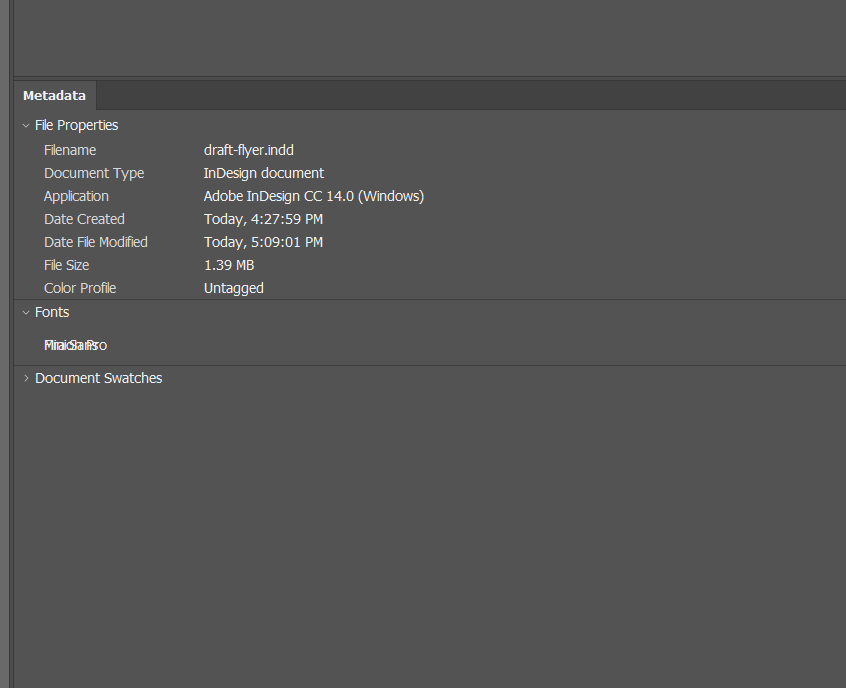
Capture.PNG

Please explain how to correct.

Thank You.

464
Translate
Report
Community guidelines
Be kind and respectful, give credit to the original source of content, and search for duplicates before posting. Learn more
community guidelines

correct answers 1 Correct answer

LEGEND , Dec 18, 2018 Dec 18, 2018

Just verified this with both InDesign and Illustrator files. It appears to be a bug.

Translate
LEGEND ,
Dec 18, 2018 Dec 18, 2018

Just verified this with both InDesign and Illustrator files. It appears to be a bug.

Translate
Report
Community guidelines
Be kind and respectful, give credit to the original source of content, and search for duplicates before posting. Learn more
community guidelines
New Here ,
Dec 18, 2018 Dec 18, 2018

Lumigraphics,

Thanks for replying.  Glad to know it's not a problem with my system or setup.

Do you know whether there a fix planned for the near future?

Thank You.

Translate
Report
Community guidelines
Be kind and respectful, give credit to the original source of content, and search for duplicates before posting. Learn more
community guidelines
LEGEND ,
Dec 19, 2018 Dec 19, 2018
LATEST

Unfortunately, I have no way to know.

Font data is embedded in the XMP metadata which means it would be accessible to a custom script. I don't have a sample but you may be able to look around and find one online.

Translate
Report
Community guidelines
Be kind and respectful, give credit to the original source of content, and search for duplicates before posting. Learn more
community guidelines

