


- Home
- Business Catalyst (read-only)
- Discussions
- Web App Search Modifications
- Web App Search Modifications
Web App Search Modifications

Copy link to clipboard
Copied
Has anyone found a way to create a web app search tool that will search multiple databases?


 4
Replies
4
4
Replies
4




Copy link to clipboard
Copied
Hi,
To my knowledge this is not yet possible as the web app search will only search within it's web app items.
Kind regards,
-Sidney

Copy link to clipboard
Copied
Hi Basilone,
I am currently developing this site (http://www.helpineeda.com/home) and I have twicked the main search form to search 2 web apps-
but you can add as many web apps as you like simply by creating a new <option> and adding the form action to it.
Here is the html and javascript I am using:
<form name="catcustomcontentform84870" method="post" onsubmit="return checkWholeForm84870(this)" action="" data-ajax="false">
<select class="home-select" id="selectNeed" data-role="none">
<option class="home-select-option" value="/Default.aspx?CCID=15996&FID=95571&ExcludeBoolFalse=True&ID=/helpers-search">Helpers</option>
<option class="home-select-option" value="/Default.aspx?CCID=15953&FID=95386&ExcludeBoolFalse=True&ID=/job-search">Jobs</option>
</select>
<input type="text" name="CAT_txtKeywords" id="CAT_txtKeywords" class="home-keywords" placeholder="Enter keywords..." data-role="none" x-webkit-speech>
<input class="cat_button home-btn" type="submit" value="Search" data-role="none" >
</form>
<script type="text/javascript">
function checkWholeForm84870(theForm){
var why = "";
if (why != ""){
alert(why);
return false;
}
{
var sel = document.getElementById("selectNeed");
theForm.action = sel.options[sel.selectedIndex].value;
theForm.submit();
return false;
}
return true;
}
</script>
PS I came up with this solution by modifying this: http://kb.worldsecuresystems.com/598/bc_598.html#main_Logging_into_different_Secure_Zones_according_...
I hope this helps.
Dave Black
@webmosphere

Copy link to clipboard
Copied
It is possible to create a site-wide search, and restrict it to web apps... http://kb.worldsecuresystems.com/kb/creating-search-page-web-app.html
Copy link to clipboard
Copied
@mon_adobe,
You can so into the site search details and select the "search type". However there's not option to restrict to a particular web app if you have multiple web apps active.
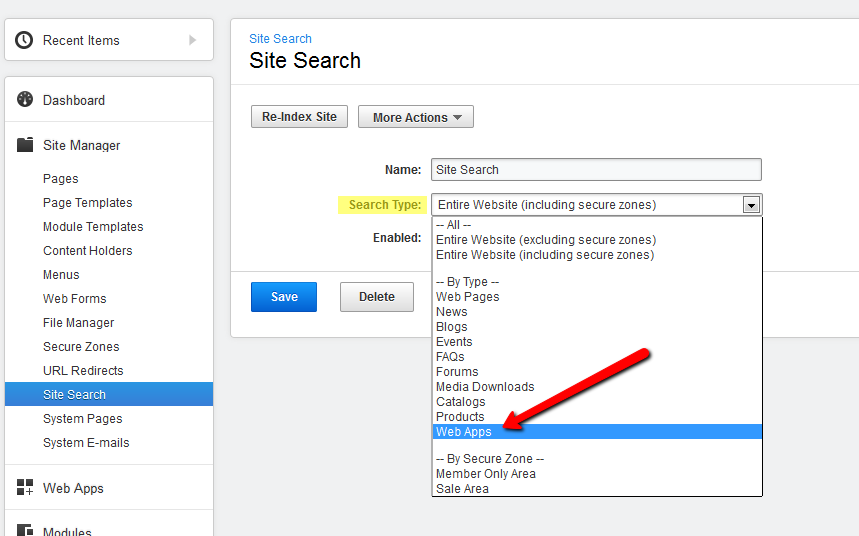
Otherwise you'll need to use the web app search to have it dedicated to a specific web app.
Hope this helps!
-Sidney

Get ready! An upgraded Adobe Community experience is coming in January.
Learn more
 AdChoices