
Participant
November 12, 2019
Question

Buttons won't display
  • November 12, 2019
  • 2 replies
  • 3085 views

Not sure the title of this post accurately describes the challenge I am experiencing with a Captivate 2019 project.
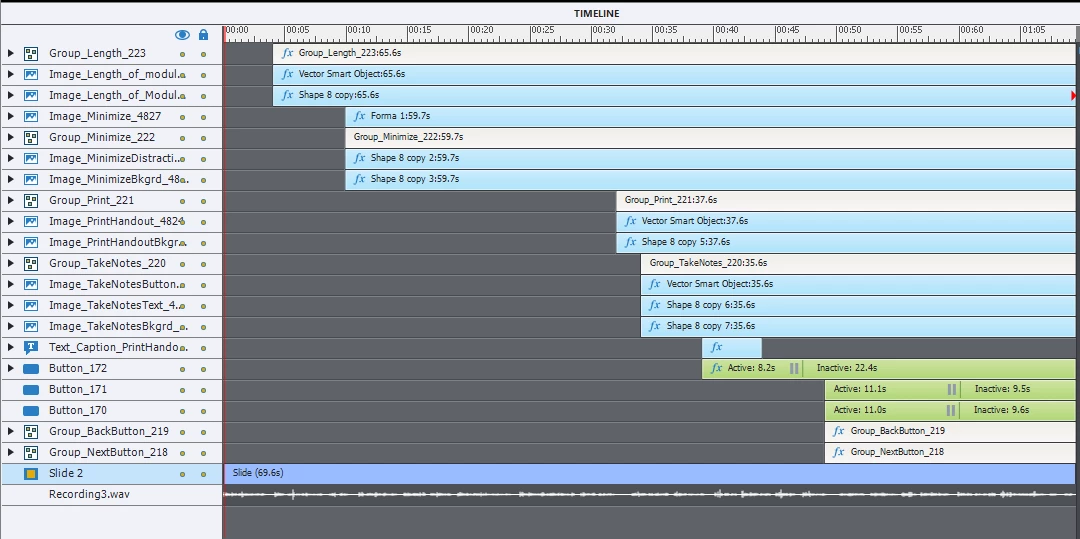
The slide is formatted to display various text in sync with audio narration.  At the conclusion of the audio the Next and Back buttons are displayed however they are not functional i n spite of my trying many things.
Not sure what is interfering with the timeline.  

This topic has been closed for replies.

2 replies

Participant
November 13, 2019

I have read the blog recommended and have read the (entertaining) banter amongst repliers  however . . . 
I still don't know how to fix the Captivate problem with my project.
Can anyone tell me specifically what to do . . . what steps to resolve this.

Maybe I need to change something with button_172 or maybe I am suppose to go the route of javascript.
I am still confused and frustrated.

Lilybiri
Legend
November 13, 2019

I explicitly asked about the functionality of the button Button_172, got no answer. Probably you have only to move the pausig point of this button (maybe it is even not necessary to pause) at least after the start of the timeline of the Next and Back button. That will allow them to appear. You can move that pausing ponit either by dragging the tiny vertical line to the right with the mouse, or by editing the number 'Pause after' in the Timing Properties of that button.

Sorry for the discussion. StagPrime solves eveerything with JavaScript, not with the Tiemlnie.

Lilybiri
Legend
November 12, 2019

If the Next and Back button are Button_171 and Bt_170 they can only appear if the playhead which is paused by button Button_172 is released by that button. Another Timeline issue.  Getting frustrated, when will trainers and books explain the Pausing of the Timeline in a proper way? Not even the certificate training has it embedded.

 Have a look at:

http://blog.lilybiri.com/pausing-captivates-timeline

Stagprime2687219
Legend
November 12, 2019

Would you believe me if I said that I rarely make use of the timeline at all in any of my projects?

Here is a screenshot of a portion of one of my project timelines.

They pretty much all look like this.


Lilybiri
Legend
November 13, 2019

There are many features of Captivate you don't use, because you prefer immediately to switch to JavaScript, Greg. The Timeline has a lot of power, and is much easier to understand by non-programming developers. Problem is that few training explain the power of the Timeline. Will not insist, you are just missing the hybrid features of Captivate where it is using and extending Timelines of video apps like Premiere Pro, Animate and After Effects. 


It is just a choice: pure programming or using all the features of the eLearning authoring tool. No judgment at all, but you choose for the first way, and I prefer the second way. Interesting comparison. 

http://blog.lilybiri.com/timeline-advanced-workflows