Exit
  • Global community
    • Language:
      • Deutsch
      • English
      • Español
      • Français
      • Português
  • 日本語コミュニティ
  • 한국 커뮤니티
0

Issue with Text Entry Box accepting a blank entry instead of "0"

Community Beginner ,
Mar 13, 2020 Mar 13, 2020

Program: Captivate 2019 - Version 11.5.1


I have 12 validated TEBs on one slide with a single Submit button that checks for the correct entry. I have assigned variables with the single correct number to each of the TEBs. All 12 function as intended. The issue I have is that the correct answer for two of them is the number 0. If the users do not fill in those two TEBs and just click submit, the program accepts the blank entry as well.


How do I force the program to only accept the 0 answer and not a blank response? Thank you.

TOPICS
Advanced actions
264
Translate
Report
Community guidelines
Be kind and respectful, give credit to the original source of content, and search for duplicates before posting. Learn more
community guidelines
LEGEND ,
Mar 13, 2020 Mar 13, 2020

Problem with Captivate variables is that you cannot define if a variable is a string or a number. A blank string, a 0 or an empty field are the same. I didn't try it out if my approach using comparison with a really empty variable will work in this use case. Maybe try it out, explained in this blog post:

http://blog.lilybiri.com/where-is-null-in-cp2017


Translate
Report
Community guidelines
Be kind and respectful, give credit to the original source of content, and search for duplicates before posting. Learn more
community guidelines
Community Beginner ,
Mar 13, 2020 Mar 13, 2020
LATEST

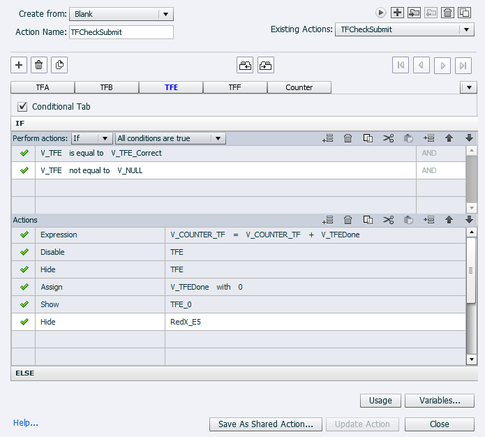
I had looked at your blog before when trying to find a solution. This still does not seem to work and it could just be that I entered the advanced action incorrectly. When I add a V_NULL with no value to the advanced action and run it, entering the number 0 will return as incorrect. The value for V_TFE_Correct is 0.


2020-03-13_14-04-39.png

Translate
Report
Community guidelines
Be kind and respectful, give credit to the original source of content, and search for duplicates before posting. Learn more
community guidelines
Resources
Help resources