


- Home
- Captivate
- Discussions
- Re: Captivate 5 and Plateau LMS (AICC)
- Re: Captivate 5 and Plateau LMS (AICC)
Captivate 5 and Plateau LMS (AICC)

Copy link to clipboard
Copied
Problem:
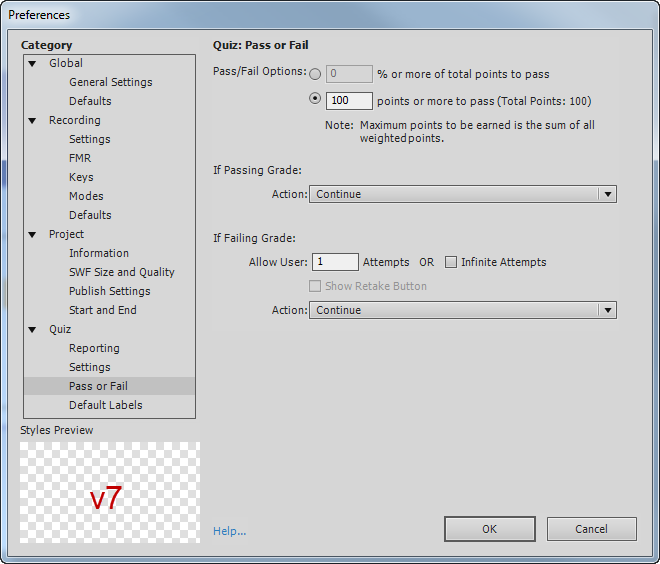
Courses produced in Cap 5 mark complete in the Plateau LMS even if they are not completed. I can open, then immediately close a course and it will be marked complete. Originally this course has no quiz so I had completion set for slide views, which was 100. I tried an angle with a quiz question, so I added a quiz question and thought maybe that would help. I added one quiz question that basically said yes/no, click yes to verifiy you've completed this course. The question is graded and I set the value of 100. I thought reporting a score back to the LMS would fix the problem, no. The quiz is madatory to take and pass.
Here are the settings I've used in my latest version. There is the one question quiz at the end. If anyone has any ideas on how to help me I'd be grateful. I'm not sure if I'm missing something or what I've been looking at this for two days. Thanks.




 2
Replies
2
2
Replies
2


Copy link to clipboard
Copied
Hi
Can you just change the LMS to SCORM 1.2/2004 and republish as zip and upload the same package to cloud.scorm.com (free registration0 and upload and test you content for the completion and notice of the report is similar.
If not, consult your LMS admin.
Can you also check if any other project (dummy) behaves the same way on your LMS or not.
Thanks,
Anjaneai

Copy link to clipboard
Copied
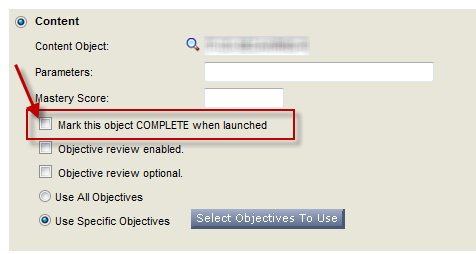
This sounds like you have the settings in the LMS incorrect. Go into Plateau and look at your content object online settings. Make sure you do not have a check mark in the box that says "Mark the object COMPLETE when launched". If you have this checked, it will mark complete and ignore your course pass/fail communication. It's a common thing to overlook.
Cheers,
Jodi


Find more inspiration, events, and resources on the new Adobe Community
Explore Now
 AdChoices