Exit
  • Global community
    • Language:
      • Deutsch
      • English
      • Español
      • Français
      • Português
  • 日本語コミュニティ
  • 한국 커뮤니티
0

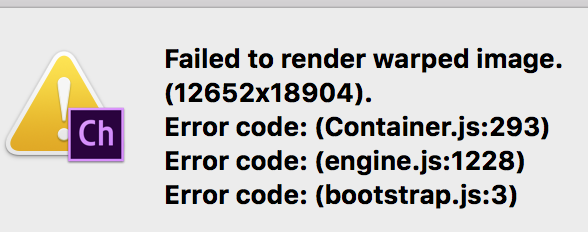
Failed to render warped image

New Here ,
May 17, 2017 May 17, 2017

Hi, I'm fairly new to character animate. I created a character in photoshop, and have been really careful with all the layers and groups created so Ch can support it. However, when I try placing the photoshop file with a character in it into a scene, this error keeps popping up. Screen Shot 2017-05-17 at 17.35.59.png
If i open up the photoshop file as a puppet it opens fine in Ch. Please do let me know whats going on!!

459
Translate
Report
Community guidelines
Be kind and respectful, give credit to the original source of content, and search for duplicates before posting. Learn more
community guidelines
Adobe Employee ,
May 17, 2017 May 17, 2017

Could you share here or DM me your .puppet file (File > Export > Puppet) via a shared link on Google Drive, Dropbox, or Creative Cloud to take a closer look?

Translate
Report
Community guidelines
Be kind and respectful, give credit to the original source of content, and search for duplicates before posting. Learn more
community guidelines
Adobe Employee ,
May 17, 2017 May 17, 2017
LATEST

Is your Photoshop document size 12652x18904? You might be running low on video memory on your GPU to render that in the Scene panel. What is your GPU and how much VRAM does it have? (In System Information, go to Hardware > Graphics/Displays, and see what the Video Card and its VRAM amount is.) You might try scaling your Photoshop document smaller to see if that helps.

Translate
Report
Community guidelines
Be kind and respectful, give credit to the original source of content, and search for duplicates before posting. Learn more
community guidelines