Exit
  • Global community
    • Language:
      • Deutsch
      • English
      • Español
      • Français
      • Português
  • 日本語コミュニティ
  • 한국 커뮤니티
0

Only one eye blinks on all my characters?

New Here ,
Oct 24, 2017 Oct 24, 2017

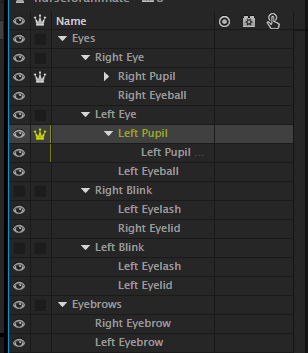
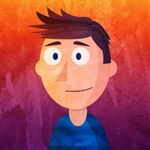
Hi everyone! So I've just started using Character Animator recently and just about everything is making sense to me except one thing. I draw my characters in Illustrator and label all the layers appropriately but when I bring them into Character Animator, only one of their eyes will blink properly - always the right one. The right eye will blink with the eyelids and show the eyelashes over it which is what I want. The left eye will only blink using the eyelids for some reason. Screen Shot 2017-10-24 at 10.07.30 AM.png Screen Shot 2017-10-24 at 10.07.13 AM.png

I've attached the two pictures, one showing how I laid it all out and the other shows what it's coming up as in the scene. This happens to all my characters and I don't know why

Anyone?

1.4K
Translate
Report
Community guidelines
Be kind and respectful, give credit to the original source of content, and search for duplicates before posting. Learn more
community guidelines
Adobe Employee ,
Oct 24, 2017 Oct 24, 2017

You need to put the blinks inside the eye groups - Left Eye and Right Eye.

Translate
Report
Community guidelines
Be kind and respectful, give credit to the original source of content, and search for duplicates before posting. Learn more
community guidelines
Contributor ,
Nov 13, 2023 Nov 13, 2023
LATEST

For anyone wanting the blinks outside the Eye group (for instance if you want the pupils and eyeballs behind the face but the blinks obviously in front), you can rename them "Lids Closed" or "Closed Lids" and they will work with a trigger.


This is another instance where folder structure and auto tagging gets in the way. I wish there was a simple Settings preference to turn auto tagging off or to tie whatever layer I want to certain performance behaviors.

Translate
Report
Community guidelines
Be kind and respectful, give credit to the original source of content, and search for duplicates before posting. Learn more
community guidelines