


- Home
- Character Animator
- Discussions
- Re: libgit2 error -1/2(Failed to rename lockfile)
- Re: libgit2 error -1/2(Failed to rename lockfile)

Copy link to clipboard
Copied
I've been getting an error message in Character Animator CC. Here is my system and software info:
- Windows 10 Pro, version 1809
- Character Animator CC 2019, version 2.1.1
Here is a screen shot of the error message

This is my work computer, so my files are stored on the network, so that they will be backed up every evening. The "N:\Navitas Website\Animation\Data Analytics\Character Animator\Data Analytics - Scenes 4-7" is the location on the network of my files.
Here is a screen shot of the directory tree for my Character Animator files on the network.
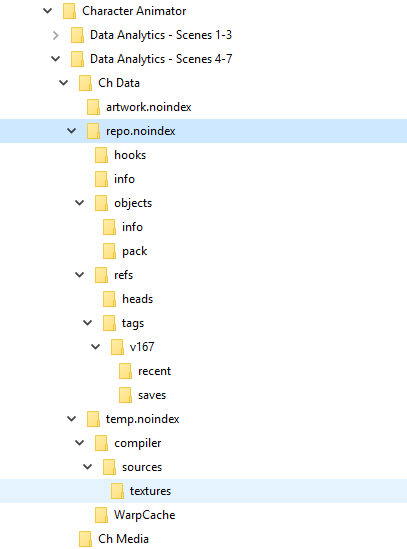
How can I fix this problem?
Thanks.


 1 Correct answer


Thanks for the pointer. I replied to a message privately, but since the info might be of general use, I'll post here as well.
Character Animator projects use a SQLite database internally and the locking used for transaction rollback (the mechanism that restores the database to a good state after a serious error or crash) is not reliable on network volumes, so I'd avoid working on Ch projects stored on such volumes. It's fine to save a copy there for backups, but working from a project stored on a
...
 3
Replies
3
3
Replies
3


Copy link to clipboard
Copied
I normally refer LibGit errors to DanTull from Adobe.
Copy link to clipboard
Copied
Thanks for the pointer. I replied to a message privately, but since the info might be of general use, I'll post here as well.
Character Animator projects use a SQLite database internally and the locking used for transaction rollback (the mechanism that restores the database to a good state after a serious error or crash) is not reliable on network volumes, so I'd avoid working on Ch projects stored on such volumes. It's fine to save a copy there for backups, but working from a project stored on a network drive is risky.
DT
Copy link to clipboard
Copied
I will move my files.
Thanks.


Get ready! An upgraded Adobe Community experience is coming in January.
Learn more
 AdChoices