


- Home
- ColdFusion
- Discussions
- Re: CF 9 not showing up in Perfmon. Cannot add CF ...
- Re: CF 9 not showing up in Perfmon. Cannot add CF ...
CF 9 not showing up in Perfmon. Cannot add CF counters.

Copy link to clipboard
Copied
Hi,
This is a brand new enterprise install of 64-bit Coldfusion 9 on Windows 2008 server.
Coldfusion Application Server 9 is not showing up as service in windows Reliability and Performance Monitor (perfmon). CFSTAT and Performance Monitoring are enabled inside the CF Admin. When I click on cfstat.bat the command prompt window displays information for a millisecond and then goes away.
I followed recommendations here: http://kb2.adobe.com/cps/404/kb404026.html
Is there a solution for this? I cannot add any Coldfusion counters to Perfmon. I am really dependent on perfmon for tracking CF server performance.


 10
Replies
10
10
Replies
10


Copy link to clipboard
Copied
Hi,
Suggest open a DOS CMD prompt and run CFSTAT from the command line to see “what flashes up”.
EG:
-DOS
-cd \coldfusion9\bin
-cfstart.bat
What does it say?
I know that does not help much with PERFMON however the counters are the same as CFSTAT and maybe whatever the error is for CFSTAT might relate to the CF PERFMON problem.
HTH, Carl.
Copy link to clipboard
Copied
Carl, thanks for your reply.
This is what I get.
Pg/Sec DB/Sec CP/Sec Reqs Reqs Reqs AvgQ AvgReq AvgDB Bytes Bytes
Now Hi Now Hi Now Hi Q'ed Run'g TO'ed Time Time Time In/Sec Out/Sec
0 0 0 0 -1 -1 0 0 0 0 -25 0 0 0
There are some negative values and lots of zeros. Seems pretty buggy.
Any suggestions?
Copy link to clipboard
Copied
Well Sasha I am not real sure I do not use CF PERFMON much myself for performance monitoring preferring JVM logging, CFMetric and CFSTAT in that order. Having said that if you do “CFSTAT 1” it will repeat cfstat at 1 second intervals which might get you by until CF PERFMON is sorted.
I am configuring a server currently CF9 Ent Win 08r2 and enable CF PERFMON just by way of sanity check and it worked for me.
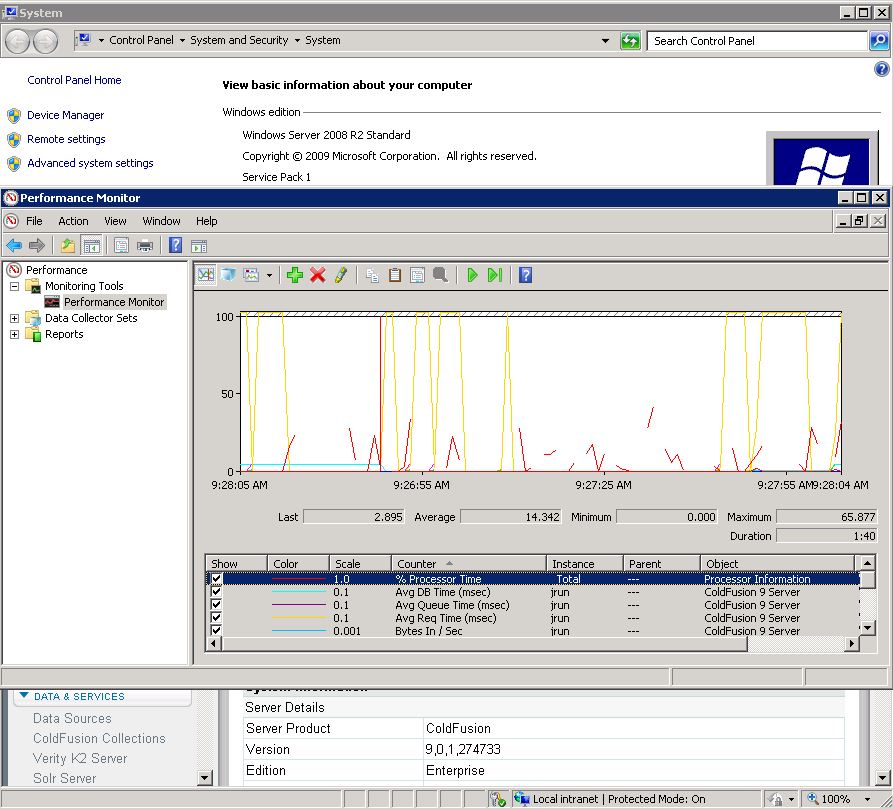
So where to with your CF PERFMON? Maybe check neo-metric.xml file:
<var name='cfstat'>
<string>true</string>
</var>
<var name='cfstatport'>
<string>7997</string>
</var>
What else maybe disable AV, Firewall chance something is getting blocked?
HTH, Carl.
Copy link to clipboard
Copied
neo-metric.xml is already set up they way you suggested. so I am pretty much stuck.
Can you give me a little bit more information about JVM logging and CFMetric? I could not find anything about this at all. Is this a 3rd party application or something built into CF 9?
Thank you!
EDIT: I found this error in my windows logs:
The Open Procedure for service "ColdFusion 9 Application Server" in DLL "C:\Windows\system32\cfperfmon_9.dll" failed. Performance data for this service will not be available. The first four bytes (DWORD) of the Data section contains the error code.
and this:
The Open Procedure for service "BITS" in DLL "C:\Windows\system32\bitsperf.dll" failed. Performance data for this service will not be available. The first four bytes (DWORD) of the Data section contains the error code.
Copy link to clipboard
Copied
JVM logging information is fair say hard to get all in one place. I did a talk on JVM matters at CFMEETUP which probably brings a lot of detail together. The slide deck in the talk is still there for download (as described in the talk):
http://experts.adobeconnect.com/p55663036/
I think CFMetric logging may suit your needs better if you where after counters in CF PERFMON, tho keep in mind CFSTAT counters are the same as perfmon. Read this to enable CFMetric:
http://kb2.adobe.com/cps/191/tn_19120.html
I have a preference to do CFMetric logging with some different switches and use this tool (from another Carl not me) to graphically display the log contents:
http://www.adobe.com/cfusion/exchange/index.cfm?event=extensionDetail&extid=1029407
The log errors in your edit I have not seen before however if you search the forum or google perhaps you will find what you need to fix CF PERFMON. Let readers know.
HTH, Carl.
Copy link to clipboard
Copied
there's nothing is google search results for the log errors. but I will keep on digging. If I find something I will post here.
EDIT: Uninstall / Reinstall CF 9.0 (no hotfix) did it. Enabled Performance Monitoring inside CF Admin. Restart CF.
Went back into Computer => Manage => Diagnostics => Reliability and Performance => Performance Monitor. Right click to Add Counters and by magic Coldfusion 9 Server is now there. Not sure if registry edits were required (see above), but I did them earlier anyway.
Copy link to clipboard
Copied
I tried to set up metrics, but I am getting an error: "
Could not read metrics data"
When checking the files
XML Config: C:\ColdFusion9\runtime/servers/coldfusion/SERVER-INF/jrun.xml - is configured correctly.
But this one is missing from my directory: Log File: C:\ColdFusion9\runtime/logs/coldfusion-metrics.log
What am I doing wrong here?
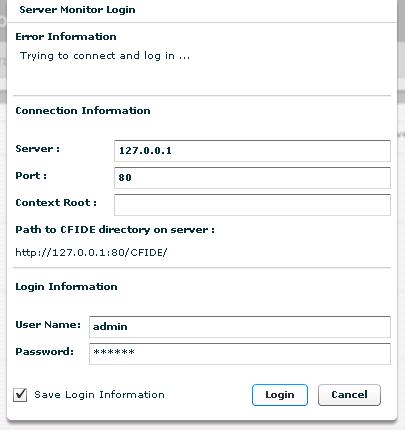
EDIT: In the process of setting up metrics I discovered that after CF reinstall CF server monitor is refusing to log me in. It just sits there and does nothing:
Any suggestions how to fix this?
Copy link to clipboard
Copied
Greetings,
Check if the metrics log information is being reported in:
C:\ColdFusion9\runtime\logs\coldfusion-out.log or event log
If so then for now create new text doc called coldfusion-metrics.log in there, paste the metric information in file and save the log. Try CFMetric viewer app again. How does that go?
From your edit sounds like “there are more problems than you can poke a stick at” – to use an expression. What with having CF PERFMON, CF MONITOR not working wonder if CF SERVER MANGER is working not that it will help solve the original PERFMON issue?
I don’t want to sound lame but might be better to wait 24 hours till the “big guns” return to the forum (being Sunday in other parts of world) see what they got to say.
HTH, Carl.
Copy link to clipboard
Copied
I decided to do another CF reinstall. It fixed the problem with being unable to log into Coldfusion Server Monitor. I can login normally after typing in the password.
However, Coldfusion Server 9 service has disappeared from Performance Monitoring once again. I did a full CF reinstall, a server reboot, checked the registry as per instructions in the original post -- no dice. I think I am done with trying to fix it. Maybe somebody else can post a solution here, if indeed there is one... 
Copy link to clipboard
Copied
Yes I hear you. Not much that I got to add for now. Will see what other responders have got to say. For now I will be an interested reader.
Regards, Carl.


Get ready! An upgraded Adobe Community experience is coming in January.
Learn more
 AdChoices