


Formatting help?

Copy link to clipboard
Copied
Hi,
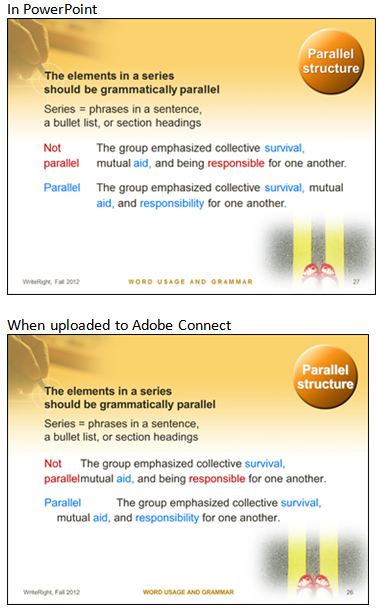
My team continues to have difficulty when uploading PowerPoint 2010 to Connect. I am including a few example screenshots. I have spoken to a representative from Adobe about this, who has never heard of an issue like this, and has idea what I was talking about. So, now with proof, I ask again for help. We have used Connect at my company for several years now, but this issue has become more prominent within the past year or two. I do not know if this is an issue specific to our license, or how to resolve it. The font used in this example is Arial. We have seen less of this issue while using Arial, but Calibri, the default font for Microsoft, causes many more issues.



 2
Replies
2
2
Replies
2


Copy link to clipboard
Copied
You can try the old trick, save as PPT (instead of PPTX) and then upload. That may solve the problem.

Copy link to clipboard
Copied
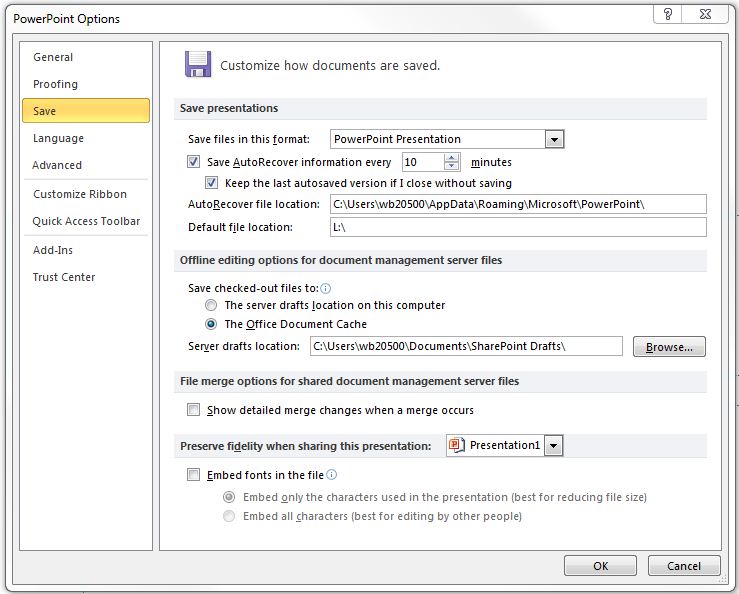
You might also try saving the file with embedded fonts (instead of relying on the user and the server to have the same fonts) and uploading the newly saved PPT. Do this by selecting File, Options, Save, "Embed fonts in the file" (your version of PPT may vary a bit).

Get ready! An upgraded Adobe Community experience is coming in January.
Learn more
 AdChoices