Exit
  • Global community
    • Language:
      • Deutsch
      • English
      • Español
      • Français
      • Português
  • 日本語コミュニティ
  • 한국 커뮤니티
0

I have available space, but I can't upload a .5MB file to the Document Cloud.

New Here ,
Oct 12, 2020 Oct 12, 2020

"You don't have enough storage space to continue."
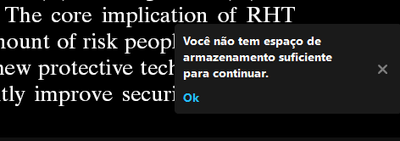
André98BC_0-1602556684034.png

Trying in the web app...

"It was not possible to upload the file"

André98BC_2-1602556783447.png

The file is 512kB big. Apparently the Document Cloud does not have a tool for managing your used space, so I manually summed up the sizes of all my files, and they don't even top 1.4GB.

225
Translate
Report
Community guidelines
Be kind and respectful, give credit to the original source of content, and search for duplicates before posting. Learn more
community guidelines
Community Expert ,
Oct 12, 2020 Oct 12, 2020
Translate
Report
Community guidelines
Be kind and respectful, give credit to the original source of content, and search for duplicates before posting. Learn more
community guidelines
LEGEND ,
Oct 13, 2020 Oct 13, 2020

In What Web App are you trying to use for this?

Where it the file located on YOUR Computers hard drive? How much space is available on the drive?


Translate
Report
Community guidelines
Be kind and respectful, give credit to the original source of content, and search for duplicates before posting. Learn more
community guidelines
Community Expert ,
Oct 13, 2020 Oct 13, 2020
LATEST

Free up some space.  Permanently deleting files is a 2-step process.


Nancy O'Shea— Product User, Community Expert & Moderator
Translate
Report
Community guidelines
Be kind and respectful, give credit to the original source of content, and search for duplicates before posting. Learn more
community guidelines

