Exit
  • Global community
    • Language:
      • Deutsch
      • English
      • Español
      • Français
      • Português
  • 日本語コミュニティ
  • 한국 커뮤니티
0

Launch Adobe programs but do not show Task Manager

New Here ,
Sep 05, 2020 Sep 05, 2020

Good afternoon,

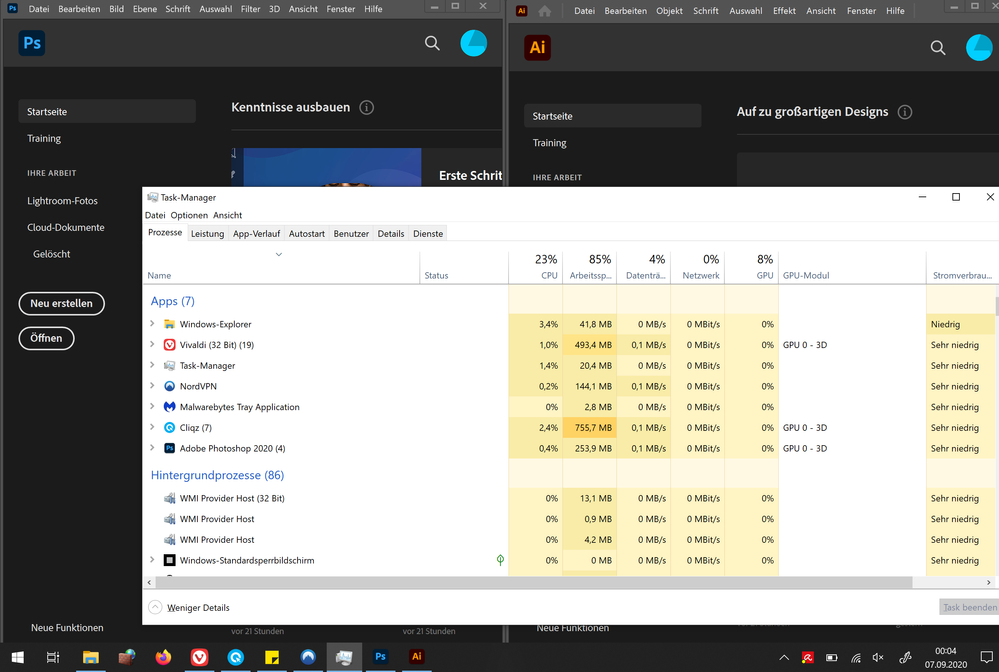
I have the following problem: Adobe programs like Photoshop, Illustrator are started but not listed in the task manager. For this I would have the following questions 1. How can this be? What can I do about it?

System requirements: Surface X, 8 GB Ram, i5 processor. I use Adobe products without any problems until today.
The following steps have been taken so far: Uninstalled and reinstalled, other settings were not made.

I would be very grateful for help.

Translated with www.DeepL.com/Translator (free version)

TOPICS
Collaboration
1.8K
Translate
Report
Community guidelines
Be kind and respectful, give credit to the original source of content, and search for duplicates before posting. Learn more
community guidelines
Community Expert ,
Sep 06, 2020 Sep 06, 2020

that would be an os problem but embed a screenshot (using the insert photos icon) showing task manager and all the open apps.  background processes need not be displayed.

Translate
Report
Community guidelines
Be kind and respectful, give credit to the original source of content, and search for duplicates before posting. Learn more
community guidelines
New Here ,
Sep 06, 2020 Sep 06, 2020

Unbenannt.PNG

Translate
Report
Community guidelines
Be kind and respectful, give credit to the original source of content, and search for duplicates before posting. Learn more
community guidelines
New Here ,
Sep 06, 2020 Sep 06, 2020

Today the process of Photoshop is visible, that of illustrator not. I have not made any changes. I hope this is enough information, if you need more details just let me know.

Translate
Report
Community guidelines
Be kind and respectful, give credit to the original source of content, and search for duplicates before posting. Learn more
community guidelines
Community Expert ,
Sep 06, 2020 Sep 06, 2020
LATEST

that's windows issue.  


google it or post to an ms forum.

Translate
Report
Community guidelines
Be kind and respectful, give credit to the original source of content, and search for duplicates before posting. Learn more
community guidelines