
Exit
  • Global community
    • Language:
      • Deutsch
      • English
      • Español
      • Français
      • Português
  • 日本語コミュニティ
  • 한국 커뮤니티
0

can't open puchased digital editions in app

New Here ,
Mar 19, 2018 Mar 19, 2018

all of the sudden I can't open my books downloaded and stored in the app on my ipad! It worked fine yesterday. I have tried to reset app and ipad, but when i tap the books nothing happens! Pleas help! Have deadline to meet today and need access to these books!


8.2K
Translate
Report
Community guidelines
Be kind and respectful, give credit to the original source of content, and search for duplicates before posting. Learn more
community guidelines
New Here ,
Mar 19, 2018 Mar 19, 2018

same thing... all books worked fine yesterday..  this morning I get this error

Item Info: Permissions: Unknown permission error

Entire library <--Even non ebook .pdf files.

Translate
Report
Community guidelines
Be kind and respectful, give credit to the original source of content, and search for duplicates before posting. Learn more
community guidelines
New Here ,
Mar 19, 2018 Mar 19, 2018

A lot of people are experiencing this issue. Nothing's wrong with your app or computer. I talked to the live help. They can't help you either so don't waste your time. Someone who actually knows will come here eventually and solve the problem.

Translate
Report
Community guidelines
Be kind and respectful, give credit to the original source of content, and search for duplicates before posting. Learn more
community guidelines
New Here ,
Mar 19, 2018 Mar 19, 2018

Thanks! Found a workaround via an other app from the store were i purchased the litterature.

Translate
Report
Community guidelines
Be kind and respectful, give credit to the original source of content, and search for duplicates before posting. Learn more
community guidelines
New Here ,
Mar 19, 2018 Mar 19, 2018

I have the same problem.  I am getting the following error code: RET_RECORD_CORE_INVALID_CLIENT_CERT

I searched for the code on Adobe Help, but it was not recognized.

Translate
Report
Community guidelines
Be kind and respectful, give credit to the original source of content, and search for duplicates before posting. Learn more
community guidelines
New Here ,
Mar 21, 2018 Mar 21, 2018

Echoing this issue! Adobe servers are probably belly up.

Translate
Report
Community guidelines
Be kind and respectful, give credit to the original source of content, and search for duplicates before posting. Learn more
community guidelines
Community Beginner ,
Mar 19, 2018 Mar 19, 2018

All my library is gone today. It was working fine up to yesterday and today everything disappeared evene digital edition starter guide that came with it. Is there any solution?

Translate
Report
Community guidelines
Be kind and respectful, give credit to the original source of content, and search for duplicates before posting. Learn more
community guidelines
New Here ,
Mar 19, 2018 Mar 19, 2018

same problem for me. RET_RECORD_CORE_INVALID_CLIENT_CERT solutions???

Translate
Report
Community guidelines
Be kind and respectful, give credit to the original source of content, and search for duplicates before posting. Learn more
community guidelines
New Here ,
Mar 19, 2018 Mar 19, 2018

I downloaded two ACSM files. Opening the files results in opening Adobe DE but after that nothing happens.

Also the books are not visible in Adobe DE.

Tried all kinds of things. Finally I tried to delete the authorization and got an error : "cannot remove authorization, please try later".

It looks like there is an issue with the Adobe DE server...

Translate
Report
Community guidelines
Be kind and respectful, give credit to the original source of content, and search for duplicates before posting. Learn more
community guidelines
New Here ,
Mar 19, 2018 Mar 19, 2018

Hi,

just giving a temporary solution. This looks like a licensing date issue.

Here’s how I fixed it on my IOS: change time and date to manual and set the date at a previous date. I set it to 17 March and it worked.

Hope this helps.

Bhavesh

Translate
Report
Community guidelines
Be kind and respectful, give credit to the original source of content, and search for duplicates before posting. Learn more
community guidelines
New Here ,
Mar 19, 2018 Mar 19, 2018

many thanks, it works!

Translate
Report
Community guidelines
Be kind and respectful, give credit to the original source of content, and search for duplicates before posting. Learn more
community guidelines
New Here ,
Mar 19, 2018 Mar 19, 2018

It works on my iMac too!!! Thank you so much!:)))) I hope they come up with a permanent solution though.

Translate
Report
Community guidelines
Be kind and respectful, give credit to the original source of content, and search for duplicates before posting. Learn more
community guidelines
Community Beginner ,
Mar 19, 2018 Mar 19, 2018

does the date and time make a difference?  i changed mine to the 17th too and nothing happened 

Translate
Report
Community guidelines
Be kind and respectful, give credit to the original source of content, and search for duplicates before posting. Learn more
community guidelines
Community Beginner ,
Mar 19, 2018 Mar 19, 2018

i closed and restarted app and that helped  thanks!

Translate
Report
Community guidelines
Be kind and respectful, give credit to the original source of content, and search for duplicates before posting. Learn more
community guidelines
New Here ,
Mar 19, 2018 Mar 19, 2018

I had to change my date to before the certificate expired for me it was before 2/23/2017 and it finally worked.

Translate
Report
Community guidelines
Be kind and respectful, give credit to the original source of content, and search for duplicates before posting. Learn more
community guidelines
Community Beginner ,
Mar 21, 2018 Mar 21, 2018

How can I change my date on pc app?

Translate
Report
Community guidelines
Be kind and respectful, give credit to the original source of content, and search for duplicates before posting. Learn more
community guidelines
Community Beginner ,
Mar 21, 2018 Mar 21, 2018

Well this is just a basic change you have to do on your computer.

As told previously : change manualy the clock in the parameters of your computer.

I just did it, and it worked.

Hope this is going to be temporary

Translate
Report
Community guidelines
Be kind and respectful, give credit to the original source of content, and search for duplicates before posting. Learn more
community guidelines
New Here ,
Mar 19, 2018 Mar 19, 2018

This works. Thank you!

Translate
Report
Community guidelines
Be kind and respectful, give credit to the original source of content, and search for duplicates before posting. Learn more
community guidelines
New Here ,
Mar 20, 2018 Mar 20, 2018

How do I change the date? I looked in settings of app, couldn't find the date.

Translate
Report
Community guidelines
Be kind and respectful, give credit to the original source of content, and search for duplicates before posting. Learn more
community guidelines
New Here ,
Mar 20, 2018 Mar 20, 2018

I have the 4.5.7 edition.

Translate
Report
Community guidelines
Be kind and respectful, give credit to the original source of content, and search for duplicates before posting. Learn more
community guidelines
New Here ,
Mar 20, 2018 Mar 20, 2018

I kept exploring my app settings on my android tablet. Found a fix, 

FYI: for android,  go to settings, the the ebb Apps, click on ADE app, them open app details in store which goes to play store, shows an update button. After downloading update, I was able to open my ebook!

Apparently this app doesn't update automatically.

Translate
Report
Community guidelines
Be kind and respectful, give credit to the original source of content, and search for duplicates before posting. Learn more
community guidelines
New Here ,
Mar 20, 2018 Mar 20, 2018

This worked! Thank you!!

Translate
Report
Community guidelines
Be kind and respectful, give credit to the original source of content, and search for duplicates before posting. Learn more
community guidelines
New Here ,
Mar 19, 2018 Mar 19, 2018

it is same to me on my windows laptop

Translate
Report
Community guidelines
Be kind and respectful, give credit to the original source of content, and search for duplicates before posting. Learn more
community guidelines
New Here ,
Mar 19, 2018 Mar 19, 2018

I have the same problem.  The suggested workaround or resetting the time worked.  Now can a tech from Adobe provide a solution or a status of the solution. 

Translate
Report
Community guidelines
Be kind and respectful, give credit to the original source of content, and search for duplicates before posting. Learn more
community guidelines
New Here ,
Mar 19, 2018 Mar 19, 2018

eBooks.com is awaiting a solution from Adobe. In the meantime, if you bought your ebook from eBooks.com, most titles can be read using our online (browser-based) reader app.  The reader doesn't require special software or plugins.

Go to your bookshelf and, instead of clicking "Download", choose "Read now"
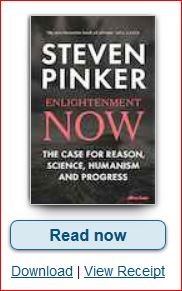
Read Online at eBooks.com.png

I hope this helps.

Translate
Report
Community guidelines
Be kind and respectful, give credit to the original source of content, and search for duplicates before posting. Learn more
community guidelines
