 Adobe Community

- Home
- Dimension
- Discussions
- Re: Imported graphic won't conform to 3d model
- Re: Imported graphic won't conform to 3d model

Copy link to clipboard
Copied
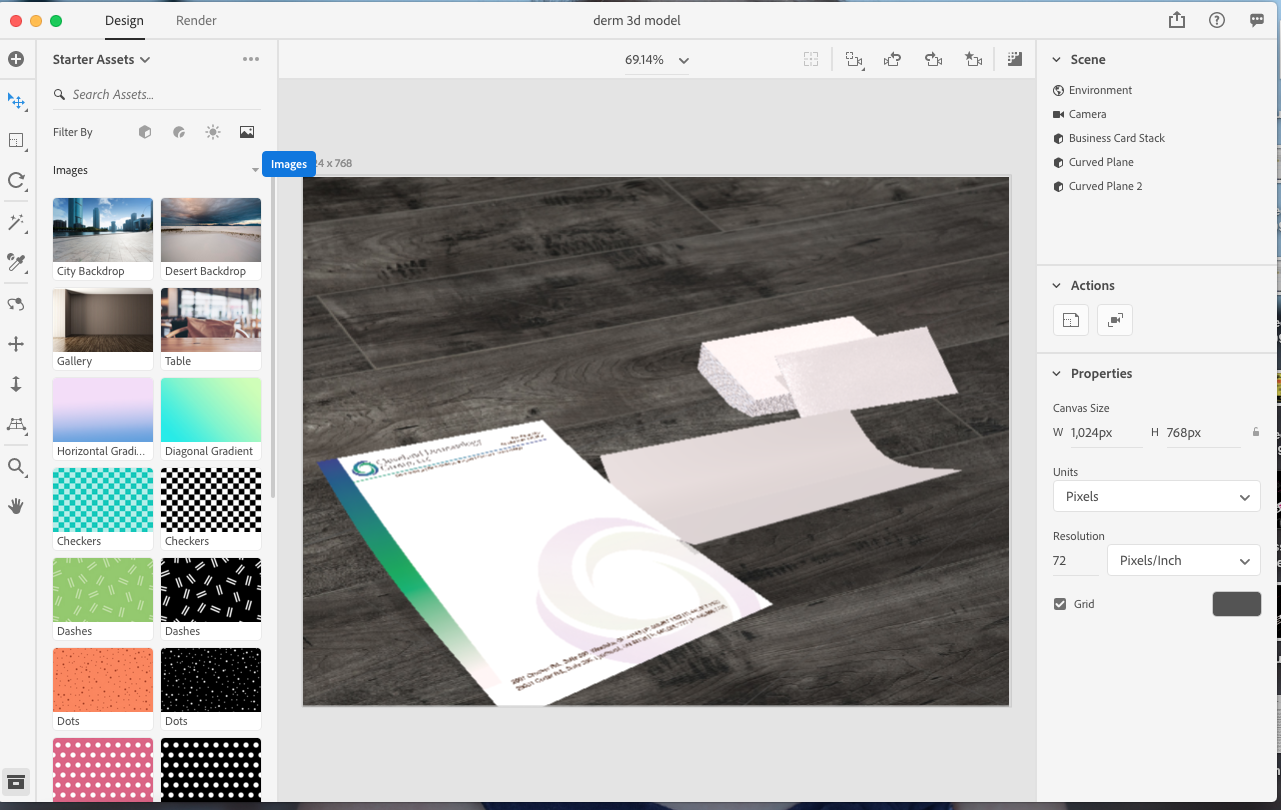
When I import a image (in this case a designed letterhead paper) the graphic doesn't take on the curved form from the curved plane.. it stays flat. How can I get it to take the shape of the 3D model?


 1 Correct answer


In Dimension it is not possible to warp any placed image, so the only workaround is to edit image in PS after placing on 3D object. I can suggest you to create several artboards in PS and place different warp examples of text on them. After importing PSD file as placed graphic you can choose artboard with image which the best fits 3d Object surface.

 5
Replies
5
5
Replies
5

Copy link to clipboard
Copied
Do you mean to import as placed graphic? Can you share that image?
Copy link to clipboard
Copied
Sure as you can see the image isn't taking the same shape as the model. I clicked on the image and selected import image.
Copy link to clipboard
Copied
In Dimension it is not possible to warp any placed image, so the only workaround is to edit image in PS after placing on 3D object. I can suggest you to create several artboards in PS and place different warp examples of text on them. After importing PSD file as placed graphic you can choose artboard with image which the best fits 3d Object surface.
Copy link to clipboard
Copied
Ok thanks, When viewing the tutorials for Dimension it looked as though I could do this easily. It now seems misleading.. I could just do all of this in photoshop then and not even use this new program.

Copy link to clipboard
Copied
RUR44028 wrote
I could just do all of this in photoshop then and not even use this new program.
correct but Dimension is normally faster than Photoshop as it only uses one light... i use them both

 AdChoices