Adobe Community

- Home
- Dimension
- Discussions
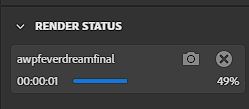
- Renders stop at 47-50% at 0.01 estimated time left
- Renders stop at 47-50% at 0.01 estimated time left
Renders stop at 47-50% at 0.01 estimated time left

Copy link to clipboard
Copied
1280x720 Stops at 47% every time.
1920x1080 Stops at 48% every time.
3840 x 2160 Stops at 50% every time.
The renders never finish. When I use low setting it finishes. But It won't finish on Medium or High settings. I have RX550 4 GB, 16GB of 3200MHz, AMD Ryzen 2600 Six-core and running on Windows 10. Any tips?


 5
Replies
5
5
Replies
5


Copy link to clipboard
Copied
Did you using any complex objects or many light effects ot transparency properties of the objects? That can be a reason
Copy link to clipboard
Copied
I used 8 models, a plane and basic lighting.

Copy link to clipboard
Copied
Hi,
Same Problem here,
The Scene have :
1 environement (Studio exposure and fill light)
1 directional Light (Square directional Light)
5 Objects (Each have 1 decals)
except for the decals, all com from the "Dimension" original library.
Copy link to clipboard
Copied
It's Me Again,
I have make few test, step by step : Suppress the décals, the light, environement, and object and eatch time the render stop between 47 and 49%..
It's work now, I have close the app and I launch again with "execute as administrator" Maybe relaunch only (without admin right) work too
++

Copy link to clipboard
Copied
go into your Gpu software and turn off any error tracking options... this should stop the software crashing when it generates temp image files

 AdChoices