
Participant
May 9, 2013
Answered

How do I change from disk CS6 to Creative Cloud?

  • May 9, 2013
  • 2 replies
  • 3611 views

I bought photoshop cs6 and have updated it regulary.  I also own a creative cloud subscription.  I want to take the installed from disk cs6 to the creative cloud to get all the new features.  How do i do this?
This topic has been closed for replies.
Correct answer Jeffrey_A_Wright

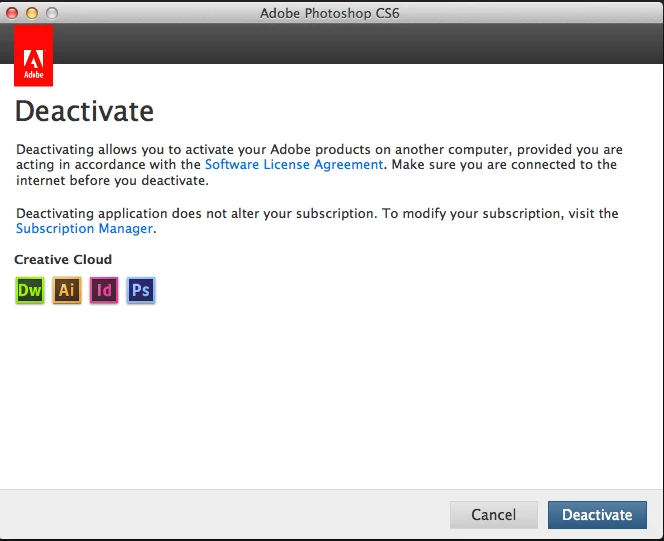
Actually there is no need to remove your current installation of CS6.  If you go to Help>Deactivate you can deactivate your perpetual version.  Once deactivated please choose the option to License this Software and enter the Adobe ID tied to your subscription.  You can then verify that the Creative Cloud license has been applied by going to Help>Deactivate and verifying the bold text on the left hand side indicates Creative Cloud.  You can find an example of this in the image posted below.

2 replies

NightSkyGuy
Inspiring
May 17, 2013

I'm confused now.

  1. Has Photoshop CC BEEN released already, or not?  (Or if not "CC" a version of Photoshop that has more features than the perpetually licensed CS6)
  2. To use "Photoshop CC" I have to deactivate CS6?
  3. By "Help->Deactivate" I assume you mean by starting PS CS6 and using it's help... there appears to be no help in AAM.

If I deactivate CS6 how do I then verify that the actions I've been developing work on the CS3, CS5, CS6 and CC versions of Photoshop?

Jeffrey_A_Wright
Community Manager
Community Manager
May 17, 2013

Photoshop CC will not be released until June 17. 

In specific please see the following:

The new CC apps, such as Photoshop CC and Illustrator CC, and Creative Cloud features, such as Sync Settings, desktop notifications, integration with Behance, and desktop notifications, will be available exclusively to Creative Cloud members on June 17, 2013. Learn more.

You can find more details at http://www.adobe.com/products/creativecloud/faq.edu.html#purchasing-availability

NightSkyGuy
Inspiring
May 17, 2013

Thanks, that explains why "Photoshop CC" isn't present, but I thought there were already new Photoshop CS6 features available only in the cloud... is that not the case?  Creative Cloud is now almost a year old.

I am still confused whether I need to deactivate my PS CS6 Perpetual license?  Jeffrey Tranberry says they can exist side by side but this article makes me wonder. Why would I deactivate a perpetually licensed product.  I want and need them both runnable so I can test my scripts and actions that I develop.

I'm too scared to try deactivating my PS CS6 now that I've just joined the Cloud, and as I noted, it's not clear that I'll gain anything until mid June at the earliest. 

Finally, after joining the cloud and getting the new AAM, I noticed that attempting to install the ACR 8.1 beta reports that my "AAM is corrupt" when I tried to run the ACR installer on Windows 7 64-bit system.

http://blog.starcircleacademy.com/wp-content/uploads/2013/05/Adobe-Application-Manager-5162013-82117-PM.bmp.jpg

MichaelKazlow
Legend
May 9, 2013

Uninstall CS6. Install everything from the CC suite.

Jeffrey_A_Wright
Community Manager
Jeffrey_A_WrightCommunity ManagerCorrect answer
Community Manager
May 9, 2013

Actually there is no need to remove your current installation of CS6.  If you go to Help>Deactivate you can deactivate your perpetual version.  Once deactivated please choose the option to License this Software and enter the Adobe ID tied to your subscription.  You can then verify that the Creative Cloud license has been applied by going to Help>Deactivate and verifying the bold text on the left hand side indicates Creative Cloud.  You can find an example of this in the image posted below.