


- Home
- Download & Install
- Discussions
- Re: I can't find settings in the preferences, apps
- Re: I can't find settings in the preferences, apps

Copy link to clipboard
Copied
Hello, I wanted to download some old adobe apps, so I entered the adobe site to see how to do it and it goes to preferences> apps, and then down it shows settings there is anybody else that got this problem too? do you know how to solve it?
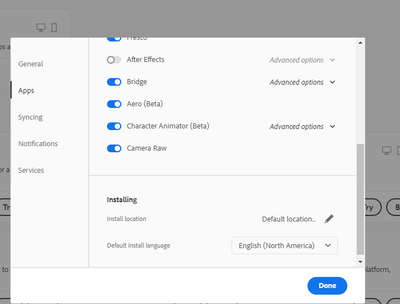
Thank you,
Ariel


 1 Correct answer
.png)

If you have followed these instructions but still don't see the "Show Older Apps" switch, then you can use the direct download links to access older apps instead:
Adobe Creative Cloud 2019 Direct Download Links, for Windows and macOS
Muse, Fuse, Edge Animate, Speedgrade, Fireworks, Encore, etc. can be found there.

 11
Replies
11
11
Replies
11

Copy link to clipboard
Copied
Hi Ariel,
You should see a "Show Older Apps" switch under the Apps tab there, in Preferences...
What version of the Creative Cloud Desktop app are you running? The current version is 5.3.2.471 (Help menu > About Creative Cloud)
You can also run Check for updates there under the Help menu.
Copy link to clipboard
Copied
oh i see i have 5.3.1.471 maybe because of this thank you!
Copy link to clipboard
Copied
How to update it?
Copy link to clipboard
Copied
Run Check for updates there under the Help menu.
Copy link to clipboard
Copied
I don't have there anything about the creative cloud.
Copy link to clipboard
Copied
Follow these instructions to enable the "Show Older Apps" option:
If you don't see that option, make sure your Administrator has not disabled it:
(If you are running the Teams or Enterprise/business version of Creative Cloud rather than as an Individual, then it's possible your admin has disabled this capability and you would need to contact them.)
Copy link to clipboard
Copied
I don't have any admin and I really not have any idea
Copy link to clipboard
Copied
What is it you wish to download, exactly? Older versions of CC apps? Which versions and why?
The Desktop app will only allow you to download the current release (2021) and one version back (2020).
Or, are you trying to download old & discontinued apps like Muse or Fuse?
Copy link to clipboard
Copied
I want to download adobe muse
Copy link to clipboard
Copied
If you have followed these instructions but still don't see the "Show Older Apps" switch, then you can use the direct download links to access older apps instead:
Adobe Creative Cloud 2019 Direct Download Links, for Windows and macOS
Muse, Fuse, Edge Animate, Speedgrade, Fireworks, Encore, etc. can be found there.
Copy link to clipboard
Copied
thank you very much


Find more inspiration, events, and resources on the new Adobe Community
Explore Now
 AdChoices