 Adobe Community

- Home
- Download & Install
- Discussions
- Lightroom CC says I need to update Windows 10 to i...
- Lightroom CC says I need to update Windows 10 to i...

Copy link to clipboard
Copied
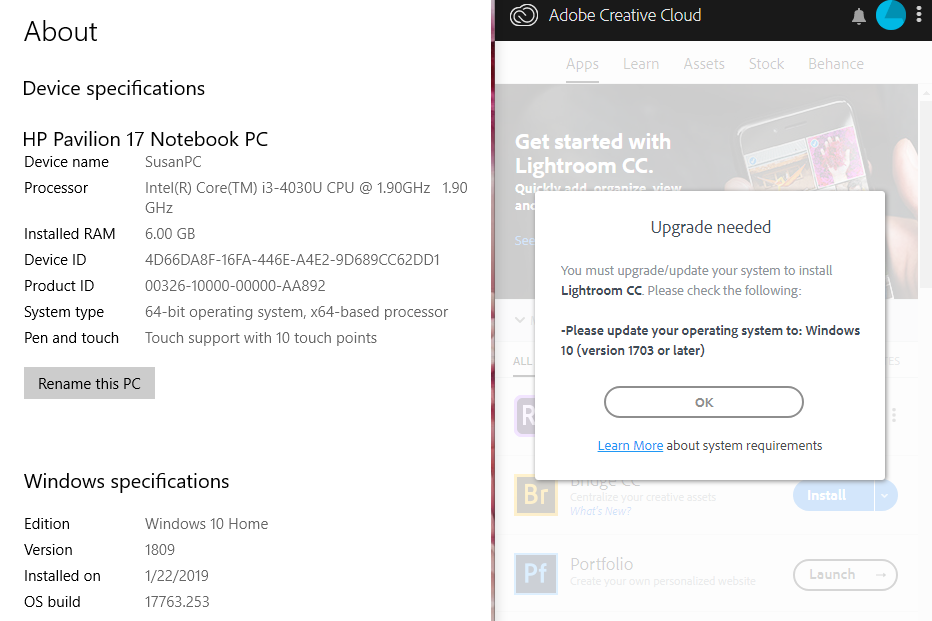
I'm trying to install the trial version of Lightroom CC. I was able to install Lightroom Classic just fine, but I need the CC version because it has a compatible IOS app and Classic doesn't (as far as I know).
Anyway, in the Apps section in the Creative Cloud it says "not compatible" and when I click it insists I don't have a newer version of Windows 10 installed even though I clearly do. I have 1809 which is obviously later than 1703. Can anyone help me or explain what's happening? I have signed out and signed back in. I have updated Windows. And I have uninstalled the Cloud and reinstalled it. Nothing seems to help. Any help would be appreciated, thanks.


 1 Correct answer
I just wanted to let you know that I did contact them and was given an alternative way to download Lightroom CC. It's working now. Thanks for the tip!

 8
Replies
8
8
Replies
8


Copy link to clipboard
Copied
restart your computer and retry updating.
Copy link to clipboard
Copied
I did. Several times. I spent the later half of yesterday doing just that. No change.
Copy link to clipboard
Copied
using a browser that allows popups and cookies, contact adobe support during pst business hours by clicking here and, when available, click 'chat', http://helpx.adobe.com/x-productkb/global/service-ccm.html
Correct answer by
heyysusana
AUTHOR
Copy link to clipboard
Copied
I just wanted to let you know that I did contact them and was given an alternative way to download Lightroom CC. It's working now. Thanks for the tip!
Copy link to clipboard
Copied
good to hear!

Copy link to clipboard
Copied
I'm having the same problem and I'm struggling to contact them
Copy link to clipboard
Copied
using a browser that allows popups and cookies, contact adobe support during pst business hours by clicking here and, when available, click 'chat', http://helpx.adobe.com/x-productkb/global/service-ccm.html

Copy link to clipboard
Copied
heyysusana it would have been nice if you could have posted how you solved the problem for others to see


 AdChoices