Exit
  • Global community
    • Language:
      • Deutsch
      • English
      • Español
      • Français
      • Português
  • 日本語コミュニティ
  • 한국 커뮤니티
0

Updates not working PS & LRC

Explorer ,
Dec 12, 2021 Dec 12, 2021

Using Windows 10 I can't update to LR 11.0 or PS 23.1.0.

Tried using Creative Cloud, even downloaded new version of Creative Cloud, Tried direct download. Photography subscription is active. Creative Cloud says everying is up to date, it is not.


Thanks

TOPICS
Creative Cloud , Installation
381
Translate
Report
Community guidelines
Be kind and respectful, give credit to the original source of content, and search for duplicates before posting. Learn more
community guidelines

correct answers 1 Correct answer

Explorer , Dec 13, 2021 Dec 13, 2021

After contact with Adobe (Syed) via phone we completely uninstalled the Creative Cloud application and reinstalled with new version, I had tried that before without luck, and the new version is showing that updates are now available. So the problem was with their Creative Cloud not allowing access to the updates.


Thanks for eveyone's time.

Translate
Community Expert ,
Dec 12, 2021 Dec 12, 2021

Please take a look here: 

https://helpx.adobe.com/creative-cloud/kb/all-apps-displayed-aam.html

https://helpx.adobe.com/creative-cloud/kb/creative-cloud-application-recognizing-available.html


My System: Intel i7-8700K - 64GB RAM - NVidia Geforce RTX 3060 - Windows 11 Pro 25H2 -- LR-Classic 15 - Photoshop 27 - Nik Collection 8 - PureRAW 5 - Topaz Photo
Translate
Report
Community guidelines
Be kind and respectful, give credit to the original source of content, and search for duplicates before posting. Learn more
community guidelines
Explorer ,
Dec 13, 2021 Dec 13, 2021

Thanks for your time.

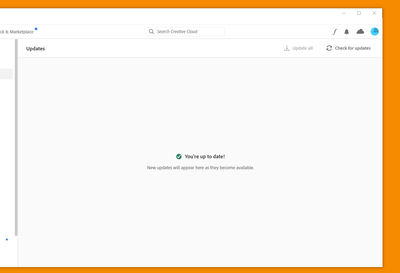
Compatability mode is not checked, the 3 dots are not visible on right of bar, 'update all' is greyed out and 'Check for updates' returns "You are up to date"

Maybe I just have to uninstall Creative Cloud, PS & LR and reinstall from my Photography Plan after a fresh save of both my catalogs. Up till this latest update I never had any trouble that I know of. my Current versions are PS 22.5.1 and LR 10.4 and Camera Raw is 13.4.
 

johnw7182060_1-1639401445180.png


johnw7182060_0-1639401310766.png


Translate
Report
Community guidelines
Be kind and respectful, give credit to the original source of content, and search for duplicates before posting. Learn more
community guidelines
Community Expert ,
Dec 13, 2021 Dec 13, 2021

Which exact version of  Windows 10 use're using?

My System: Intel i7-8700K - 64GB RAM - NVidia Geforce RTX 3060 - Windows 11 Pro 25H2 -- LR-Classic 15 - Photoshop 27 - Nik Collection 8 - PureRAW 5 - Topaz Photo
Translate
Report
Community guidelines
Be kind and respectful, give credit to the original source of content, and search for duplicates before posting. Learn more
community guidelines
Explorer ,
Dec 13, 2021 Dec 13, 2021

looks like fixed

Translate
Report
Community guidelines
Be kind and respectful, give credit to the original source of content, and search for duplicates before posting. Learn more
community guidelines
Explorer ,
Dec 13, 2021 Dec 13, 2021
LATEST

After contact with Adobe (Syed) via phone we completely uninstalled the Creative Cloud application and reinstalled with new version, I had tried that before without luck, and the new version is showing that updates are now available. So the problem was with their Creative Cloud not allowing access to the updates.


Thanks for eveyone's time.

Translate
Report
Community guidelines
Be kind and respectful, give credit to the original source of content, and search for duplicates before posting. Learn more
community guidelines


